Joomla 2.5 has reached its end of life as for 12/31/2014. Please be advised this may be a security risk to your website. You can view more information about the end of life here.
When creating a Joomla 2.5 content plugin, there are several events at which you can run your code. For example, the hook we’ve been using in our testing thus far has been onContentAfterTitle, which allows us to run code immediately after the title of the article has been displayed. In this tutorial, we’ll look at the various events you can trigger your code at within a content plugin.
How are the plugin events triggered?
Content plugins are triggered within the components/com_content/views/article/view.html.php file. You can see the code below that triggers each event below:
//
// Process the content plugins.
//
JPluginHelper::importPlugin('content');
$results = $dispatcher->trigger('onContentPrepare', array ('com_content.article', &$item, &$this->params, $offset));

$item->event = new stdClass();
$results = $dispatcher->trigger('onContentAfterTitle', array('com_content.article', &$item, &$this->params, $offset));
$item->event->afterDisplayTitle = trim(implode("\n", $results));

$results = $dispatcher->trigger('onContentBeforeDisplay', array('com_content.article', &$item, &$this->params, $offset));
$item->event->beforeDisplayContent = trim(implode("\n", $results));

$results = $dispatcher->trigger('onContentAfterDisplay', array('com_content.article', &$item, &$this->params, $offset));
$item->event->afterDisplayContent = trim(implode("\n", $results));
Testing each plugin event
In our plugin’s PHP file, helloworld.php, we added the following functions to test each of the above triggers:
public function onContentPrepare($context, &$row, &$params, $limitstart)
{
    echo "<div>OnContentPrepare</div>";
}

public function onContentAfterTitle($context, &$row, &$params, $limitstart)
{
    return "<div>OnContentAfterTitle</div>";
}

public function onContentBeforeDisplay($context, &$row, &$params, $limitstart)
{
    return "<div>OnContentBeforeDisplay</div>";
}

public function onContentAfterDisplay($context, &$row, &$params, $limitstart)
{
    return "<div>OnContentAfterDisplay</div>";
}
Timing Plugin Events
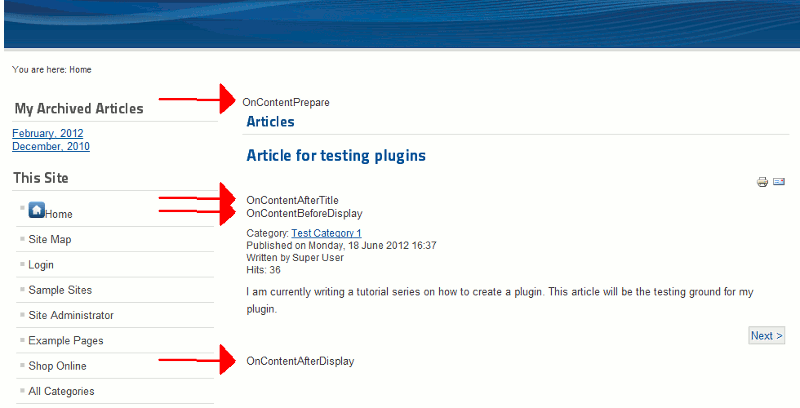
As you can see in the screenshot to the right, each plugin event is triggered at different points of the article setup. For example, some events are triggered before the article is displayed, some triggered during, and some ran after.
OnContentPrepare
The OnContentPrepare event is triggered before the article is printed to the screen. If you wanted to modify the content in some way, this would be the hook to use. While this plugin modifies the article, the other events add content to the article.
OnContentAfterTitle
The OnContentAfterTitle event allows you to add content to the article after the title is printed but before the introtext is displayed.
OnContentBeforeDisplay
The onContentBeforeDisplay event is very similar to OnContentAfter Title, but it runs after it.
OnContentAfterDisplay
After the content of an article has been displayed, you can run OnContentAfterDisplay to add information to the end of the article.