Outlook 2010: Server Rejected your Login

Email Client: Microsoft Outlook 2010
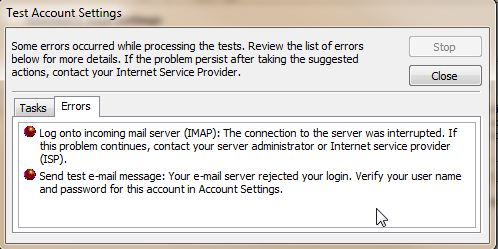
Error Message: Your e-mail server rejected your login. Verify your user name and password for this account in Account Settings

outlook-rejected-login

Solution:
Close the window and edit your username and password in Account Settings. To get to your account settings, click on file in the upper left hand corner. Then click Account Settings.

Please refer to the Outlook 2010 set up guide for more information on setting up Outlook 2010 to check your email.

What is the correct username?
Your user name should be your full email address, in all lowercase. This should be the same credentials for both incoming and outgoing mail servers. 

We also have a helpful guide on Outlook 2010 Error: Security certificate cannot be verified.

Share this Article
Carrie Smaha
Carrie Smaha Senior Manager Marketing Operations

Carrie Smaha is a Senior Marketing Operations leader with over 20 years of experience in digital strategy, web development, and IT project management. She specializes in go-to-market programs and SaaS solutions for WordPress and VPS Hosting, working closely with technical teams and customers to deliver high-performance, scalable platforms. At InMotion Hosting, she drives product marketing initiatives that blend strategic insight with technical depth.

More Articles by Carrie