WordPress has ecommerce plugins that allow you to use your WordPress as a shopping cart as well. Occasionally, the ecommerce plugin will not save to the Shopping cart products. When visiting the shopping cart after products are added, the site still says the cart is empty. This is caused by the Sessions save path (session.save_path in the php.ini) not being set to the correct directory.
Known issues with ecommerce plugins
This is a common issue with WordPress ecommerce plugins. The following plugins are known to have this issue:
- WP Ecommerce
- Woo Commerce
Below will show you the steps to fix the sessions path in your cPanel File Manager.
Fixing the sessions problem
This sessions save path is a relatively easy fix. This can be done in the cPanel File Manager. To get the shopping cart to allow the products to add to the cart, you will need to fix the sessions path to the folder location on the server where the sessions ar stored.
- Login into your cPanel.
- Go to the File Manager. Select the Web Root public_html directory and click Go.
- Find your php.ini and edit it.
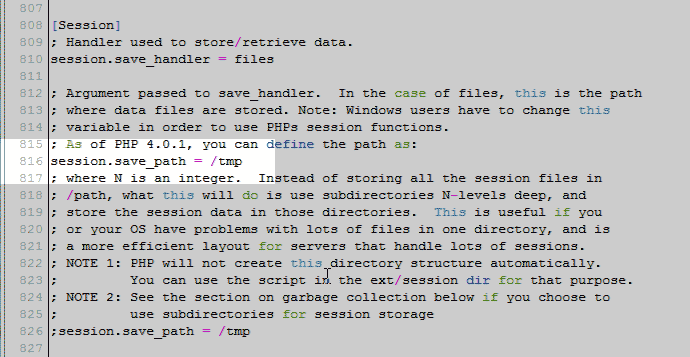
You will need to change the “Sessions path” in the php.ini for the WordPress Shopping cart.
Update the php.ini save path sits similar to the following.
session.save_path = /tmp
Change the path to the following:
session.save_path = home/username/session foldername
Note! You will need to create a folder in your “Home” directory. You will need to change the name from “foldername” to the name you want the folder to be and the” username” to your cPanel username.
The folder must be writeable with 755 permissions.
Save the changes to your php.ini.
Note! You may need to make the php.ini recursive in the .htaccess to see the changes take effect.
- Test your ecommerce shopping cart again. You should see the cart save the products in the cart now.

