The Admin Tools Joomla component can be used to protect your Joomla website against brute force attacks. In a snutshell, a brute force attack is when hackers repeatedly guess your Joomla password over and over again until they get it right and login to your dashboard.
Enabling the password-protect administrator feature within Admin Tools adds another layer of security to your Joomla dashboard, making it even harder for hackers to guess your secure password and get into your dashboard.
- Log into your Joomla 3 dashboard
- If you haven’t already, install the Admin Tools component
- In the top menu of your Joomla Dashboard, click Components and then click Admin Tools
- Find and click on the button that says Password-protect Administrator
- Enter a Username, enter a Password, and then Retype password.
- Click the Password-protect button.
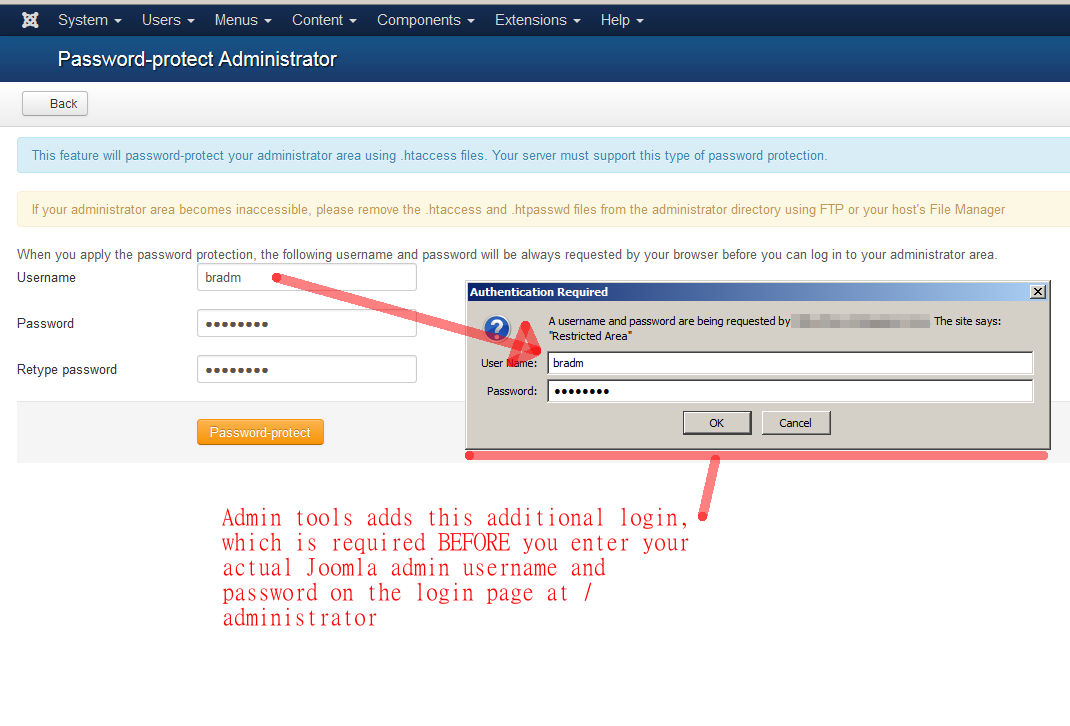
As soon as you click the Password-protect button, your admin dashboard will be password protected. You will then be required to type in the username and password that you just setup.
Your Joomla dashboard is now protected from brute force login attempts with an additional layer of security. If there are any bots attempting to guess your passwords, they will now need to guess two sets of username and passwords, making the task much more infeasible.