There are many times it can be helpful to have your Account Technical Details. Fortunately, it is quite easy to obtain this information from within your Account Management Panel (AMP).
Here is a list of information that can be viewed:
- Type of hosting plan you have
- Primary domain name
- cPanel username
- Server name
- Hostname
- Temporary URL
- Temporary cPanel URL
- Temporary Webmail URL
- cPanel URL
- Webmail URL
- Nameservers 1 & 2
- IP addresses for the nameservers.
How to View Account Technical Information
- Log into AMP.
-
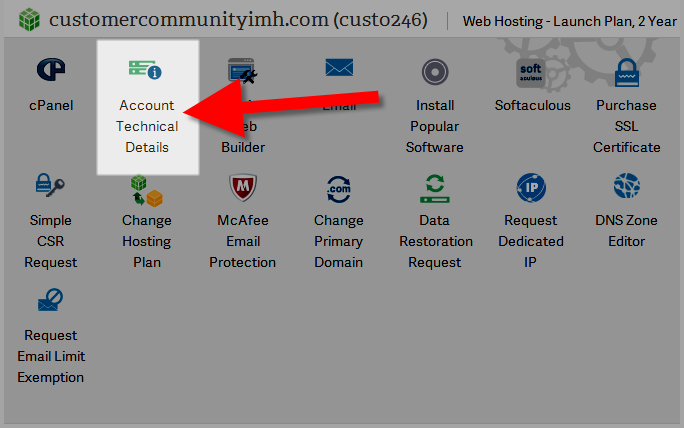 On the AMP home page, click the button titled Account Technical Details.
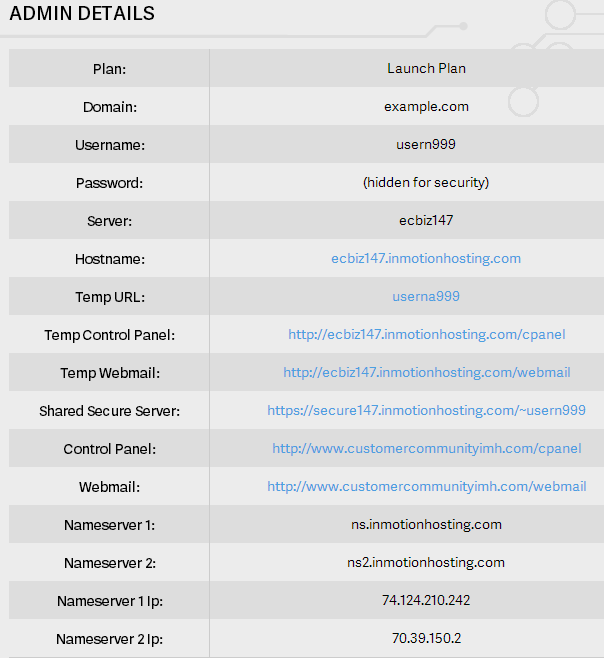 You will then see your Account Technical Details, which will look similar to the following screenshot.


Congratulations, now you know how to view your Account Technical Information in AMP!