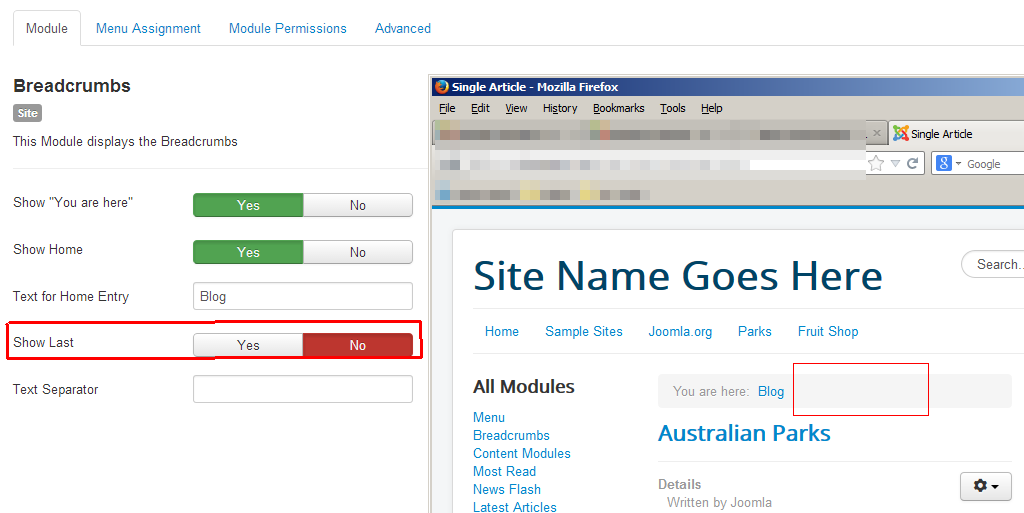
As we continue reviewing the settings available for the breadcrumb module in Joomla, we come across the Show Last setting. According to Joomla, this setting controls the following:
Show Last
Show/Hide the last element in the Pathway
Breadcrumbs are intended to show you where within the site you are, and to allow you to easily explore other areas of the site. If you are on a page named Commonly asked questions, showing this in the breadcrumbs may not be a benefit as you already know you’re on that page.
In Joomla 3, you can configure the breadcrumbs not to show the current page the user is on. This is controlled by the Show Last setting. Below, we’ll show you how to toggle this setting on/off.
To hide the current page in your breadcrumbs:
- Log into your Joomla 3 dashboard
- In the top menu, click Extensions and then click Module Manager
- Find and click on your breadcrumb module
- Find the Show Last setting. Depending on your Joomla version, it should be under the Module tab for the Basic Settings tab.
Click either Yes or No, and then click the Save button at the top of the page.
Below are screenshots that help demonstrate how the show last setting will affect your breadcrumbs:
Show Last – Enabled 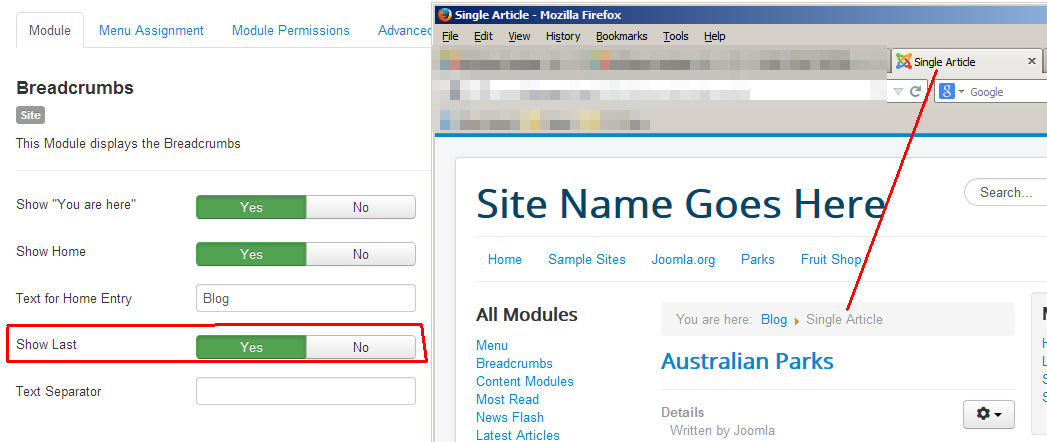
Show Last – Disabled