
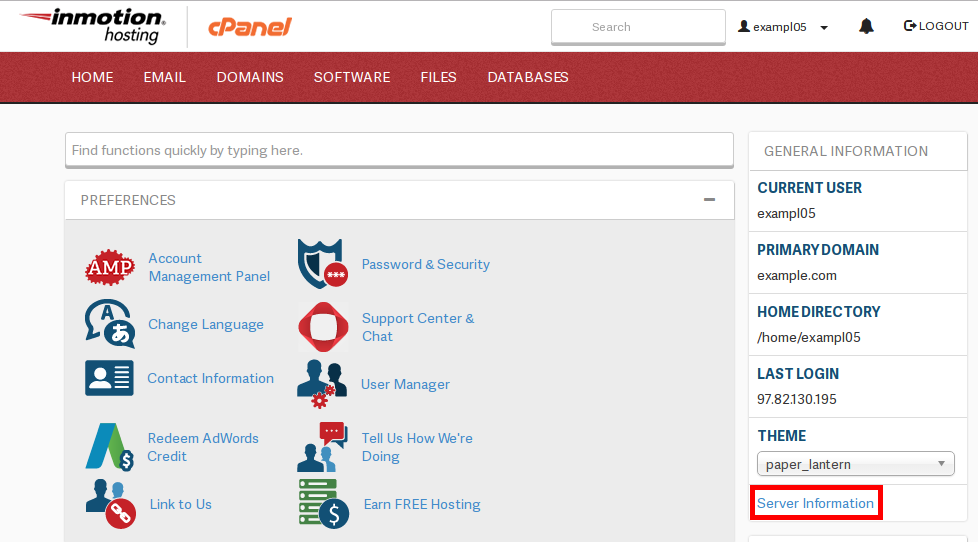
What Version of ______ am I Running? Updated on January 2, 2020 by Carrie Smaha 0 Minutes, 25 Seconds to Read Our support department receives a large amount of contacts concerning verisons of Apache, MySQL, and PHP that are running on the servers. We have many different configurations so the server you’re on can have different combinations of versions. Finding out the information is quite easy. The first step is to log into your site’s cPanel and click on “Server Information” to the right-hand side of the screen: Once the Server Information page has loaded, the various details will be listed, as pictured below: Share this Article Carrie Smaha Senior Manager Marketing Operations Carrie Smaha is a Senior Marketing Operations leader with over 20 years of experience in digital strategy, web development, and IT project management. She specializes in go-to-market programs and SaaS solutions for WordPress and VPS Hosting, working closely with technical teams and customers to deliver high-performance, scalable platforms. At InMotion Hosting, she drives product marketing initiatives that blend strategic insight with technical depth. More Articles by Carrie Related Articles How to Run and Read a Traceroute: Troubleshooting Website Connectivity What Are Meta Tags? Guide to SEO Meta Tags & Best Practices Meta Descriptions and SEO Install Let’s Encrypt Free SSL Certificate on Ubuntu with Certbot How to Set Up a 301 Permanent Redirect via .htaccess & cPanel BlaB! AX Maintenance Mode How to Log in to BlaB! AX 6 Ways to Improve Website Accessibility How to Create HTML Pages with the CherryTree Note-Taking Application Connecting with Google Analytics in Jetpack
What version of email server am I running. I checked server information in Cpanel but did not see that info. Neither the Linux version.
Hello David – Thanks for the question regarding the version of the mail server being used for your account. Since you’re on a shared server account, your best avenue to getting that information will be to contact our technical support team (https://www.inmotionhosting.com/support/amp/how-to-get-great-technical-support/). They will be able to access your server and provide the information you seek.