
In this article:
Whether you’re working toward PCI compliance or general server hardening, closing unneeded open ports is an important step for improved performance and security. WebHost Manager (WHM) has many security features available to help you achieve these goals. ConfigServer Security & Firewall (CSF) software has multiple capabilities which complement the others well.
CSF has more security features and is more versatile than the preinstalled APF. It also has a WHM interface for easier iptables management. If you have APF installed, we recommend you uninstall APF and install CSF.
Below we’ll cover how to view listening ports with ConfigServer Security & Firewall (CSF).
Improve performance and security today with our VPS Hosting plans.
View Listening Ports
- Log in to WHM.
- Select ConfigServer Security & Firewall on the left.
- (Optional) Do you see a CSF update available instead of Firewall Status: Enabled and Running? If so, update CSF, Restart csf+lfd and Return before continuing.
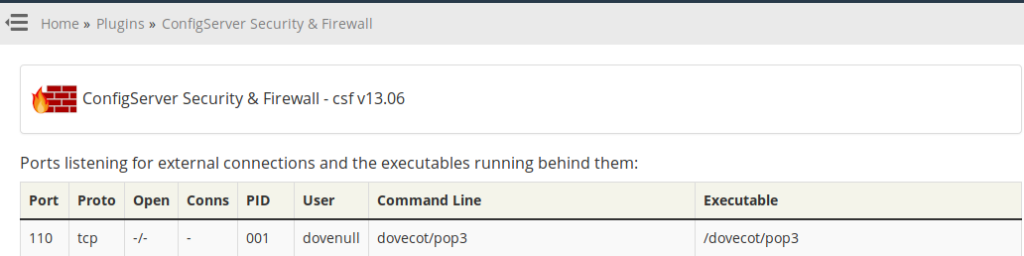
- Click View Listening Ports.
Related Tasks
Use the port, protocol, process ID (PID), user, command line (process name), and executable information for many tasks including the following:
- View only listening ports instead of all current processes
- Get more info on the process ID in SSH using PS [pid-number]
- Block unneeded ports in CSF
- Stop processes using their respective settings managers or the htop SSH tool
- Cross-reference information from nmap port scanner and similar tools
- Improve web application security
- Pass PCI compliance
- Managing profiles for certain situations
- Other server hardening tasks
Before making any major changes, you may want to backup your CSF file just in case anything goes wrong.
Are you trying to learn more about web security in general? There are many other ways you can secure your web activity for free. Check out our latest blog to learn 6 Ways to Secure Your Web Activity From Your Computer.