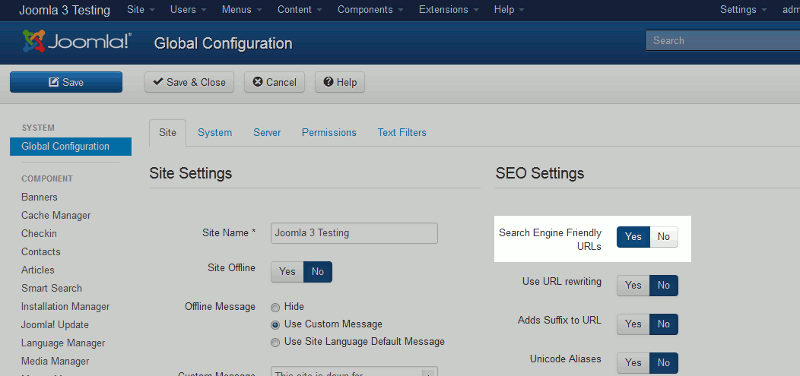
In the Global Configuration settings of Joomla 3.0 is a set of SEO Settings that you can adjust. SEO stands for Search Engine Optimization, and configuring these parameters will allow you to change various settings about your site that some search engines may look at when crawling your site.
In this tutorial, we’ll look specifically at the Search Engine Friendly URLs setting.
To adjust your Joomla 3.0 SEF URL setting:
- Log into your Joomla 3.0 admin dashboard
- In the left menu under the SYSTEM heading, click Global Configuration
- There are several tabs at the top: Site, System, Server, Permissions, Text Filters. Ensure you are on the Site tab by clicking on it.
- On the right side of the page under the SEO Settings heading, find the Search Engine Friendly URLs setting. Select either Yes / No to adjust the value.
- In the top left menu, click Save to save these changes. In our testing, we wrote an article named This is my first test article and assigned it to the Uncategorized category. Below shows what the URL to this article looks like when we have the Search Engine Friendly URLs setting toggled to Yes / No:
Search Engine Friendly URLs – YES https://domain.com/index.php/2-uncategorised/1-this-is-my-first-test-article
Search Engine Friendly URLs – NO https://domain.com/index.php?option=com_content&view=article&id=1:this-is-my-first-test-article&catid=2&Itemid=101