
Type a domain name like example.com into your browser, and a website loads in seconds. What is DNS? The Domain Name System (DNS) is the internet’s directory: it translates that name into the numeric IP address your browser needs, and this guide walks through exactly how.
What Is DNS?
The Domain Name System (DNS) is the internet’s directory service. Every device connected to the internet has a numeric Internet Protocol (IP) address, something like 192.0.2.1. Humans are bad at remembering strings of numbers, so DNS lets you use a memorable name instead.
Think of DNS as the contacts app on your phone. You tap a name, not a phone number, and your phone looks up the correct number behind the scenes. DNS works the same way: you type a domain name, DNS looks up the matching IP address, and your browser connects to the right server automatically.
How Does DNS Work?
Every time you visit a website, your device runs a DNS lookup: a fast chain of requests that hops between servers until it finds the IP address behind the domain name. The whole process usually finishes in a fraction of a second, but it involves several servers working together.
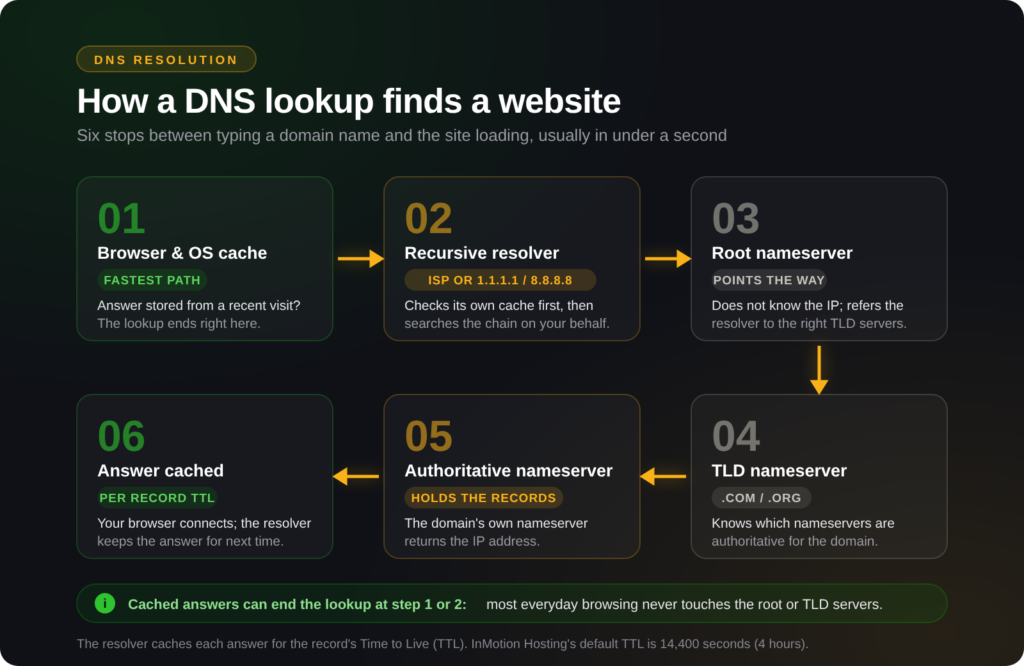
- Browser and operating system cache: Your browser and computer check whether they already have the answer stored from a recent visit. If they do, the lookup ends here.
- Recursive resolver: If nothing is cached locally, the request goes to a recursive resolver, usually run by your internet service provider or a public resolver such as 1.1.1.1 or 8.8.8.8. The resolver checks its own cache first, then takes over the search on your behalf.
- Root nameserver: If the resolver has no cached answer, it asks one of the internet’s root nameservers. Root nameservers do not know the IP address, but they point the resolver toward the correct top-level domain (TLD) nameservers, such as those for
.comor.org. - TLD nameserver: The TLD nameserver does not know the IP address either, but it knows which nameservers are authoritative for the specific domain and points the resolver there.
- Authoritative nameserver: This is the domain’s own nameserver, the one holding its actual DNS records. It returns the IP address for the requested domain.
- Caching: The resolver hands the IP address back to your browser and stores a copy for future requests. It keeps that copy for the length of time set by the record’s Time to Live (TTL) value.
Because answers are cached at nearly every stop along this chain, most everyday browsing never touches the root or TLD nameservers at all. Your resolver already has the answer cached from a recent lookup for the same domain.
Every cached answer originates from a nameserver, the kind of server that holds a domain’s actual DNS records. Here is what those are and how they differ from the records themselves.
What Are Nameservers and DNS Records?
A nameserver is a server that stores a domain’s DNS records and answers queries about them. When you register a domain, you assign it to a set of nameservers, and those nameservers become the domain’s authoritative source of truth. Change the nameservers, and you change who controls the domain’s DNS.
DNS records are the individual entries stored on those nameservers, the actual instructions that tell the internet where a domain’s traffic should go: which server hosts the website, which server handles email, and so on.
What Are the Common DNS Record Types?
A domain’s zone file can hold many record types, but five show up in almost every setup:
- A: Points a domain or subdomain to an IPv4 (Internet Protocol version 4) address.
- CNAME: Points a domain or subdomain to another domain name instead of directly to an IP address.
- MX: Routes email for the domain to the correct mail server, ranked by priority.
- TXT: Stores text data used for domain verification and email security, among other purposes.
- NS: Lists which nameservers are authoritative for the domain.
Those five cover most day-to-day DNS work, but there are several more, each with its own fields and formatting rules. For a full record-by-record reference, see the Complete Guide to DNS Records.
What Is DNS Propagation?
DNS propagation is the delay between when you change a DNS record and when that change is visible everywhere on the internet. It happens because resolvers around the world cache your old record and keep serving it until the cache expires, even though the authoritative nameserver already has the new value.
The record’s Time to Live (TTL) value, set in seconds, controls how long a resolver holds onto a cached answer. InMotion Hosting’s default TTL is 14,400 seconds (4 hours), so most InMotion-hosted records expire from any given resolver’s cache within that window. Because different resolvers around the world cache the record at different times, full propagation across the entire internet typically takes 4 to 24 hours.
Note: You cannot force propagation to finish faster. Lowering a record’s TTL before you make a change gives resolvers a shorter cache window going forward, but it does not clear caches that already hold the old answer.
Tip: If a domain does not resolve at all, even after 24 hours, check that its nameservers point to the correct provider before you troubleshoot individual records. A record change on the wrong nameservers never takes effect.
For a deeper look at propagation, including why it matters when you plan a site migration, see What Is DNS Propagation and Why It Matters for Your Business on the InMotion Hosting blog.
DNS at InMotion Hosting
If InMotion Hosting is your domain registrar, nameservers and DNS records live in two separate places. The Account Management Panel (AMP) manages nameservers for InMotion-registered domains, where you assign which company’s nameservers are authoritative for your domain. cPanel’s Zone Editor manages the individual records that live on those nameservers, such as A, CNAME, MX, and TXT records.
For the full domain-names category, including nameserver changes and record management, visit the DNS and Nameserver Changes hub.
Conclusion
DNS is the invisible layer that turns memorable domain names into the IP addresses computers actually use to communicate. You now know how a lookup resolves, from local cache to recursive resolver to authoritative nameserver, and why propagation takes time. You also know where to make changes: AMP for nameservers, cPanel’s Zone Editor for records. When you are ready to add or edit specific records, see the Complete Guide to DNS Records for step-by-step instructions.