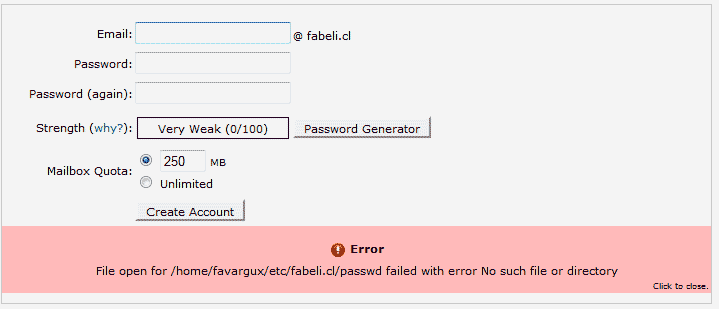
Create email account error: No such file or directory Updated on August 16, 2021 by InMotion Hosting Contributor 0 Minutes, 52 Seconds to Read When setting up an email account in the cPanel email accounts, you may encounter the following error. Error File open for /home/userna5/etc/domain.com/passwd failed with error No such file or directory This error occurs when the etc folder was deleted or renamed inside your home directory of your files. How to fix the No such file or directory error First, contact tech support to see if you can have your files restored from a backup. If support does not have the files in the backups, proceed to step 2. Login into your cPanel. Go to the File Manager. Select the Home directory and click Go. Check for the following Necessary files for your server to function. The following are the files you need for your server. – public_html – public_ftp – mail – etc If any of these are missing, you can just recreate them in the file manager. Once you have the etc and/or the mail folder created, your will be able to create email addresses again. Share this Article Related Articles How to Fix the “550 No Such User Here” Email Error How to Setup an Email AutoResponder in cPanel Logging into Horde How to Change an Email Password in cPanel and Webmail How to Purchase InMotion Hosting Professional Email in AMP What is MailChannels and How it Benefits You Email Error – Mailbox Quota Exceeded How to Archive Email Using IMAP Upgrade to iOS6 causing IMAP issues How To Set Up Gmail for POP3 and SMTP
You are amazing people. You will be get success because you are doing work like a legend. love you so much you saved my dollars.
Thanks, that really helped, I was only creating the etc folder and could not create emails. Once I created the mail folder it worked like a charm.
Thanks! I have had so many issues with this. After spending three hours on it, it turns out it is a two minute fix 🙂
You guys are my new best friends! you are right, I was missing the files, because I ditched a theme that was ticking me off. That will teach me to stay calm. I put the files back in home folder, however Im not sure if I put them in the correct place. Thank you for this assitance. Your help is amazing I would have never found the problem by myself whew! I’m faving this site.