TikiWiki by default does not have any way of inserting a YouTube video through the WYSIWYG editor. To have YouTube videos displayed on your TikiWIki site, you can use the following code in your page.
{YOUTUBE(movie=VIDEO_NUMBER,width=>425,height=>350,quality=>high, allowFullScreen=y)}{YOUTUBE}
A typical YouTube video link for sharing YouTube videos looks like the following:
https://youtu.be/TzzGPfVx32M
The code that identify’s the video is the TzzGPfVx32M number. This is particular to the video and changes for each video. This is what you use in the code to display the YouTube video on your TikiWIki. We will now walk through the steps on how to insert a YouTube video in TikiWiki in the following section.
Inserting a YouTube video in TikiWiki
- Log into TikiWiki.
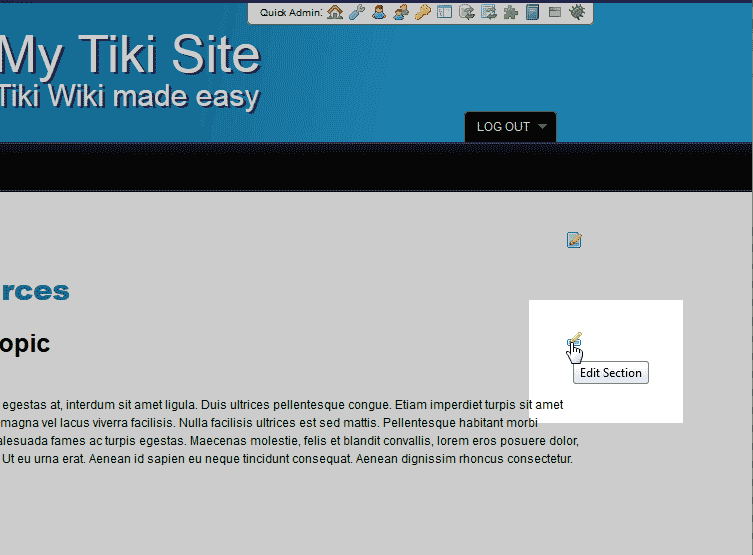
Edit the page you want to insert the YouTube video into.
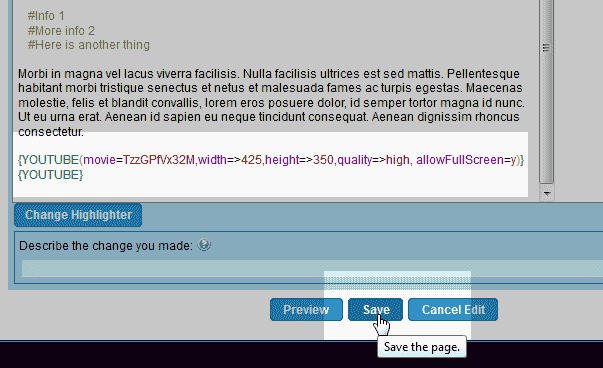
TikiWiki does not have a function to insert a YouTube video in the WYSIWYG editor. In order for YouTube videos to work, you need use the special code.
Paste the following TikiWIki code into your page where you want the video to appear.
{YOUTUBE(YOUTUBE=VIDEO_NUMBER,width=>425,height=>350,quality=>high, allowFullScreen=y)}{YOUTUBE}Important! Change the “VIDEO_NUMBER” text in the code with your YouTube video code, For example, TzzGPfVx32M.
Save the changes.

The YouTube video should load on your site just like the snapshot to the right.
