When pages are deleted or renamed, there is a chance that Google may have cached the page in their web crawler. Also, someone could have book marked the page. To Keep these deleted and renamed pages from getting a “404 not found error“, you can set up redirects in your Tiki pages to redirect the old page to the new one. This tutorial will explain how to redirect pages in TikiWiki.
How to redirect a page
There is no redirect function automatically built into TikiWiki. To redirect, you simply place the following code in the content of the page you are redirecting to.
~tc~ (alias(Page Name)) ~/tc~
TikiWiki will read that code when the old url is visited and redirect to the page the code was placed on. For example, If you are redirecting a page that was renamed from “Home Page” to “My TikiWiki learning Site“, you simply add the code to the “My TikiWiki learning Site” page. Then the old “Home Page” url will redirect to your “My TikiWiki learning Site” page. The following are steps to create a redirect in TikiWiki.
- Log into TikiWiki.
- Find the page you want to redirect the deleted or renamed page to.
Click the Edit button.
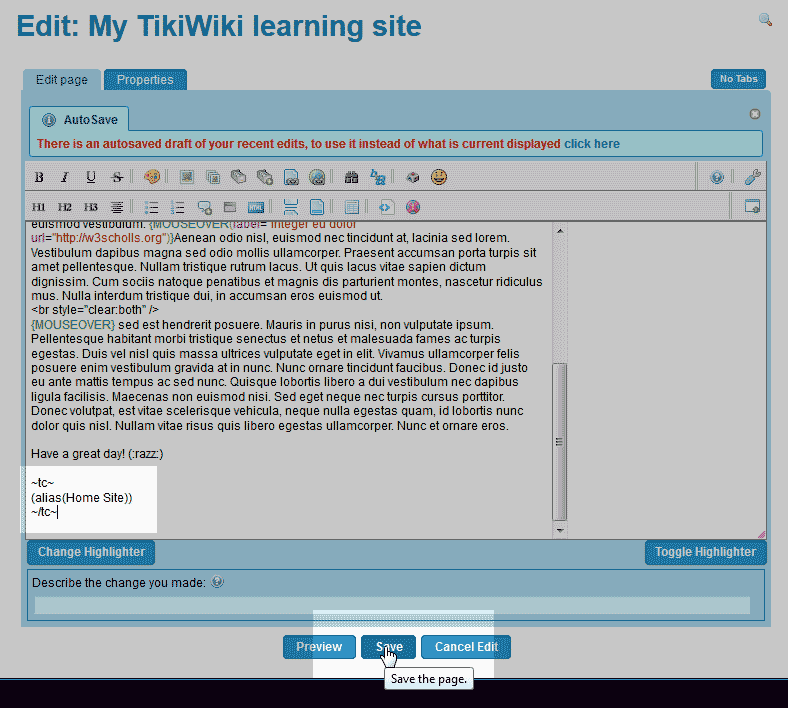
Paste the following code into the bottom of the page content.
~tc~ (alias(Page Name)) ~/tc~
Important! Replace the text that says “Page Name” with the name of the deleted or renamed page.
Click Save.

Now when the old page name is visited in the address bar (in this case the renamed page is “Home Page“) the page will redirect to the new page.
