
There are multiple ways to interact with viewers within your website – forums, contact forms, and various forms of live chat. In this article we’ll cover embedding an Internet Relay Chat (IRC) room into your website using the Kiwi IRC widget generator.
Embed an IRC Widget
- Visit KiwiIRC.com and select Your account and Embed a widget.
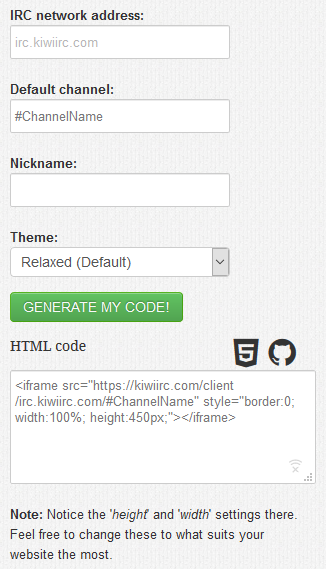
Alternatively, you can use the widget generator link. - Specify the IRC network address, Default channel, default Nickname, and Theme. For most cases, specifying only the channel will suffice.
- Press Generate my code! to generate the HTML code.
Note: You can share the included URL to open the IRC room in a separate window, e.g
https://kiwiirc.com/client/irc.kiwiirc.com/#ChannelName. - Create or edit a page or post to embed the widget.
- Paste the HTML code into the Text editor and press Publish.
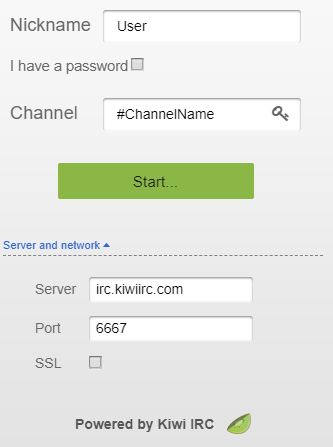
- View the page to see this login window before connecting to the IRC room.
Note: Anyone can change these settings. Users will need to choose an unique nickname.
Creating a IRC room for a channel name doesn’t grant administrator privelidges or prevent others from joining the channel from another location. You’d need to register a channel with a network such as Freenode to achieve this. You can learn about editing the appearance of your chatroom and more from Kiwi IRC documentation and our guide for adding HTML in WordPress posts.