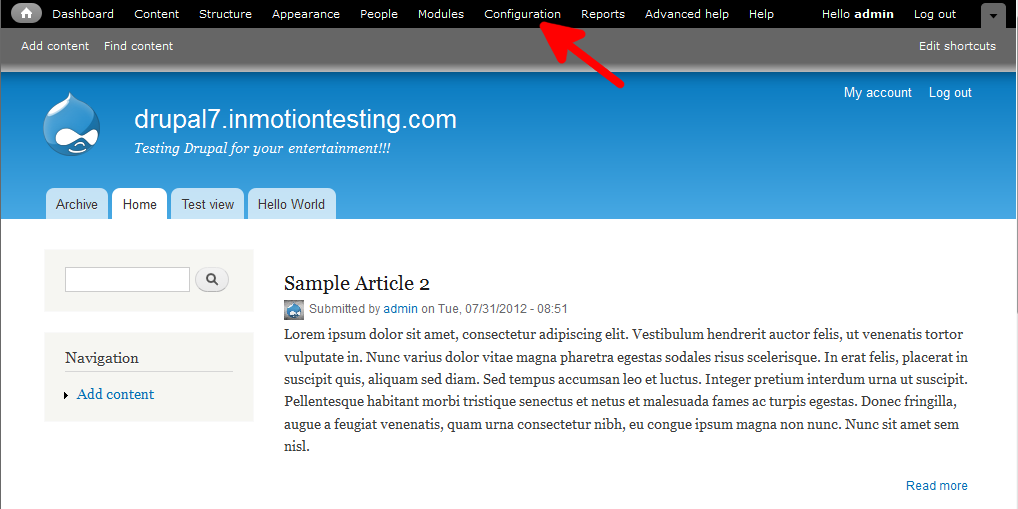
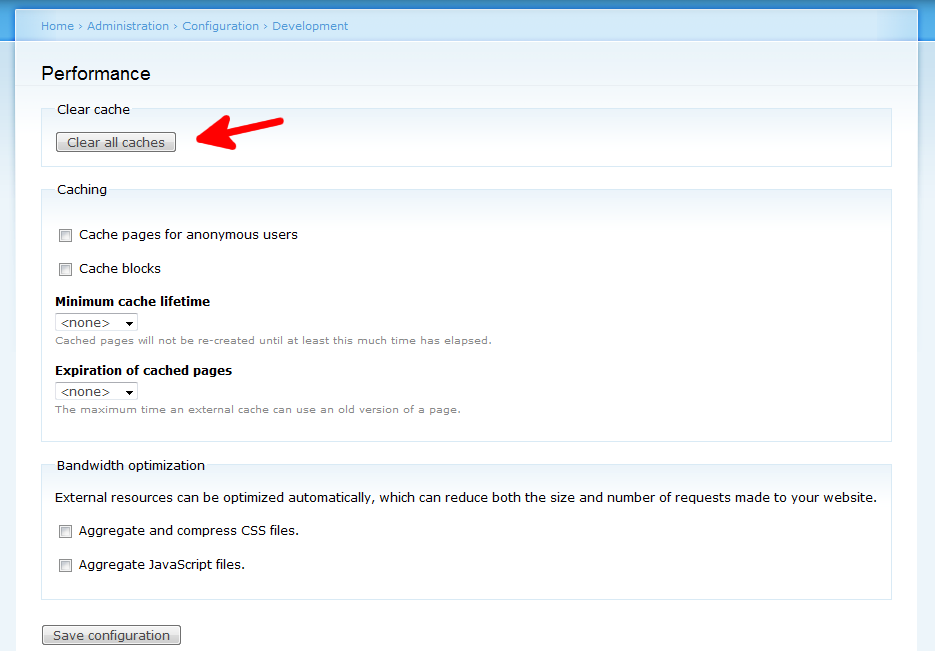
How to clear caching in Drupal Updated on October 12, 2023 by Scott Mitchell 0 Minutes, 53 Seconds to Read Setting up caching in Drupal can speed things up for your site and enhance the site’s overall performance. Caching is great as it keeps snapshots of data and pages so reload time is much quicker. There are times, however, when you may need to clear the cache. Caching mechanisms sometimes get hung or maybe you simply want to push out a change to your site as quickly as possible. Clearing the cache can help with that. It is very easy to clear caching within Drupal by following these simple steps. Deleting the cache content in Drupal: Log into your Drupal admin dashboard. On the top menu bar, locate the Configuration option and click on it. This brings you to the main Configuration category screen. Find the subcategory named Development and click on the Performance link. Once on the Performance screen, look to the button on the screen at the top named Clear All Caches. Give it a click. You have now cleared out all caches in Drupal. Reduce your website bounce rate with our lightning fast Dedicated Drupal Hosting. Share this Article Related Articles Finding 404 page not found errors in Drupal 7 Removing the site title in Drupal 8 Content Types in Drupal 8 Disabling user images for posts and comments in Drupal 8 How to add an image in Drupal 7 How to upload your custom logo in your Drupal 7 theme Setting custom logos in your Drupal 8 theme Fixing the “An unrecoverable error occurred” error in Drupal How to Make a Duplicate Drupal Site How to Install a New Theme in Drupal
when clear cache which file has to to chages because i host portal on server i want clear cache,so after clear cache which file i want to change on server.
Hello pratiksha, I am not understanding what you are asking. Are you asking what files change when the cache is cleared? Or are you asking if you have to make any changes to files yourself? Kindest Regards, Scott M
I am so very lucky I found you guys… This totally answered my question as well on the issue of clearing the cache. Thank you!!!