
You may want to re-direct traffic from one domain to another — perhaps you have renamed your business and want all traffic sent to a new URL (domain.com to anotherdomain.com). In other situations, maybe you just need to redirect a single page — sending visitors who end up on last year’s sale page to a new page showcasing your latest products. cPanel has built in tools to set up any type of redirect quickly and easily. Read on and learn how to redirect a domain in cPanel.

How to Redirect a Domain in cPanel
- Login to cPanel.
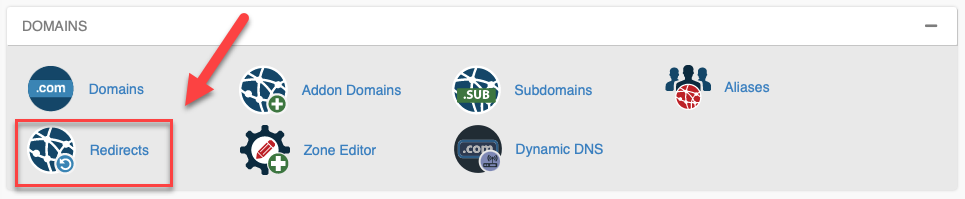
- Under the Domains section, select the Redirects icon.
- Usually, you should choose Permanent (301), as Temporary (302) redirects are usually for specific testing and configuration purposes.
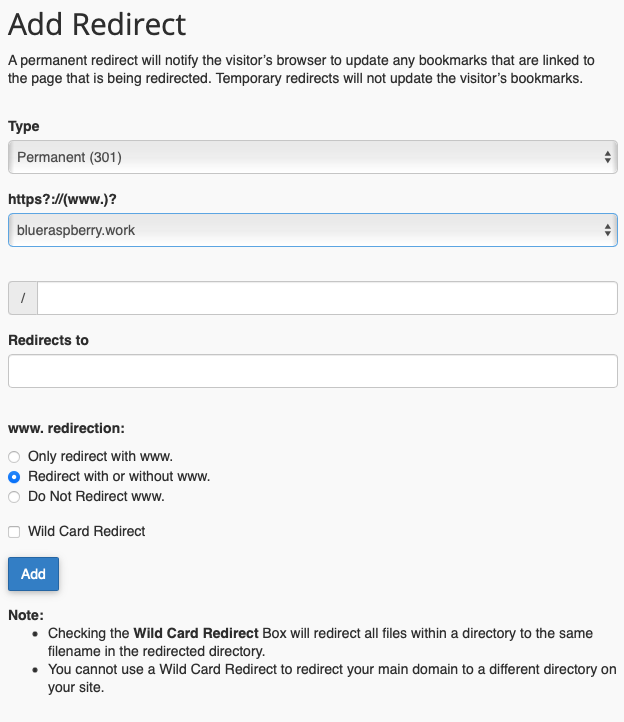
- Use the dropdown menu to choose which of your sites the redirect is for.
- If you want to redirect a specific page (biography.php) or directory (portfolio/), enter these in the line with the slash / on it. Enter everything that comes after your domain and the slash. For example, if you wanted to redirect example.com/animals/dogs/puppy.jpg, you would add animals/dogs/puppy.jpg to the box. If you want to redirect the entire site, leave the box with the slash empty.
- Under ‘Redirects to,’ enter the specific site or page you want visitors to be redirected to.
- By default, “Redirect with or without www” will be selected. Leave this option checked on InMotion Hosting servers unless you are purposefully setting up a nonstandard configuration.
- If you want to redirect more than one page to equivalent pages, check the Wild Card Redirect box. Think of this like a redirect that will take anyone from your first site to the equivalent page on a target site. For example, if you set up a wildcard redirect for example.com/recipes/ to demonstration.com/food/ and someone visited example.com/recipes/apple-pie.php they would be redirected to demonstration.com/food/apple-pie.php Keep in mind that you cannot set up a wildcard to redirect a domain to a directory — you could not use a wildcard to send example.com to example.com/more/.
- Click the Add button to add the redirect. After cPanel has finished updating, this redirect — and any others you have set up — will be listed at the bottom of the page under Current Redirects.
Tools Similar to Domain Redirects
Was the above not exactly what you were looking for? Check out these other ways to direct one domain to another:
- Create a 301 redirect using .htaccess instead of cPanel
- Park a Domain in cPanel
- Force HTTPS with the .htaccess File
Launch your web presence quickly and easily with Shared Hosting. Our user-friendly hosting is perfect for everyone, providing the fastest shared hosting experience possible, all powered by cPanel.
 Free Domain & SSL Certificates Unlimited Bandwidth 400+ One-Click Applications USA & European Data Centers