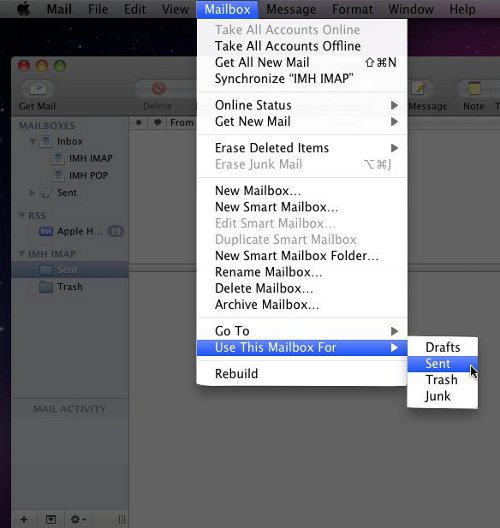
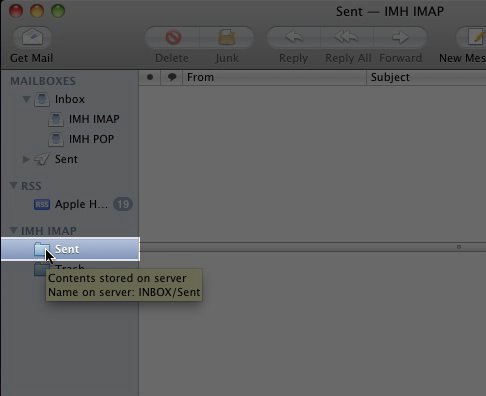
When you setup Mac Mail, by default MacMail will not use the “Sent” folder on the server to place sent emails in when the server is configured for IMAP. If you wish to have your sent items stored on the server you will need to go through a short, simple process in order to have this done:
How do I set up Mac Mail to Save Sent Items on the Server?
Carrie Smaha
Senior Manager Marketing Operations
Carrie Smaha is a digital strategy, web development, and SEO leader with 20 years of experience. She built her foundation in fast-paced agency environments before moving in-house to InMotion Hosting, where she leads go-to-market programs, agency initiatives, and technical product marketing that connects product capability to real customer decisions.
More Articles by CarrieRelated Articles
- How to Create an Email Autoresponder in Webmail
- How to Find Your Email Settings in cPanel or Webmail
- How to Allow or Block a Country in WHM with cPHulk or CSF
- Transferring Emails from Your Old Host to InMotion Hosting
- How to Block Spam Email in cPanel and Strengthen Email Authentication
- How to Back Up Email Using Thunderbird
- Mail Delivery Failed: Returning Message to Sender
- How to Use InMotion Email with Gmail (2026 Update)
- SPF, DKIM, DMARC, PTR, and BIMI Records: Complete Setup Guide
- SMTP and ESMTP Error Code List