There are many settings to consider when configuring your orders. The Terms of Service rule is an option that allows you to choose whether or not you want to require the customer to accept your Terms of Service before processing their order. Setting the Terms of Service option in PrestaShop 1.5 is very simple.
To set the Terms of Service rule option in PrestaShop 1.5:
- Log into your PrestaShop 1.5 dashboard.
- Using the top menu bar, hover over the Preferences tab and select the Orders option.
- From the Preferences : Orders screen, find the Terms of Service field and select either Yes to force the customer to have to accept the Terms of service, or No to not force the acceptance. The default setting for this option is Yes.
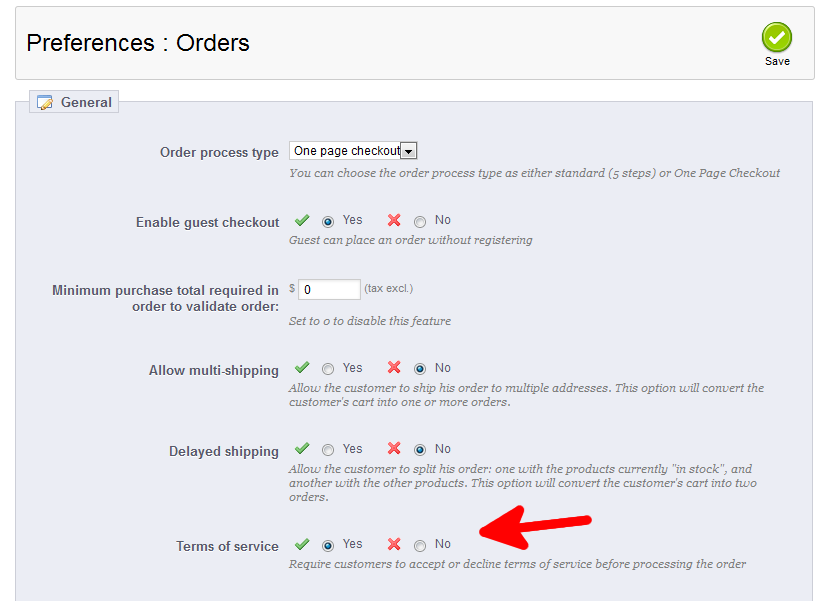
- Once finished, click on the Save button in the upper right corner of the screen.
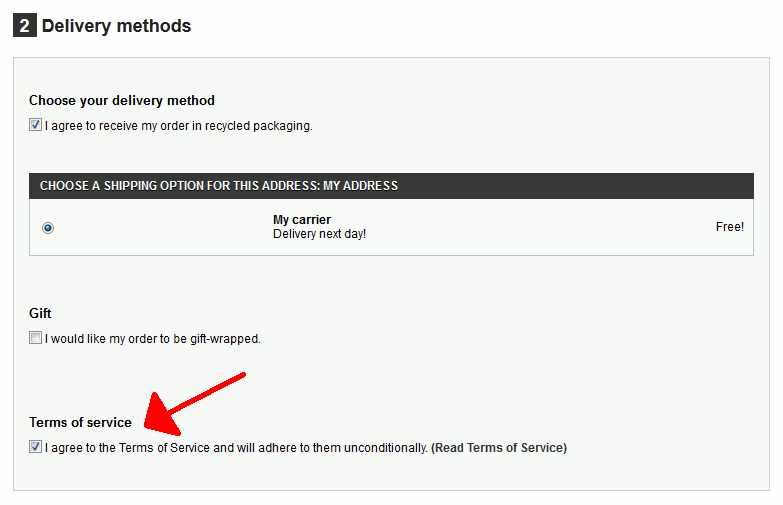
As you can see in the screenshot below, when terms of service is enabled, users will be required to check a box during step 2 of the order process to confirm they have agreed to your terms:
You now know how to set the Terms of Service option in PrestaShop 1.5!