
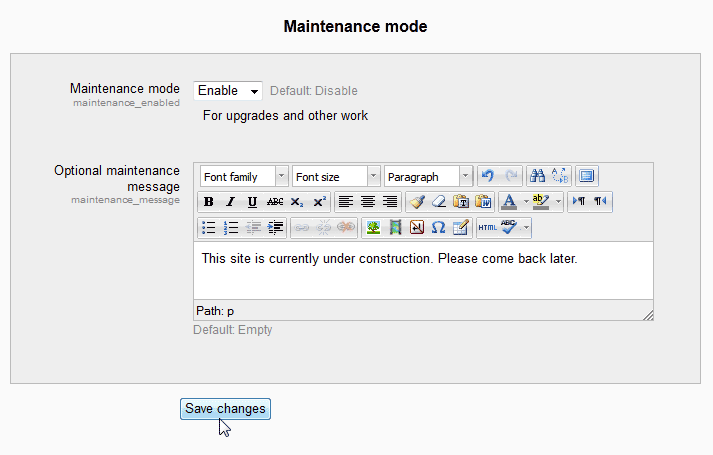
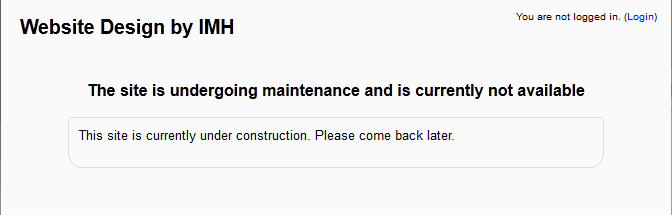
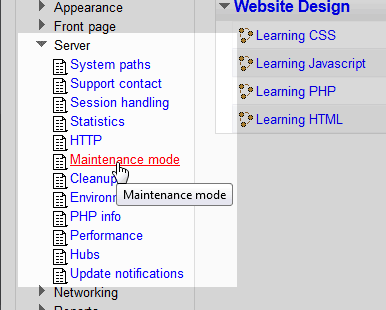
Enable / Disable maintenance mode in Moodle Updated on August 16, 2021 by InMotion Hosting Contributor 1 Minutes, 5 Seconds to Read When developing a Moodle site, Moodle 2.3 has the feature that allows the site to be set to Maintenance mode (or an under construction page). Maintenance mode gives the administrator the option to leave the Moodle site inaccessible to the public while developing the site. Maintenance mode can also be used when diagnosing problems with the Moodle site. This prevents users from accessing as a guest or logging in during the site construction. This article will explain how to enable or disable maintenance mode in Moodle 2.3. Enabling and Disabling Maintenance mode in Moodle Log into the Moodle Dashboard Go to Site administration > Server > Maintenance mode in the Settings navigation. On the Maintenance mode page, add the text to the Optional maintenance message block. Select Enable for the maintenance mode. Click Save changes log out of Moodle. Now when visiting the site, The message that was inserted into the Optional maintenance message block will display. To disable the maintenance mode, log back in as an administrator and follow the same steps. Select the Disable option in the maintenance mode settings and save. Now the Construction page will be gone. This concludes the article for enabling and disabling maintenance mode in Moodle. For more information about server and security settings in Moodle, please visit Moodle site security and server settings . Share this Article InMotion Hosting Contributor Content Writer InMotion Hosting contributors are highly knowledgeable individuals who create relevant content on new trends and troubleshooting techniques to help you achieve your online goals! More Articles by InMotion Hosting Related Articles How to install Moodle using Fantastico Installing Moodle with Softaculous How to Add Content Security Policy in Moodle With the Local CSP Plugin Inserting an image slider in Moodle Changing the Moodle admin password through PhpMyAdmin Fix “uploaded file may exceed the post_max_size directive in php.ini” How to Add the Quiz Module in Moodle Adding the File Resource Module to Moodle Courses Integrate Jitsi with Moodle Courses How to Install a Plugin in Moodle
Do you not realise that once maintenance mode is enabled you’re not able to login How would the landing page know you are the admin? There has to be a way to disable maintenance mode from back end.
Hello Chaitanya Bhanose – Thanks for the query about maintenance mode. Yes, maintenance mode will prevent typical users of Moodle from seeing anything. However, Administrators of the application can still log in and work in Moodle. It is enabled by an admin and can also be disabled by an admin. The maintenance mode is used to prevent people other than the admin from working in Moodle while updates or maintenance are being done to the Moodle site. I hope that helps to clear up any confusion.