In Moodle 2.3, IP addresses can be blocked or allowed access to the site. Frequently, robots and other visitors can hit the Moodle site frequently causing the site to crash or hackers to attempt to compromise the site. To restrict Moodle's access from the web, Moodle incorporated the IP blocker feature in the Site administration. IP's can also be set so that only users from the school campus can access as well. This gives the administrator the ability to regulate the traffic. The following will explain how to block IP addresses in Moodle.

Using the IP blocker

  1. Log into the Moodle Dashboard
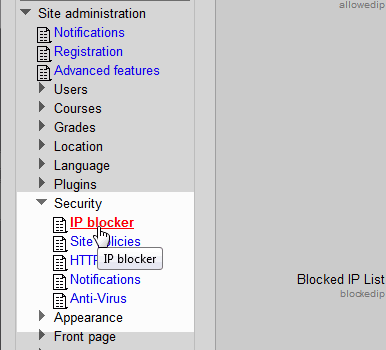
  2. block-ips Navigate to Site administration > Security > IP blocker in the Settings.
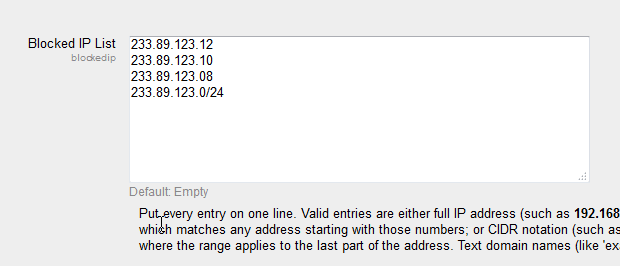
  3. block-ips-add Enter the IP's in the Blocked IP's list. Each IP needs to be on a separate line. IP ranges can be added as well. Once the IP's are entered click Save changes.

Congratulations, now the IP's that were entered will not be allowed to access the Moodle site. This concludes the article for Blocking IP's in the Moodle Site administrator. For more information about articles with a similar topic, please visit Moodle site security.

Like this Article?

Login to comment.

Your Opinion Matters

... but we need to know what you're thinking!

I'm James Richardson, your friendly Community Support technician, and I wrote the article you're looking at now. I like to think it's perfect, but I'm sure you have some suggestions. Please, let me know what they are!

Feedback
Your Email Address
Because we'd like to talk with you!

Latest Questions

If you need some help, submit your question to our Community!
We guarantee a response within 60 minutes (8am - 9pm EST, Monday - Friday)
Ask a Question!
Recent Questions
  1. zone shipping
  2. How do I stop Outlook clients from getting this warning?
  3. how to make editable order in admin in opencart?

Need more Help?

Search

Ask the Community!

Get help with your questions from our community of like-minded hosting users and InMotion Hosting Staff.

Current Customers

Chat: Click to Chat Now E-mail: support@InMotionHosting.com
Call: 888-321-HOST (4678) Ticket: Submit a Support Ticket

Not a Customer?

Get web hosting from a company that is here to help. Sign up today!