To prevent spam bots and robots from filling your MediaWiki pages with spam links and unwanted content, you can have the “reCAPTCHA” enabled in your MediaWiki LocalSettings.php to prevent bots from editing your pages. ReCAPTCHA is a free service from Google that allows you to add a verification box to determine if the page is being edited by a human or not. ReCAPTCHA uses a public and private key to create different words required for the image. Form pre information on reCAPTCHA please see our article on How to get the public and private keys for Google reCAPTCHA.
Adding reCAPTCHA to your WIKI edit sections
- Login into your cPanel.
- Go to the File Manager. Select your MediaWiki installation directory and click Go.
- Find the LocaSettings.php file and open it with the code editor.
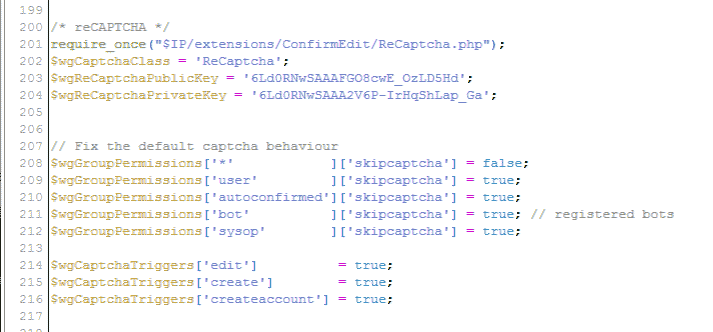
Add the following lines at the end of your LocalSettings.php file.
require_once("$IP/extensions/ConfirmEdit/ReCaptcha.php");

$wgCaptchaClass = ReCaptcha;

$wgReCaptchaPublicKey = 'Your captcha public key';

$wgReCaptchaPrivateKey = 'Your captcha private key';
This code will link your Edit pages to the reCAPTCHA in your ConfirmEdit file.Add the following code below the reCAPTCHA code. This code gives permission to users where they get the captcha or not. Also, it enables the reCAPTCHA for specific features. In this case the edit, create, createaccount, and contactpage all will have the reCAPTCHA on it.
$wgGroupPermissions['*'            ]['skipcaptcha'] = false;

$wgGroupPermissions['user'         ]['skipcaptcha'] = true;

$wgGroupPermissions['autoconfirmed']['skipcaptcha'] = true;

$wgGroupPermissions['bot'          ]['skipcaptcha'] = true;

// registered bots $wgGroupPermissions['sysop'        ]['skipcaptcha'] = true;   $wgCaptchaTriggers['edit']          = true;

$wgCaptchaTriggers['create']        = true;

$wgCaptchaTriggers['createaccount'] = true;

$wgCaptchaTriggers['contactpage'] = true; // Adds reCAPTCHA to the contact page if created
Save the changes.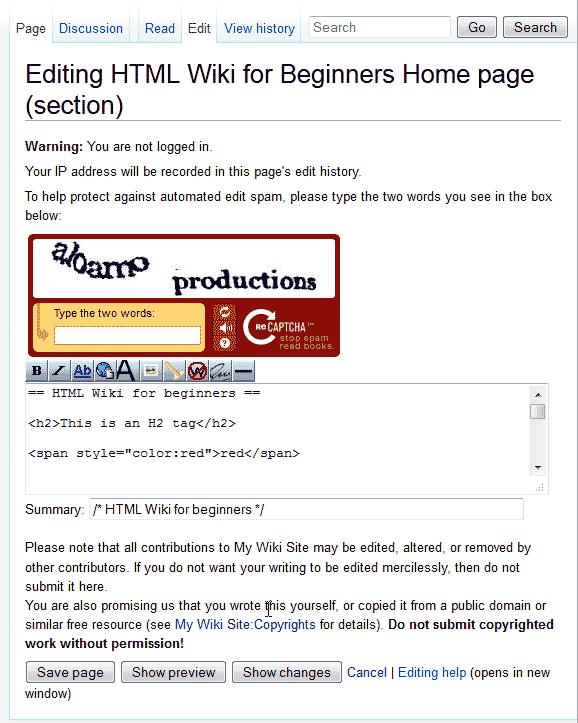
Now when someone that is not logged into your MediaWiki site tries to submit a change to your pages, the reCAPTCHA will display like the image to the right.
Important! When editing pages in your MediaWiki, the reCAPTCHA will not display until you click the save button. After you click the save button, the reCAPTCHA will appear at the top with a warning.
