Joomla 2.5 has reached its end of life as for 12/31/2014. Please be advised this may be a security risk to your website. You can view more information about the end of life here.
In our previous tutorial we installed VirtueMart for Joomla 2.5. The next thing we will want to do is create a link in our main menu to our VirtueMart store.
To create a VirtueMart menu item in Joomla 2.5:
- Log into Joomla 2.5 Dashboard
- In the top menu, hover over Menus, hover over the menu you want to place your VirtueMart link in, and then click Add New Menu Item
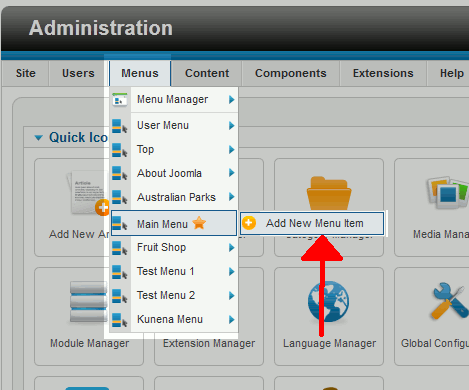
- Next to Menu Item Type, click Select
- Under Select a Menu Item Type, find and click the frontpage link under the VirtueMart header
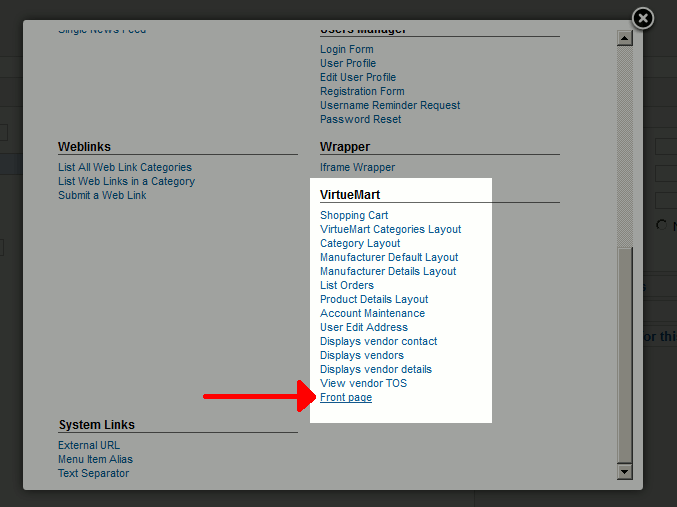
- Next to Menu Title, enter the text for the link. In our example, we entered Shop Online
- In the top right menu, click Save & Close
Congratulations, you have successfully created in Joomla 2.5 a VirtueMart menu item that links to your store front page!
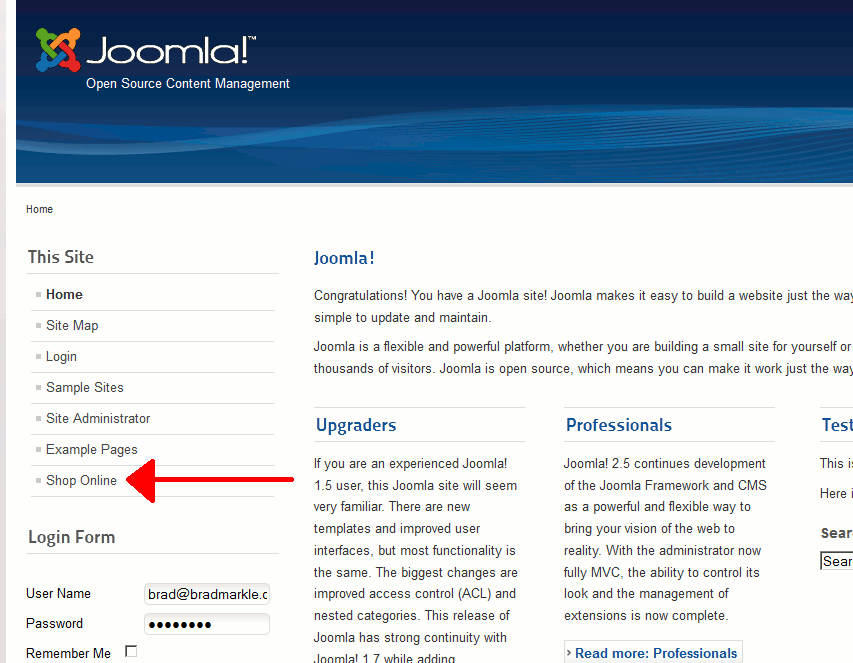
We will now begin adding products to our online store, and we will start with first adding new product categories.
