
Your cPanel account has the ability to allow you to access, view, modify, add, and delete files from your account effortlessly, using the File Manager. In this tutorial we will show you how to access the File Manager, then go over the features available there.
Accessing and Using the File Manager in cPanel
- Log into your cPanel.
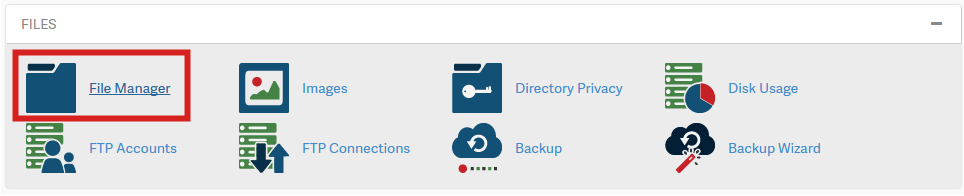
- Click on the “File Manager” in the “Files” section. You will then see your files listed.
- If you need to access a hidden file (such as .htaccess), it is covered in our guide on how to show hidden files.
cPanel File Manager Features
Now that you are logged into file manager, let’s take a few minutes to understand some of the basic features of File Manager.
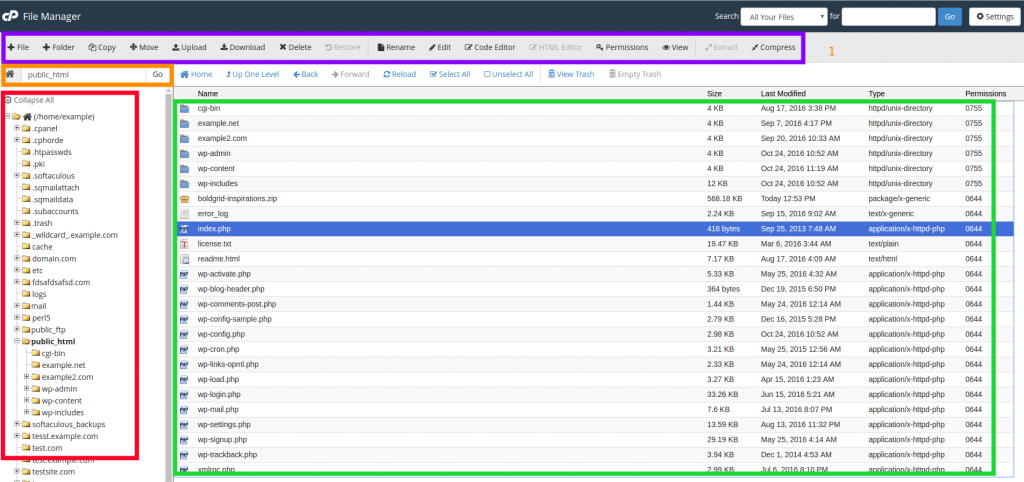
- Task Bar (Purple Outline)– This is where you can perform basic tasks like create a new folder, delete a file, edit a file and much more.
- Current Location (Orange Outline)– This tells you where you currently located. Also you can specify a path here to navigate to somewhere else.
- File Tree (Red Outline) – This is also for navigation, but shows you a visual representation of how your files are structured.
- Current Folder Contents (Green Outline) – This lets you know what the contents are of the current folder you are in.
Additional Guides
This section includes additional walk-through guides, for comon task that are performed in the cPanel File Manager:
cPanel makes it easy for you to manage your files. Read more about the cPanel file management features.
Reliable Shared Hosting for Growing Businesses
Get the performance your business website demands with NVMe SSD storage, industry-standard cPanel management, and direct access to hosting experts whenever you need assistance.
 Free Website Migration 24/7 Human Support 100% Money-Back Guarantee