
Another feature in the Moodle 2..3 plugins is the Enrollment plugin. The Enrollment plugin allows the administrator to enable or disable, edit the settings, or uninstall an Enrolment plugin altogether. Common enrolments that are enabled are the Self Enrollment, Cohort Sync, Manual Enrolment, and the Guest access. If the administrator wants to disable the Guest plugin completely, the plugin can be disabled in the Manage Enrol Plugins section of the Moodle Administrator. These are the steps to disable an enrolment plugin.
Disabling and enabling Enrolment plugins
- Log into the Moodle Dashboard
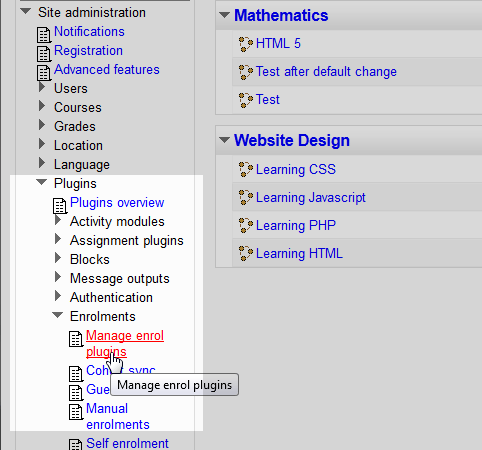
Navigate to the Site administration > Plugins > Enrolments > Manage enrol plugins in the settings on the left.

On the Manage Enrol plugins page, the list of enabled and disabled plugins will show. To disable an enrolement plugin, click the
 icon. Below is a brief description of what each column is for.
Available course enrolment plugins Name Lists the name of the plugin. Instances / enrolments Shows the quantity of instances the Guest user access the site or if the guest is enrolled in any Courses. Enable Clicking the  icon enables and the
  disables the plugin from functioning.
Up/Down Moves the Enrolement Plugin to a different position in the list. Settings Links to the plugin settings where the plugin can be configured Uninstall Uninstall’s the plugin from the Moodle site. 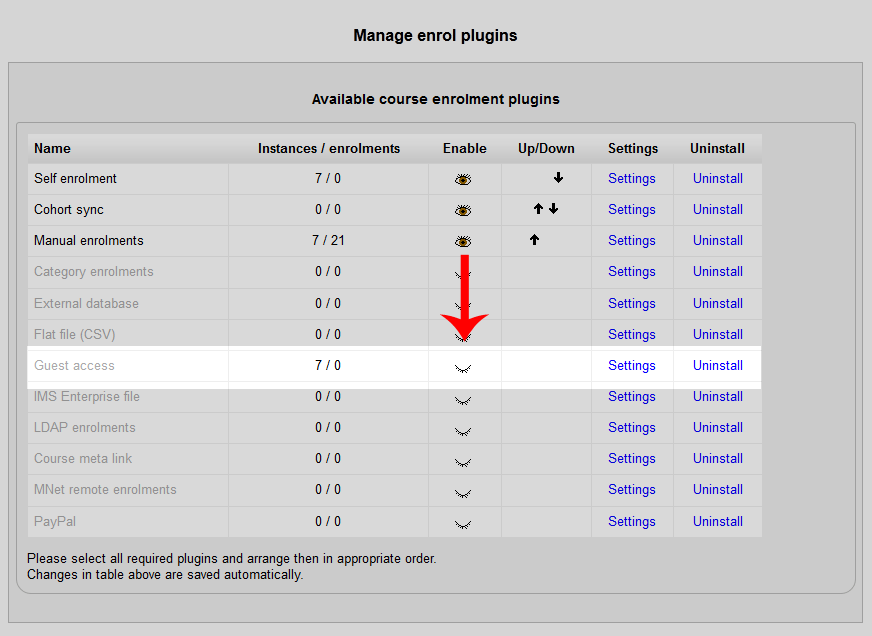
Now the
 icon will show for the plugin and the Enrolment plugin will be disabled from the entire Moodle site.

