
Now that the Activities and Resources are being added to the Course sections, headers may need to be added to the Course Sections to separate multiple Activity and resource modules. The previous tutorial touched on Adding the File Resource Module to Moodle Courses. This article will outline how to add a label to the Course modules to separate them.
Adding a Label to the Course sections to separate the modules with a header.
- log into the Moodle Dashboard
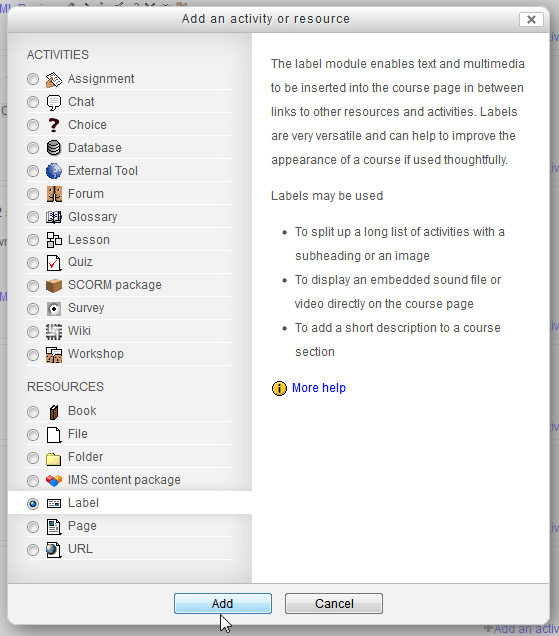
Once in the Moodle Dashboard, select the course and click the Add an activity or resource button to add a File. Select the Label radio button and click Add.
Important! Keep in mind that Editing must be turned on in the Settings section in order to edit any of these options.

Add the text that will display in the Course Section. Click Save and Return to Course.
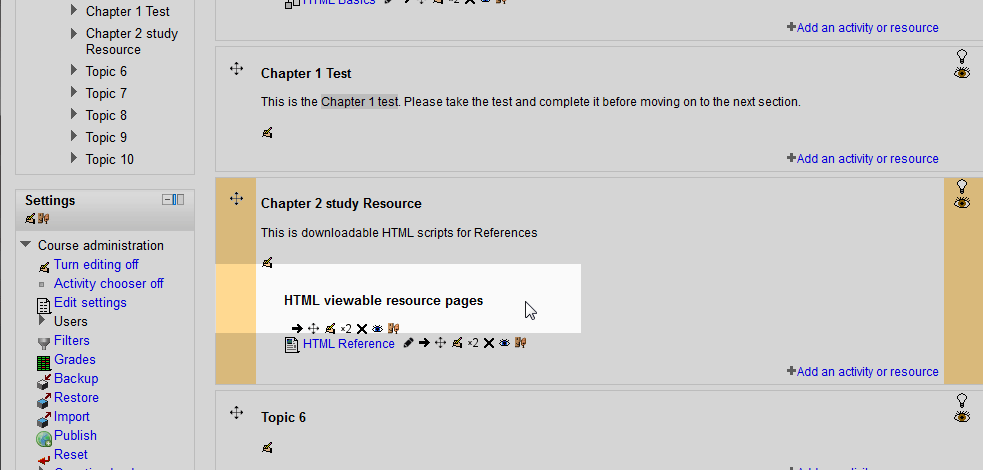
Now there will be a Label separating the Course Description from the individual modules in the Course section. The Label should look similar to the following snapshot.

This concludes the tutorial on Adding a Label Module to a Course in Moodle. Please check the next article on Making pages for courses with the page module in Moodle. For more information on this Education Channel please visit Adding an activity or resource to a course in Moodle.