
Once you’ve installed WordPress, one of the first tasks you’ll need to complete is changing your title and tagline. The title and tagline in WordPress welcomes visitors to your website and quickly sums up its purpose. They also help promote a positive user experience for your visitors and encourage them to engage with your website. This article will show you everything you need to know about how to change site title in WordPress.
You can easily change the title and tagline in the Theme Customizer in your WordPress dashboard. Continue reading to learn how to access the Theme Customizer and change the title and tagline in WordPress.
If you need a new home for your WordPress site, look no further than InMotion’s WordPress Hosting solutions for secure, optimized, budget-friendly servers.
 Fast & Easy Transfers Free SSLs Hack Protection Affordable
Change Title and Tagline in WordPress
- Log into the WordPress Dashboard.
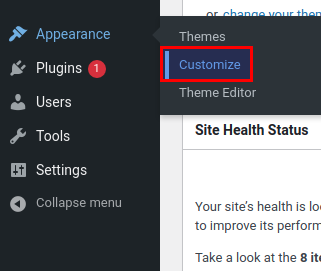
- Click Customize under Appearance.
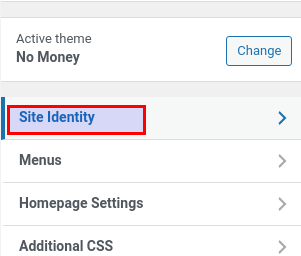
- Click Site Identity.
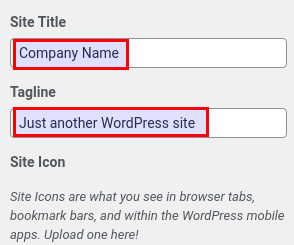
- Update the fields as needed to change page title.
- Click Publish to save your changes.
Well done, you now know how to change page title and tagline in your WordPress site! Now that you have that done, learn how to add a navigation menu to your sidebar in WordPress.
Looking for more guides? We have over 400 WordPress How To Articles to help you!
