ReCaptcha is a very popular captcha plugin. It is in use all across the web, and is not just limited for use in Joomla 3.0. In addition to being a very high quality tool, there are several interesting facts about ReCaptcha that you may not be aware of.
In this Joomla 3.0 tutorial, we’ll show you how to setup ReCaptcha.
Configuring ReCaptcha for Joomla 3.0:
- Log into your Joomla 3.0 admin
- In your Global Configuration settings, set ReCaptcha as your default captcha plugin (located in the Global Configuration settings under the Site tab).
- While still in your Joomla 3.0 admin area, in the top menu go to Extenstions » Plugin Manager.
- Using the filter feature at the top of the page, type in recaptcha. Click on the result Captcha – ReCaptcha
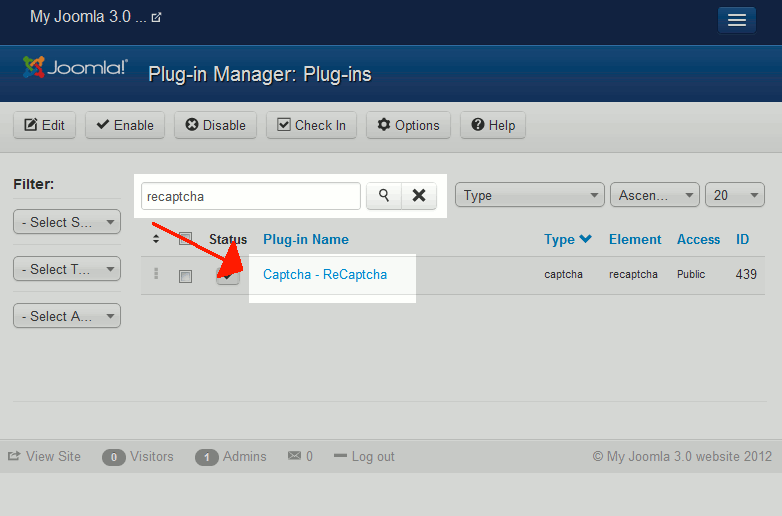
- On the Details tab, ensure that Status is set to Enabled.
- Click the Basic Options tab. Fill in the Public Key and Private Key, which you can get by registering your site here.
Another basic option you can set is the Theme. The following themes are available: Clean, White, BlackGlass, and Red.
After setting all options, click the Save button in the top left.
- Be sure to test ReCaptcha to ensure it is working! You can do this by visiting your user registration page. At the bottom of the page, you should see ReCaptcha, as it appears in this screenshot:
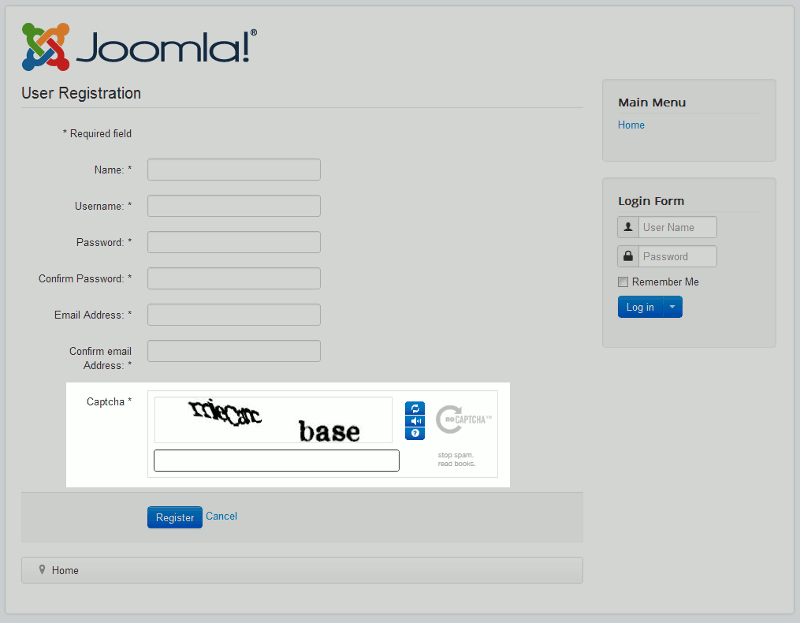
If ReCaptcha is working correctly, you should see the following message after trying to register:
Message
Your account has been created and an activation link has been sent to the email address you entered. Note that you must activate the account by clicking on the activation link when you get the email before you can login.
