If you’re using Joomla 3.0 to run a blog, one of the first things you may want to learn is how to publish your first blog post. In this tutorial, we’ll walk you through those steps.
Publishing a blog post in Joomla 3.0
- Log into your Joomla 3.0 admin dashboard
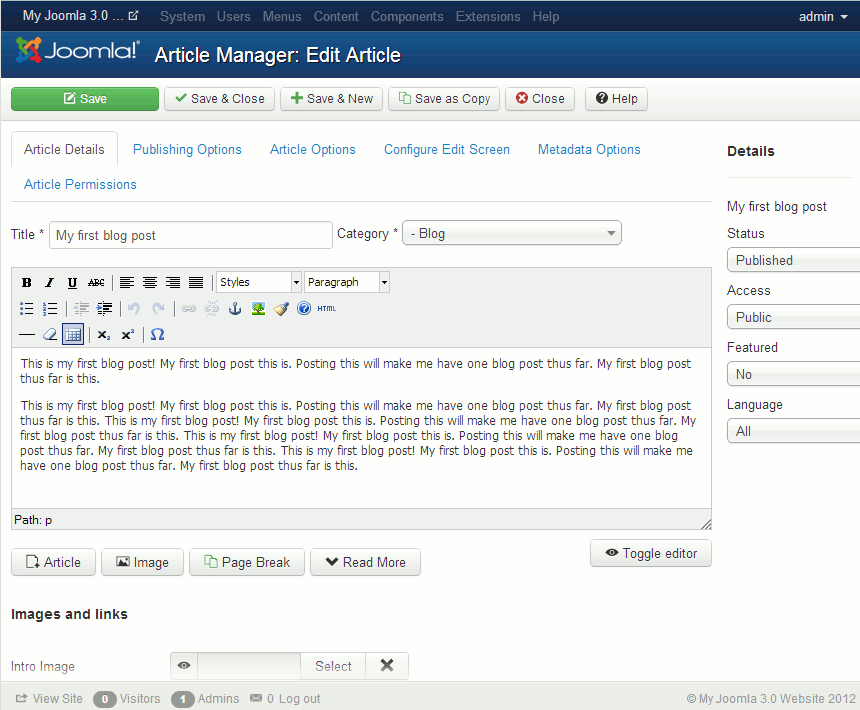
- In the top menu, click Content, hover over Article Manager, and then click Add New Article
- There are many settings you can adjust for your blog post, but we are only going to cover the basics. Below are the settings that we used:
Title My first blog post Category Blog Please note!
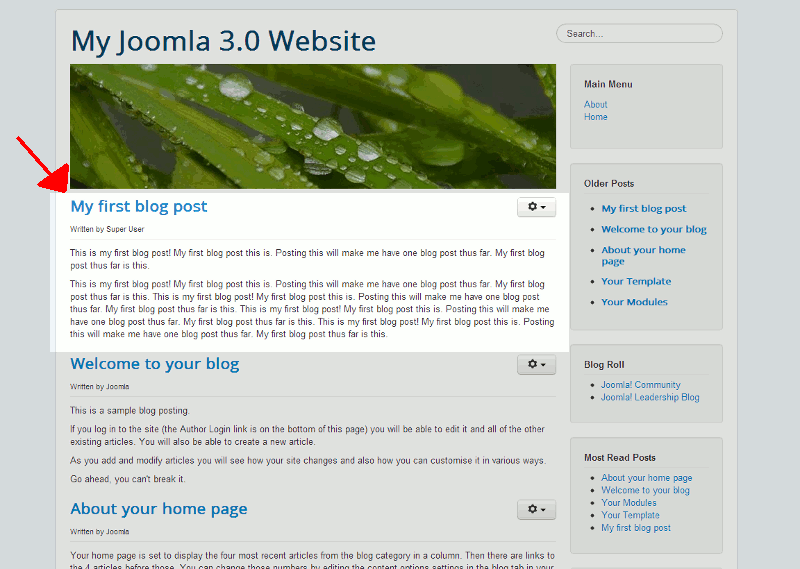
If you don’t set the Category to Blog, your post will not show up on your homepage.When finished filling out the details of your first post, click the Save button towards the top left of the page. You can see below the creating of the post within the dashboard, and what it looks like on our homepage after saving it.


I don’t know whether it’s just me or if perhaps everybody else encountering issues with your site.
It seems like some of the text in your posts are running off the screen.
Can someone else please provide feedback and let me
know if this is happening to them as well?
This may be a issue with my internet browser because I’ve had this happen before.
Appreciate it
The images at the bottom would run off if one used a smaller screen or window. It is now resolved. Thanks for notifying us.
No. I have a Testimonials tab on a Joomla 3 website which says it’s a Category Blog I want to know how to ADD to it – it hasn’t been used for quite a while.
Hello and thanks for contacting us. I recommend you check official Joomla documentation for more info.
thank you so much.