In Joomla 3.0, there is an article setting referred to as Show Parent. This setting controls whether parent categories of article categories are shown. Joomla gives the following description for this setting:
Show Parent
If set to Show, the title of the article’s category will show.
Understanding the Show Parent setting
In our testing, we used the following setup:
| Article Title | Test Article 1 |
|---|---|
| Article Category | Sub Category of Main Category |
| Parent of Article’s Category | Main Category |
You can see in the screenshots below how the Show Parent setting affected our article:
| Show Parent: Hide | Show Parent: Show |
|---|---|
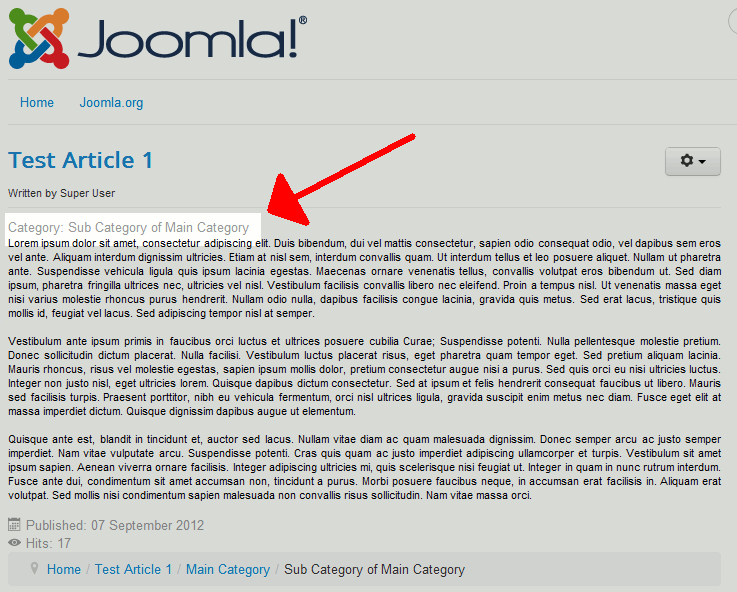
|
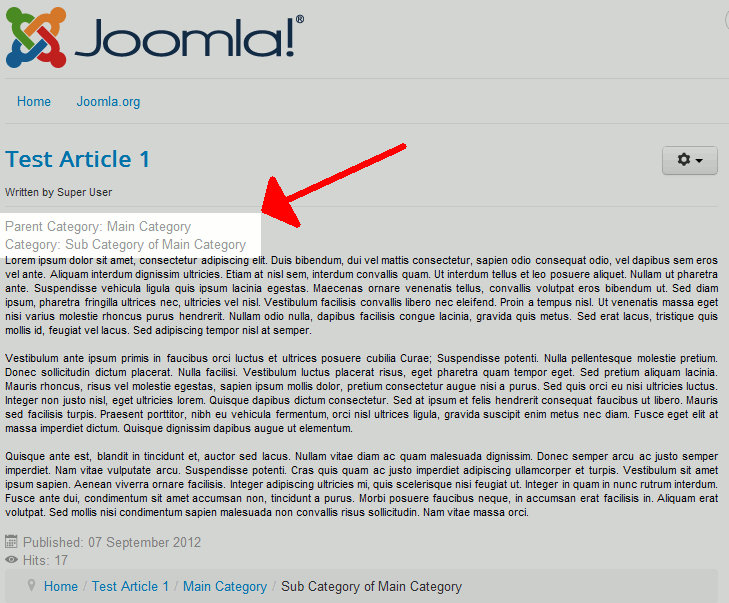
|
Please note!
- The default option is to hide the parent category.
- This setting does affect the article when viewing it directly. Instead, it only affects category pages (IE when you are viewing a page that shows a list of articles within a certain category).
To adjust the Show Parent setting in Joomla 3.0:
- Log into your Joomla 3.0 admin dashboard
- In the top menu, click Content and then click Article Manager
- In the list of articles, find the article you want to change the category setting for and click the article title
- In the tabs above the article, click the Article Options tab
- Next to the Show Parent setting, click either Use Global, Hide, or Show. Then click the Save button in the top left of the page.