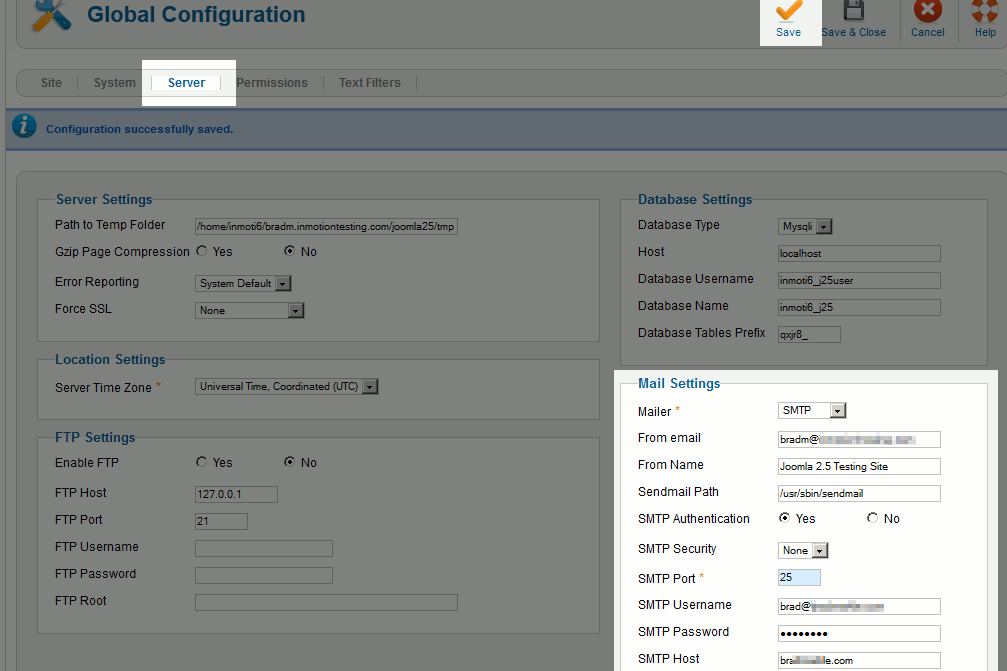
How to Configure Joomla 2.5 to Send Email Using SMTP Updated on February 19, 2025 by Brad Markle 1 Minutes, 29 Seconds to Read Joomla 2.5 has reached its end of life as for 12/31/2014. Please be advised this may be a security risk to your website. You can view more information about the end of life here. By default, Joomla 2.5 uses the php mail() function to send emails from the server. At InMotion Hosting, our servers support the php mail() function, however not all servers have this enabled. If you are not hosting with InMotion Hosting and your server does not support the php mail() function, you can configure Joomla to send email using SMTP. This method is also a good way to resolve the Could not instantiate mail funtion error. Using SMTP to send email requires that you have a valid email address, so if you haven’t already, be sure to create an email address. Configure Joomla 2.5 to use SMTP Log into your Joomla Dashboard In the top menu, hover over Site and then click Global Configuration Click the Server tab Under Mail Settings, configure the following settings and then click Save: Mailer Set this to SMTP SMTP Authentication Set this to Yes SMTP Security SMTP Port If your SMTP server uses SSL, select this option from SMTP Security and then enter the SSL Port required for your SMTP server SMTP Username Enter your SMTP Username, which generally is your full email address SMTP Password This will usually be your email address’ password SMTP Host If your email account you’re sending email from is on the same server as your Joomla 2.5 site, use “localhost” here. Otherwise, enter your SMTP hostname here. Congratulations, your Joomla 2.5 website is now configured to use SMTP! Be sure to test your site and ensure emails are sending properly. We tested this by signing up for new users within Joomla and monitored the email notifications sent to the administrators. Share this Article Related Articles How to Change a Joomla 2.5 User’s Email Address How to Configure Joomla 2.5 to Send Email Using SMTP How to install Phoca Gallery for Joomla 2.5 500 Error when using the User Manager after Upgrading to Joomla 2.5 How to install Joomla 2.5 How to Purge Expired Cache in Joomla 2.5 How to reset a Joomla 2.5 user password directly in the database Clear Cache vs. Purge Expired Cache in Joomla 2.5 Adding Google Analytics to Joomla 2.5 Joomla 2.5 Templates – $this->baseurl
Hi, I’m sorry to see that you are receiving an SMTP Error. This indicates that the settings for the SMTP server are not correct. I recommend verifying those settings and if they are all correct, you may need to check your server to ensure that it is configured for SMTP functionality. I hope this helps! Sincerely, Carlos D.
Thank you for your help. I’m getting this error. But the password is correct. Error Sending Message Testing to [email protected] | SMTP Connect() failed. SMTP Connect() failed.| SMTP -> ERROR: Password not accepted from server: Settings are: Mailer: smtp From email: [email protected] SMTP Autentication: yes Security: TLS Port: 465 SMTP host: smtp.gmail.com Any idea what the error could be?
Hello Eka, Be sure to test the usrname and password via webmail. If it is still giving the error, you may want to contact Live Support if you are one of our customers so they can check out the email logs to see if there is anything amiss there. Kindest Regards, Scott M
Hi. Thank you so much for this help. It works correctly for me with Joomla 3.4.3. It also works with Creative Contact Form. Good luck and Thanks again.
hello, i receive dont receive mail as the administrator only on my gmails when i send a copy to myself and dont know what can be the cause. my settings are Mailer==php mail from email from name send mail path==same as my email smpt authentication==no smpt security==none port==25 user name==my email password smpt host==localhost please its urgent.Thanks in advance
Hello Samuel, Compare your settings with the ones in the image above. I would make one exception however and change the port from 25 to 587 if it does not work right away. Kindest Regards, Scott M
Hello maango, Thank you for contacting us. We are happy to help, but it is not clear what you are asking. Is this an error you are receiving? Thank you, John-Paul
Dear When I click on forgot password in joomla . It ask u to provide a email id . When i provide admin mail id means mine then it shows Notice SMTP connect() failed. and Message Please check your email and follow the instructions to reset your password this too. but when i check my email id no email is there. another condition when I provide someone else mail id then it shows Message Email is not valid any solution for above problem. Is there any extension or plugin in joomla which help me in this topic . I’m using local host and joomla version 3 Thanks in advance
Hello Rupesh, If you are unable to login to your administrator, you can edit the configuration.php file and then add the SMTP settings for your email, if you Joomla admin is set to use SMTP to send emails. Otherwise, you will need to manually change the Joomla password through the database. I hope this helps to answer your question, please let us know if you require any further assistance. Regards, Arnel C.
Hello jul, Thank you for contacting us today. We are happy to help you, but will need some additional information. Are you getting any errors, or returned/bounced mails. Have you reviewed the mail logs for errors, or to verify if you are communicating with the server? Thank you, John-Paul
I found out lately that my website sends out relay of spam messages with email address mapped to my domain ([email protected]) , I never created these email addresses in my cpanel and it really does not exist there. How do i stop this parmanently?
Hello Obasi, Thank you for your question. There are several measures you can take to counter people spamming from your site. Setting up SPF Records and Domain Keys can help identify you as the sending server for emails. Check your website for mailing scripts. Users may be exploiting a mailer program, such as a contact form. Here is a helpful guide on how to Find spam script location with Exim. Locate email accounts being used to spam If you have any further questions, feel free to post them below. Thank you, -John-Paul
hi when new users are register/create accout to my site i need to send confirmation to their email address it give me like this message “Your account has been created and a verification link has been sent to the email address you entered. Note that you must verify the account by clicking on the verification link when you get the email and then an administrator will activate your account before you can login.” but no verification message is apper in the email wheather in yahoo or Gmail ….. even i chack in spam but no message so what i can do? is that from the joomla module that i uesed for my or any error of configuration or…… tnx a lot
Ensure that your message is being successfully authenticated using SMTP and has the correct credentials. Without the correct SMTP credentials, the message will fail to send.
Hi, I am running my website on Joomla 2.5 configured to use the PHP Mailer and a month ago something very unusual happened whereby multiple copies of the same email message were being sent out to users. Email messages are automatically sent out when a user registers or post a task etc. confirming to the user their action. Have anyone experienced such issue whereby multiple copies of the same email message are sent out to the same users and how to resolve this?
Hello Kenneth, You are the first person who has reported this issue so far. If it happens again, please , contact our Live Support as quickly as possible so they may investigate the server email logs to see if/why multiple emails were sent out. Kindest Regards, Scott M
Hy, I am using the cronoform component in joomla I use in this custom code when i send the mail it going into spam but this mail when i use it on other server going perfectely please resolve my issue it’s urgent thanks
Hello cool boy, Thank you for contacting us. If your emails are being flagged as spam, using SPF records and Domain Keys can help identify which machines are authorized to send email from your domain(s). Also, I recommend reviewing our guide on common words that trigger spam filters. If you include these terms, it can result in getting flagged as spam. If you have any further questions, feel free to post them below. Thank you, -John-Paul
Hello Sir, i am facing problem while setting up smtp mail in joomla 2.5 Error This message was created automatically by mail delivery software. A message that you sent could not be delivered to one or more of its recipients. This is a permanent error. The following address(es) failed: [email protected] SMTP error from remote mail server after end of data: host gmail-smtp-in.l.google.com [173.194.79.26]: 550-5.7.1 [162.144.42.79 12] Our system has detected that this message is 550-5.7.1 likely unsolicited mail. To reduce the amount of spam sent to Gmail, 550-5.7.1 this message has been blocked. Please visit 550-5.7.1 https://support.google.com/mail/bin/answer.py?hl=en&answer=188131 for 550 5.7.1 more information. zm3si13029002pac.97 - gsmtp kindly suggest what need to be done my email setting as below Mailer * PHP Mail Sendmail SMTP From email From Name Sendmail Path SMTP Authentication YesNo SMTP Security None SSL TLS SMTP Port * SMTP Username SMTP Password SMTP Host smtp.mail.com
Hello Atuel, Thank you for contacting us. This means that your SMTP settings are correct, since email is being sent from Joomla successfully; but Google is flagging it as spam. I recommend reviewing the link Google provided to their Bulk Senders Guidelines, to make sure you are within their guidelines. Also, setting up SPF records and Domain Keys can help identify you as a valid server for sending email. If you have any further questions, feel free to post them below. Thank you, -John-Paul
Hello, thanks for quick replies. Now I set a gmail account. If I turn off Authentication I get a Google error: Authentication required. If I set Security SMTP to none I get a Google error: must TLS before. If I set [email protected] I get no errors and no mails. Any suggestion? Thanks in advance, AC
Hello Alberto, If Google is forcing TLS then you will want to use that but change the port number. 25 is reserved for non-secure. 465 is the normal port number for TLS-SSL. Give that a try. Kindest Regards, Scott M
Hello, I have no errors selecting PHP Mail or SendMail, but I don’t receive any email with these settings. Setting up SMTP email: the same as administrator [email protected] Sender: the name that will be displayed (not an email) Authentification: Yes Security SMTP: TLS Port SMTP: 25 SMTP User: the same as administrator [email protected] Password SMTP SMTP Server: smtp.live.com It prompt the error SMTP connection failed and no mail is sent. Any suggestion? Thanks, Alberto
As you’re using port 25, you’ll want to have the Security option turned off. As you are using hotmail’s servers, I don’t have much information on what may be going on when connecting to them, so you may want to contact their support for more information.
Hi, I selected TLS but now it says SMTP Connection Failed. If I select PHP Mail or Send Mail no error is prompted, but I can’t receive the mail at the selected address. If SMTP is the sender where may I select the receiver of the mail? Thanks in advance, AC
Hi, I tried to follow these instructions but I still get the same error: AVISOLa siguiente dirección de destinatario ha fallado: [email protected] : MAIL not accepted from server,530,5.7.0 Must issue a STARTTLS command first. m3sm3308297wik.7 – gsmtpError del servidor SMTP: 5.7.0 Must issue a STARTTLS command first. m3sm3308297wik.7 – gsmtpError del servidor SMTP: 5.7.0 Must issue a STARTTLS command first. m3sm3308297wik.7 – gsmtp I need help, please. Thanks in advance, A.
Within the mail settings in the SMTP Security dropdown, select TLS. It should then begin working correctly.
We have tested the instructions and they do indeed work correctly in Joomla 2.5. Could you clarify what specific step you are having issues with?