When creating a WordPress site, you may discover that items on your site are not supported in Mobile browsers. In this case, your WordPress site will need a mobile based capability. One problem with Mobile versions of WordPress sites is the caching. This article will teach you how to enable Mobile website support in your WordPress Super Cache plugin.
Note! The results will vary based on the Theme and the caching plugin you are using. In this tutorial, we are using the WP Super Cache plugin.
An external plugin is required for the WordPress to be cached. In this tutorial we will install the WordPress WPTouch Mobile plugin.
Installing the WPTouch plugin
Before you can use WP Super Cache for your mobile website pages you will need to install a mobile plugin that converts your website to a mobile version. In this tutorial we are using the WPtouch 1.9.6.3 plugin version.
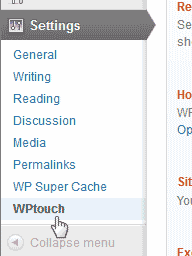 Log into the WordPress Dashboard.
- Install the WPTouch mobile plugin.Once installed you will see the WPTouch link in the Settings.
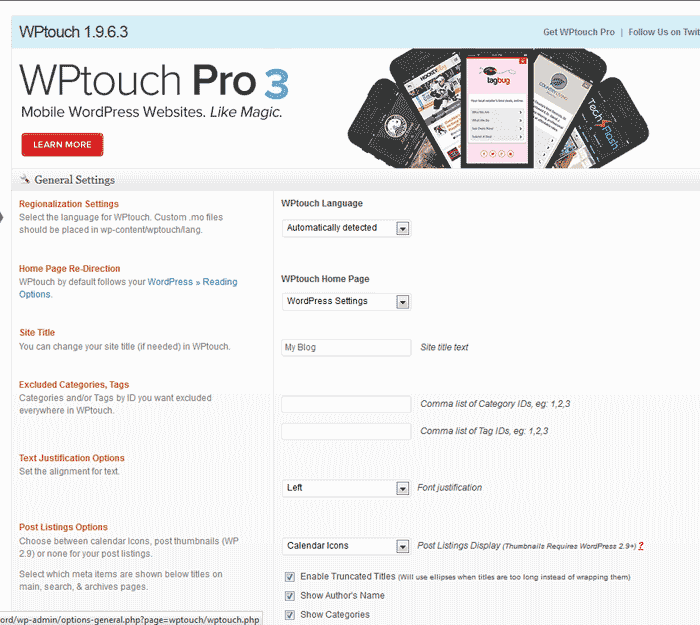
The WPTouch admin dashboard looks like the snapshot to the right.
Enabling Mobile support with Super Cache
Once you have the WPTouch mobile plugin installed, you can enable the WPTouch plugin in the WP Super Cache dashboard.
- Log into the WordPress Dashboard.
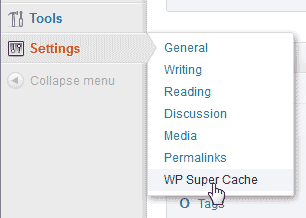 Go to Settings > WP Super Cache.
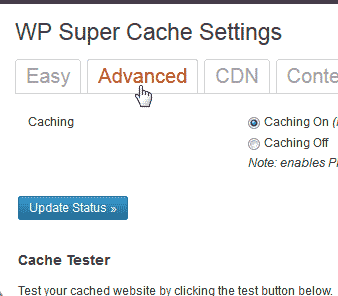 Click the Advanced tab.
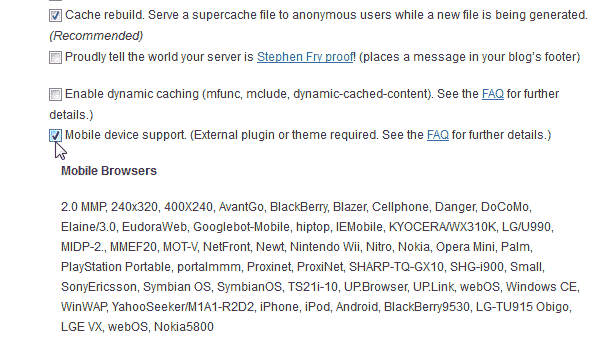 By default, you should see the Mobile Device Support check box checked. If not, check the checkbox and Save the changes.
 Click the Plugin tab.
 In the WPtouch section, click the enabled radio button and click Update.That’s is it. You will now have cached pages for your WordPress mobile site.
