OpenCart gives you the ability to sell gift vouchers for merchandise on your website. By default the website visitors can purchase gift vouchers on your site by clicking on the link on the “extras” section of the footer. The customer will then be prompted to fill out the information for the gift voucher. By default the customer can purchase any amount for a gift voucher from $1 to $1000. This is then applied to a code, which would be entered into the shopping cart by the customer at the time of purchase. A gift voucher code is not attached to a specific account when it is created. This is different than a store credit, since store credits are applied to a specific user’s account.
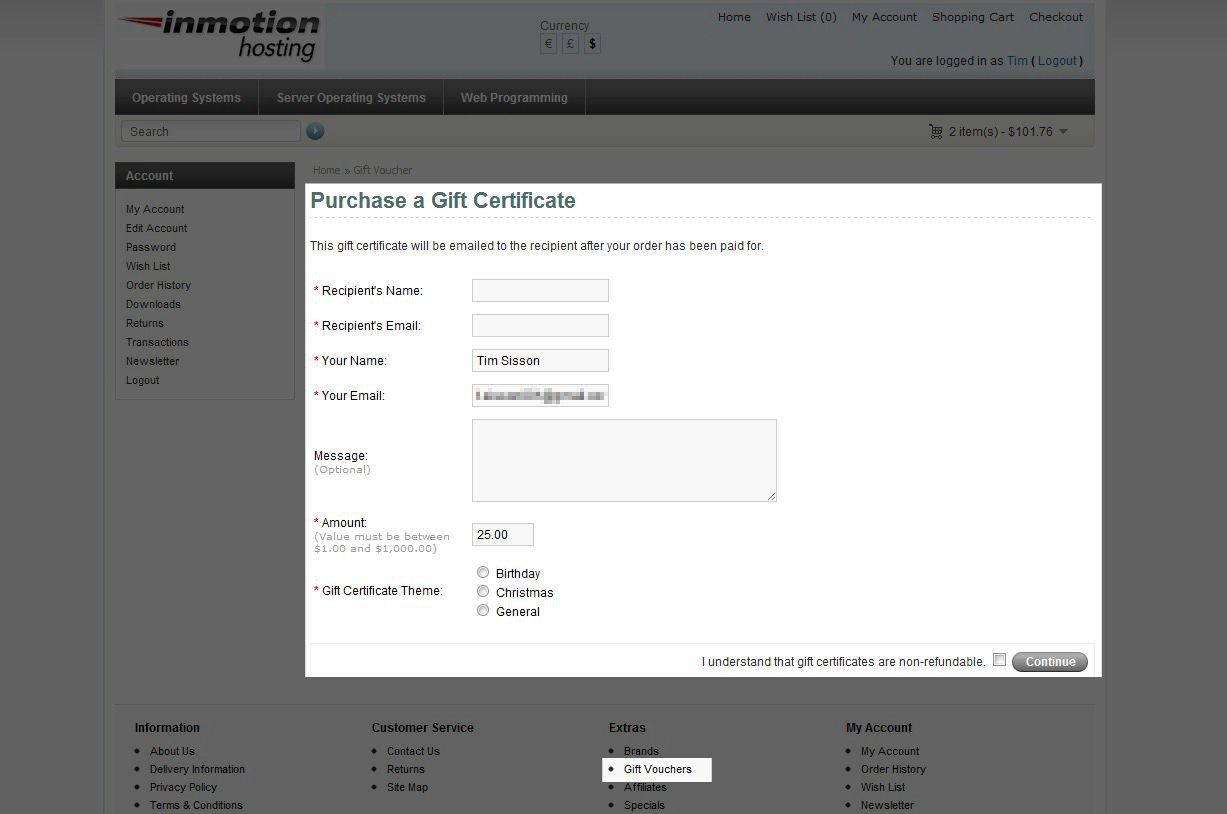
Gift vouchers are sent via email in the form of a code to be used during the checkout process. It’s important to understand that discounts are not offered on gift vouchers. Also, the gift voucher code will not be sent until the order status is updated to “complete”. This ensures that the gift voucher is paid for prior to sending the email.
Please read our article on manually creating Gift Vouchers, if you find you need to create a gift voucher manually through the OpenCart Dashboard.
If you need further assistance please feel free to ask a question on our support center website.



hello,
thanks for the tuto so much , but i was wondering in case if i want to allow any user to use the gift voucher , that will ask me not to give in parameter a specific adressin To E-Mail, plz can you help me .
Good morning,
In the frontend of my shop there isn’t a possibility of buying a gift card, where I have to set?
My e-shops is: www.famarinu.com/eshop
Thank you
Hello Manuela,
You may want to look into the following plugin as it may provide the solution for you.
Best Regards,
TJ Edens
Hi , i am trying to sell gift cards and E Gift Vouchers Of other companies like amazon, ebay, hp, apple and thousnad more, how can i do it. I can solve the issue with Gift Cards by addin them as product, Bot how do i deal with E Gift Vouchers.??? I am trying somethin like www.giftbig.com… Please advice
Hello draj,
Thank you for contacting us. I do not know any built-in way to accomplish this in OpenCart. Most likely, you will have to contact each vendor individually and setup some type of partnership.
Then, custom-code/develop a solution to communicate with the companies systems.
Thank you,
John-Paul
Hi Arnel,
Thnaks for your response.Sure,i will try to find suitable extension.
Thanks,
Sinu.
Hello,
I am new to Opencart.Feeling diffcult to do a task.I need your help on the below task.Please help me out.
Users can able to download the voucher using a chosen voucher template (Happy Birthday or something) after they purchase a service.
The vouchers are for the service items in the menu page (the items and prices are listed in the menu page).
If they choose 1 service(ex:Nail Treatment) item from the menu it’s the same price($25) as per the menu
But,If they choose 2 service items they get a 5% off from the total of the 2 items they choose(then its $25×2 minus 5%)
So the value of the voucher depends on what item they choose from the menu
Then they can download the voucher using a chosen design (Happy Birthday or something)
Apprecitae your help
Thank you in advance
Hello Sinu,
Sorry for the confusion on the vouchers. We unfortunately cannot CHANGE the way vouchers work within OpenCart. If you want to do that, it will require custom development. We do not provide this kind of service. You will need to either find an extension that you can add to OpenCart for this purpose, or hire a programmer to create that functionality for you.
You asked this question elsewhere, and unfortunately, the answer remains the same. If you do have any further questions or comments, please let us know.
Kindest regards,
Arnel C.l
Hi, I have just created an ecommerce website
www.ecoshower.com.au
I have tried to use the gift vouchers, but when it comes to Payment Method, there is none.
It says
“Warning: No Payment options are available”
How can I fix this, as the payment method works for paying for products.
thankyou for your help, much appreciated.
Marlene
Hello Marlene,
Sorry to hear you’re having problems with gift vouchers. Gift vouchers are able to be used as payment when customers checkout. They would use a code. Gift vouchers would need to be enabled in order to be used. Gift vouchers are under the Sales menu in OpenCart (v1.5x). You can also find payment options under the EXTENSIONS menu. If you have no payments enabled, then your customers will have no way to pay.
If you’re using a different version of OpenCart, or you’re having a problem not related to this ecommerce program, you will need to be more specific about the issue in order for us to help. Please provide further information on the problem if you require further assistance.
Regards,
Arnel C.
I have two stores which offer gift vouchers, how do i set this up so that the gift voucher is generated to the correct store
Hello Nicole,
Thank you for your question. The voucher is purchased from the website, and they must complete the purchase before they receive the voucher.
So the voucher is generated by the OpenCart website they complete the purchase on.
If you have any further questions, feel free to post them below.
Thank you,
John-Paul