When you first install Movable Type on your server, you will need to edit the home.html permissions and add code to the mt-config.cgi. If you skip this step you will get many “Internal Server errors” on your site.
Fixing the Permissions in Movable Type
Movable Type by default forces all the file permissions to be 666 for the pages. Even if you manually change the permissions on the server, Movable Type will automatically change the permissions back to 666. When files have 666 permissions on suEXEC or CGIwrap server, an “Internal Server Error” will be thrown. This article will explain how to fix the permissions in your Movable Type program.
- Login into your cPanel.
- Go to the File Manager. Select your Movable Type directory and click Go.
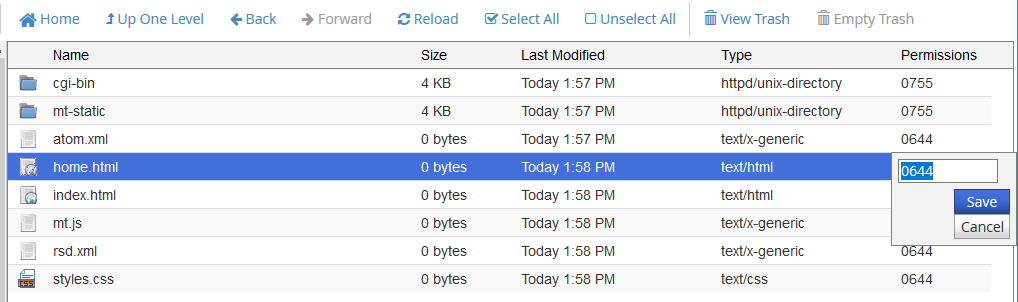
Change the permissions of the home.html file from 666 to 644.
Save the file.

Go to your cgi-bin/mt-config.cgi file and edit it. Add the following code to the end of the file.
DBUmask 0022 HTMLUmask 0022 UploadUmask 0022 DirUmask 0022
Important! Movable Type will not reset the permissions from 666 to 644 automatically. You will need to set the permissions manually on the server initially. After that, the file permissions will be saved correctly.
Save the changes
Now when you create new pages and you edit the home.html page, you will not get the “Internal Server Error“. Pages created from here on will all have the 644 permissions.
