
If you notice the incorrect time in your PHP scripts, the likely culprit is that the hosting server is in a different timezone.
For example, when you’re an InMotion PHP web hosting customer, you can select from data centers in Washington, D.C., or California, which means the server’s timezone will be either Eastern Standard Time (EST) or Pacific Standard Time (PST).
If you want to change that, it’s a quick fix. Simply insert a line of code into your php.ini file and the location you set in the code will determine the time to display in your PHP scripts. Keep reading to learn how.
Set the Timezone in PHP

- Open your php.ini file with the File Manager in cPanel .
- Add the following line of code to top of your php.ini file:
date.timezone = "US/Central".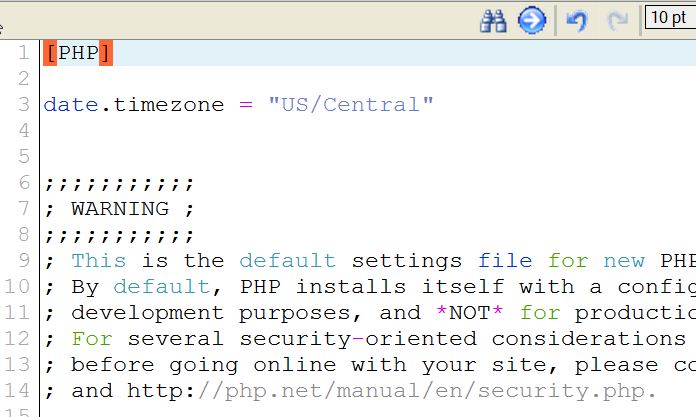
- Replace
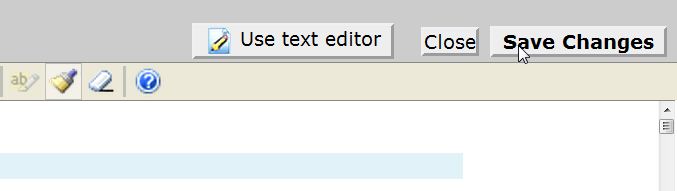
US/Centralwith the timezone from here that corresponds to the time you want to display.- Once you have entered the desired timezone, click Save Changes to save the file.
- Now, you can check your phpinfo.php page to verify the change took place.


Drag the arrow to the right to see the change in the timezone setting Congratulations! You are now able to set the timezone in PHP. If you wish to see more guides with tips and information for your website issues, please see our InMotion Hosting Support Center!
Sell hosting using your own brand with a powerful Reseller Hosting plan, now with more resources and faster storage using NVMe SSDs at no extra cost. - Replace