Adding downloadable (or digital) products to your PrestaShop 1.5 store can be a big boom to your business. Digital products are anything that can simply be downloaded after purchase. They can be ebooks, images, music files, audio books, etc. These require no shipping and the customer can access them instantly. Follow the instructions below to learn how to add a downloadable product to your PrestaShop 1.5 store.
Creating digital products in PrestaShop 1.5
- Log into your PrestaShop 1.5 admin dashboard.
- Using the top menu bar, hover over the Catalog tab and click on the Products option.
- This leads you to the Products screen. To create your new digital product, click on the green Add New button in the upper right corner.
- When you first enter the Product Edit screen, you will need to take notice of the set of radio buttons at the top. You will want to select the radio button for Virtual Product (screenshot below). This will add a Virtual Products tab on the left hand side and immediately take you there.

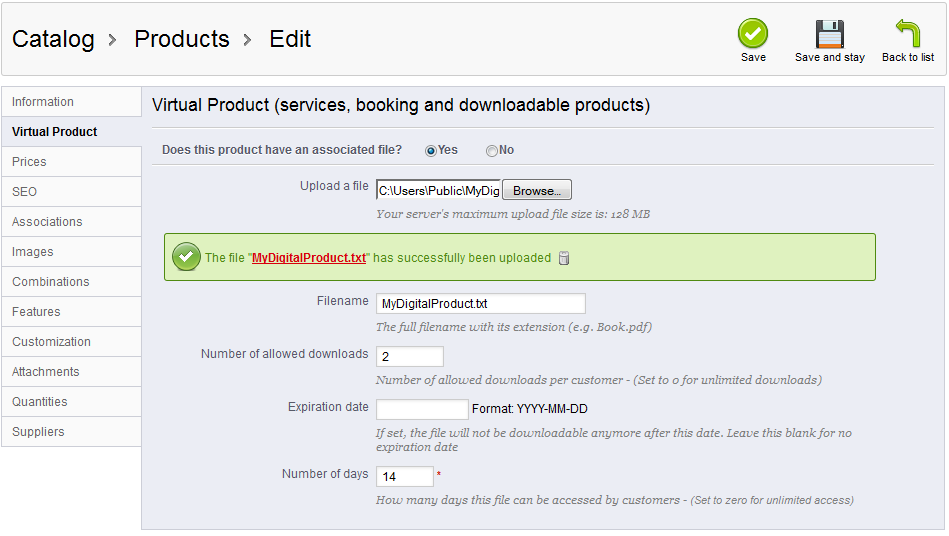
- Click on the Does this product have an associated file? and the other fields will appear. Here you upload the file and set its download limitations for the customer using the fields on the page.
Upload a File field or button used to upload the file Filename the name of the file uploaded Number of Allowed Downloads the maximum number of downloads allowed to the customer, set to 0 for unlimited Expiration date the expiration date to download the product (leave blank for unlimited) Number of Days the number of days the file is available. set to 0 for unlimited. 
- Once you have entered all your information, click on the green Save button to save the new status. You may now move on to the regular procedures such as pricing your product just as you would with a physical product.