Now that we have added CSS and JS files to the Joomla 3.0 template that we are creating, we will now add the necessary bootstrap files.

While the necessary bootstrap files can be downloaded from the official site, Joomla 3.0 actually includes the necessary css and javascript bootstrap files as well. As a template developer, this will make incorporating these files much easier.

Some bootstrap loaded with <jdoc:include type="head" />

When we added <jdoc:include type="head" /> within our template's head tag, Joomla automatically added a few JavaScript and CSS files. In the list of files below that Joomla added, you will notice that we've highlighted the bootstrap files that it included:

<script src="/media/system/js/mootools-core.js" type="text/javascript"></script>
<script src="/media/system/js/core.js" type="text/javascript"></script>
<script src="/media/system/js/caption.js" type="text/javascript"></script>
<script src="/media/system/js/mootools-more.js" type="text/javascript"></script>
<script src="/media/jui/js/jquery.min.js" type="text/javascript"></script>
<script src="/media/jui/js/jquery-noconflict.js" type="text/javascript"></script>
<script src="/media/jui/js/bootstrap.min.js" type="text/javascript"></script>

What bootstrap files do we need to include?

According to the official bootstrap documentation, we need to include the following files:

  1. bootstrap.css (or bootstrap.min.css)
  2. bootstrap.js (or bootstrap.min.js)

As <jdoc:include type="head" /> already included bootstrap.min.js for us, we only need to include bootstrap.min.css. To do this, we will update our template's index.php on our Joomla hosting server to include this file. You can see the code we added below that includes bootstrap.min.css, which we've highlighted in green:

<?php

$doc = JFactory::getDocument();

$doc->addStyleSheet($this->baseurl . '/media/jui/css/bootstrap.min.css');
$doc->addStyleSheet('templates/' . $this->template . '/css/style.css');
$doc->addScript('/templates/' . $this->template . '/js/main.js', 'text/javascript');

?>
<!DOCTYPE html>
<html>

<head>

    <jdoc:include type="head" />

</head>

What Joomla looks like when bootstrap has been added

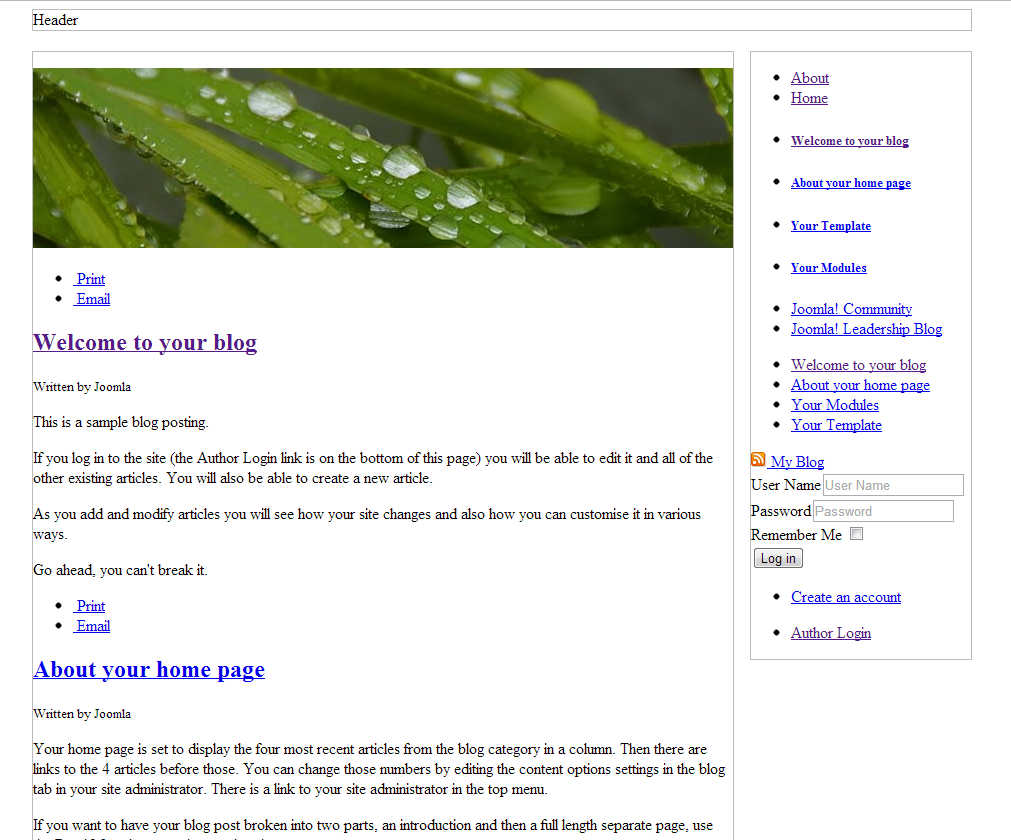
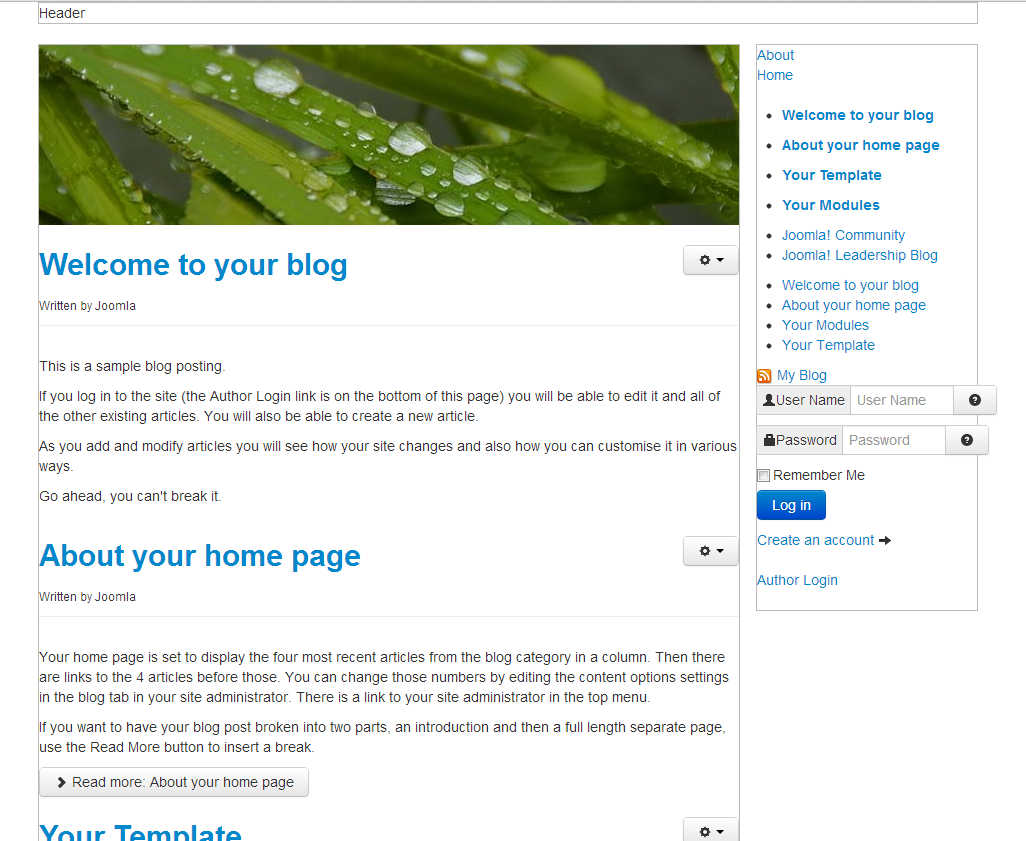
After editing our template's index.php on the server and saving the changes, our template is taking a little more form. You can see in the screenshots below how our template looks with and without this css file.

BEFORE bootstrap.min.css
AFTER bootstrap.min.css
before bootstrap css Joomla after bootstrap css Joomla
Like this Article?
ClubAero 2013-03-30 5:02 pm
Hi Brad,
You say that "Joomla 3.0 actually includes the necessary css and javascript bootstrap files as well" but in the list of files generated by <jdoc: include type="head" /> the bootstrap.min.js is not included. You then say we have to add this with:
$doc->addStyleSheet($this->baseurl . '/media/jui/css/bootstrap.min.css');
My problem is that bootstrap.min.css is overriding my own css in a form which I am implementing in a Joomla 3.0 site. I decided to try to show the form on a page with my own 'verybasictemplate' which I intend to create by modifying an existing basic template. To avoid bootstrap.min.css overriding my form css I want to omit the file being loaded by the index.php in my 'verybasictemplate'. But if bootstrap.min.css is not automatically loaded by standard Joomla templates, then I don't need to find out how to modify the template to avoid loading the file?
Is bootstrap.min.css automatically loaded by Joomla 3.0 templates or not? That is my question - sorry if I have not been clear......
ClubAero 2013-03-30 9:50 pm
And since I posted that question I have now noticed that the template.css file in the protostar template actually includes bootstrap.min.css. So even if I can avoid loading the bootstrap file it will still be there in the protostar template.......
jamesr Community Support technician 2013-04-01 5:18 pm
Joomla 3.0 does not come with it automatically. The bootstrap code can be commented out if you need it disabled. It should not effect the template adversely.

Best Regards,
James R
jrulle5 2013-05-17 4:20 pm
Where is your template getting the arrangement of modules from. What would I need to do to customize the arrangement of modules?
(specifically I don't want any sidebars, just a series of stacked modules.
Thanks.
jamesr Community Support technician 2013-05-17 4:55 pm
Hello!
If you want to edit the code of the template the following link should help you identify where the code is to edit.
A very basic template soon to be a Joomla 3.0 template

If you just want to position the modules then you can follow the tutorial below to position the modules.
How to add module positions to a Joomla 3.0 template

Best Regards,
James R

Login to comment.

Your Opinion Matters

... but we need to know what you're thinking!

I'm Brad Markle, your friendly Community Support technician, and I wrote the article you're looking at now. I like to think it's perfect, but I'm sure you have some suggestions. Please, let me know what they are!

Feedback
Your Email Address
Because we'd like to talk with you!

Latest Questions

If you need some help, submit your question to our Community!
We guarantee a response within 60 minutes (8am - 9pm EST, Monday - Friday)
Ask a Question!
Recent Questions
  1. Can I create a website on another website (e.g. Wix) and have it hosted on my inmotion domain?
  2. Why can't I see my updated web files on my website?
  3. Adding Google Analytics

Need more Help?

Search

Ask the Community!

Get help with your questions from our community of like-minded hosting users and InMotion Hosting Staff.

Current Customers

Chat: Click to Chat Now E-mail: support@InMotionHosting.com
Call: 888-321-HOST (4678) Ticket: Submit a Support Ticket

Not a Customer?

Get web hosting from a company that is here to help. Sign up today!