There may be a time or reason that you do not want customers to purchase products directly from your site. Maybe a physical store that only provides for a certain area wants to display their products. You can still show the products in a Catalog mode, which is the same as the normal shop, but without the option to purchase and check out directly via the storefront. To set the Catalog Mode in PrestaShop 1.5, simply perform the following steps:

To set your store to Catalog Mode in PrestaShop 1.5:

  1. Log into your PrestaShop 1.5 dashboard.
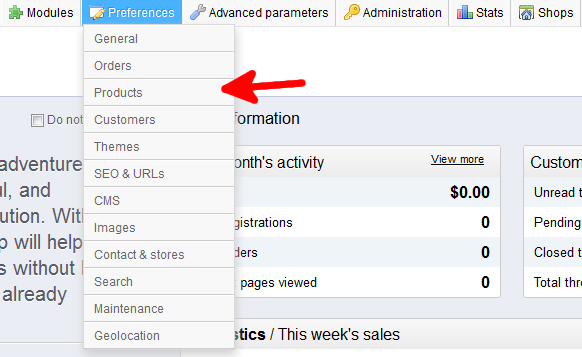
  2. Using the top menu bar, hover over the Preferences tab and select the Products option.
    _preferences-tab-products
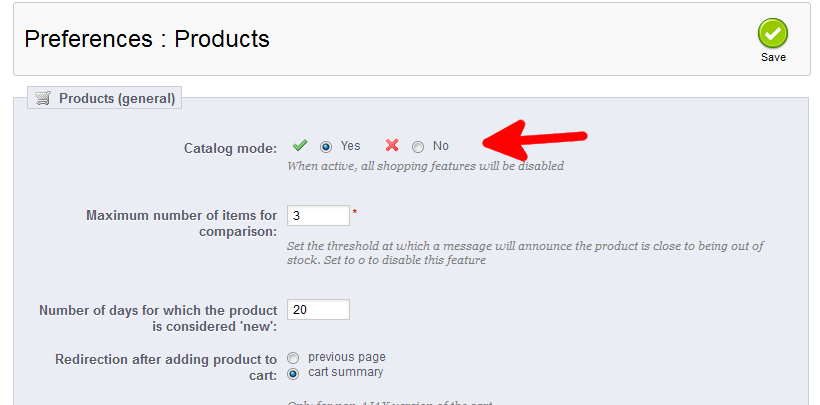
  3. From the Preferences : Products screen, find the Products (General) section at the top and locate the Catalog Mode setting. Select Yes if you want to disable purchasing on your site and make it an online catalog instead of a working storefront. This setting is set to No by default.
    preferences-products-catalog-mode
  4. Click on the green Save button to save the change.
Your store has now been converted to an online catalog in PrestaShop 1.5!

Like this Article?

Login to comment.

Your Opinion Matters

... but we need to know what you're thinking!

I'm Scott Mitchell, your friendly Community Support technician, and I wrote the article you're looking at now. I like to think it's perfect, but I'm sure you have some suggestions. Please, let me know what they are!

Feedback
Your Email Address
Because we'd like to talk with you!

Latest Questions

If you need some help, submit your question to our Community!
We guarantee a response within 60 minutes (8am - 9pm EST, Monday - Friday)
Ask a Question!
Recent Questions
  1. how and where do I copy FB like button code into HTML to add to my web page please
  2. I get a database connection error. What name should I be using to configure my database connection?
  3. Unable to block .RU domains

Need more Help?

Search

Ask the Community!

Get help with your questions from our community of like-minded hosting users and InMotion Hosting Staff.

Current Customers

Chat: Click to Chat Now E-mail: support@InMotionHosting.com
Call: 888-321-HOST (4678) Ticket: Submit a Support Ticket

Not a Customer?

Get web hosting from a company that is here to help. Sign up today!