Understanding the use and addition of an A record requires a brief explanation of DNS. DNS stands for Domain Name System. It converts human-readable domain names like example.com into IP addresses like 86.75.30.9 which computers can then read. DNS zone files reside on your server and tie domain names with IP addresses.
Most users do not need to modify their DNS settings. The most common reason for DNS changes are to route a certain part of your domain name to a third party (not our servers).
Using the Zone Editor in cPanel
cPanel provides the ability to maintain your DNS records via the Zone Editor. The following instructions provide the steps to create an A record.
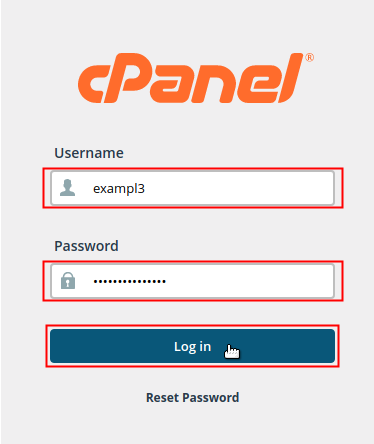
- Log into your cPanel. Be sure to log in with the cPanel user that owns the domain you are creating an A record for.

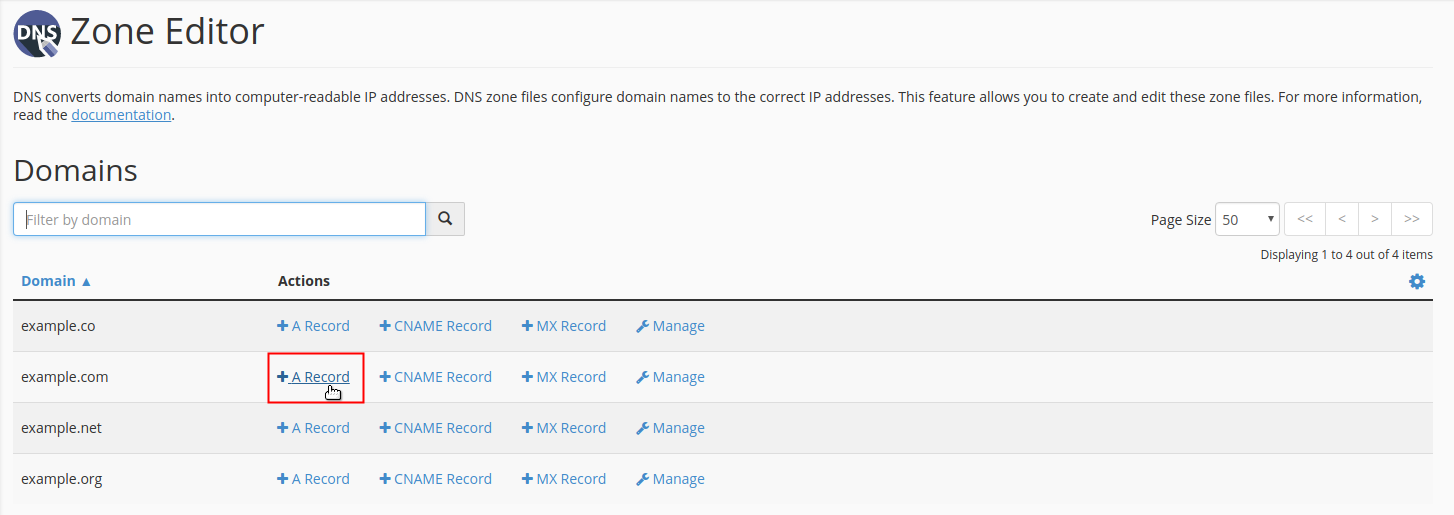
- Locate the Domains section of cPanel and click on the Zone Editor icon.

- Find your domain in the list under the Domain heading. Under the Actions heading, click on the +A Record link that corresponds with the domain you want to add the A record for.
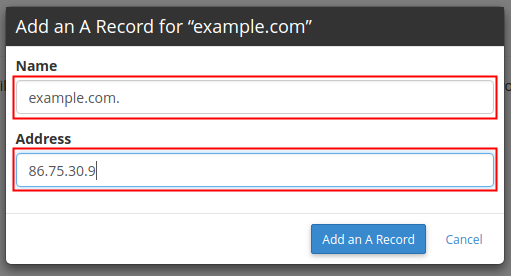
- A pop-up dialog box will display for you to fill in the data fields for your A Record. Type the Name and Address of your A record into the fields accordingly.NOTE: You may refer to the descriptions in the table below to determine what information you will enter for your A record. However, the values indicated are simply provided as sample data and should not be used as the actual values in your record.
A Record Field Description Value Name Enter the domain name that you are creating the A record for followed by a period. example.com. Address Enter the IP address that you are pointing the A record to. 86.75.30.9 - Click the Add an A Record button to save your changes.


Using the DNS Editor in WHM
VPS and Dedicated plans include a feature in WHM for editing DNS Zones for all cPanel accounts on the server. This editor provides greater control over DNS records than the Zone Editor in cPanel.


am trying to connect to my new host on webflow still showing the old files
Hi michael,
If you recently changed the DNS records, it may take 4-24 hours for the changes to propagate throughout the rest of the internet. If you continue to experience issues after this time period you may want to double check to make sure the domain is pointed to the correct name servers.
What IP Address do I need to use?
You should use the IP address that is associated with your account if that is where your website is hosted.
I need to know the correct IP address to use for a domain hosted elsewhere! Why is this so difficult to find? Is it the Namserver IP in the acount details or the one that shows up in the other cPanels or Shared Server IP?
If you are pointing the domain to the cPanel server then you can use the IP address found in cPanel/Shared IP Address. The nameserver IP is used for changing your domain’s DNS management and should not be needed if you are already modifying the A record to point the domain that way. I hope this helps!
mygreenpotential.com not working when i open it on google how to place it on dns
Mygreenpotential.com shows no active A record which produces the website but that DNS settings are handled by Google. If you’d like to point your domain to us, you’d need to change either your A record at Google to your server IP or nameservers to ours. Please keep in mind that such DNS changes may require ~4-24 hours for propagation.
What address can I use for the A record?
A records always map to IP addresses.
I have my domain at Network Solutions and my hosting account at Inmotion. I used the IP address provided in my Cpanel record and inputed it into the A Records rather than changing the name server so that i won’t have to update the DNS in Inmotion.
My domian is debruinlawfirm.com. When I refresh the site url it comes up as unable to be found or the Newtork Solutions construction page instead of the wordpress site I launched on Inmotion.
Is there something I’m not doing correctly?
It sounds like you did everything correctly. You may want to check with Network Solutions support to make sure that the record was submitted correctly on their end.
Hi, I have Domain only account with InMotion. My hoster (both website and email) is instructing me to change the following:
Can you please provide guidance on where to make all of these changes on In Motion AMP tool? The field headings are not matching the instructions provided by my hoster.
Thank you
We do not provide DNS service with domain only accounts. You will need to point your name servers to a 3rd party DNS hosting service, and then make the changes you mentioned with them. Please keep in mind that these changes, as with all DNS changes, may take up to 4 – 24 hours to take effect.
Good Day
John Paul i need a help i have one domain by name www.kcci.org.sa which is hosted at another place but i want to create multiple A Records for it from your Side is it possible and which package should i need to purchase for it i will give you brief explaination about it
i have 2 public IP’s from 2 Different ISP’s i have a domain by name www.kcci.org.sa
i need to configure it on both the public IP’s as a Redundance example
www.kcci.org.sa – 78.93.78.139 (ISP 1)
www.kcci.org.sa – 78.93.212.230 (ISP 2)
and we will configure this IP’s on our Firewalll please update
Hello Mohd Siddiqui,
Thanks for the question about the IP address configuration. Apologies, but we cannot configure a website in that manner. If you have any further questions or comments, please let us know.
Regards,
Arnel C.
Thanks, I hae pointed the www and @ records to the dns indicated in my cpanel. About the DNS records, they are still the standard namecheap dns. Do I need to change them to someting?
If you are pointing to our name servers, then the namecheap records will be invalid. You will not need to adjust them any longer. Any DNS changes would be made on your cPanel.
If you only changed the domain and @ records to point to your server here, then you cannot make any DNS changes in your cPanel as namecheap is still the DNS authority. You will need to make the changes there.
Hello, I have my domain name on Namecheap.com, and my hosting account here at Inmotion.
I understand that I would ned to enter into namecheap.com account settings, then select custom dns, pointedto ns1.inmotionhosting.com and ns2.inmotionhosting.com
Afterwards, I would need to go into namecheap.com’s dns settings and point the @ host record into the ip address that appears into my cpanel dns page. Would that be correct?
Thanks
Hello Raul,
Once you point to our name servers, you will not need to use Namecheap for DNS. You will create the DNS records within your cPanel account using the Advanced DNS Admin tool as we will then be the DNS Authority.
Kindest Regards,
Scott M
Sorry for the trouble you are having. I recommend contacting our Live Support team, so they can try and push the DNS out again for the domain that is not resolving.
Thank you,
John-Paul
Can I update A name of a subdomain? In DNS editor, I don’t see the selection for subdomains but only main domains.
rgds
Yes, you can create ‘A records’ for a subdomain by entering it in the “Name” field of the zone editor.
Thank you,
John-Paul
Hello
I bought 2 domain in a seller that is a.com and b.com. Then I bought two hosting in two different companies. one hosting in jaguar for a.com and only in the inMotion for b.com. after both websites and emails running normally, I create a subdomain at inMotion is test.b.com. I want when people want to see a.com automatic direct to test.b.com with url still a.com. I’ve changed the A record with the IP address get from inMotion. but whe i type a.com the message appear look like “biz205.inmotionhosting.com” what’s wrong? Please help.
Ensure you created the subdomain “test.b.com” in your cPanel with us. Then make sure you setup the ‘A record’ for “test.b.com” where your DNS is hosted. Also, be sure to allow up to 24 hours for the DNS changes to propagate.
Thank you,
John-Paul
I thought I did it right – oh well 🙁
I’m doing a Joomla site for my brother-in-law (free) at ndrowing.com. The old WordPress site ndrowing.ca was hosted and Domained by Netfirms.
So I did an Add-on Domain ndrowing.ca on ndrowing.com
I transferred the original site files to ndrowing .com/ndrowing.ca.
Then on NetFirms Domain panel I changed all the relevant pointers to my reseller DNS’s of ns1.servconfig.com and ns2.servconfig.com
I have a .htaccess file sitting on ndrowing .com that redirects all ndrowing.ca URL’s to ndrowing .com/ndrowing.ca.
My problem is the WHOIS query doesn’t find anything but the CIRA query (we’re Canadian so don’t hold it against me) one does.
Then a DNS analysis of ndrowing.ca gives me “The SOA record for the zone is required to be present in the primary Name Server and is not found. This usually means that the zone file is not setup properly in the primary Name Server host. It may also be due to any of the following reasons.
The Name Server domain is actually not running at all. Start your Name Server domain before running this test again.”
So what have I done incorrectly?
Hi,
I have a domain (www.lunarpupil.com) registered with inmotion and am trying to point it at my tumblr page. How can I do this, I can’t see access to cPanelx as I don’t have hosting currently???
Thanks,
Hello Daniel,
You will either need to have a hosting plan somewhere or point your domain to a 3rd party DNS service like DynDNS.
Best Regards,
TJ Edens
Hi,
I subscribe Shopify for my online sales. I was give the IP address and web address to point to. After make changes to my website A and CName, I can get the website domain to point to account in Shopify but my email now is not working. Kidly assist.
Regards.
Hello Abdul,
You most likely need to make changes to your MX record. Check out this tutorial: Change DNS records to use 3rd party services while mail with mail hosted by InMotion. Mx records are related to the Mail server, so pay close attention to those particular settings.
I hope this helps to answer your question, please let us know if you require any further assistance.
Regards,
Arnel C.
Dear Sir/Mrs
I am Theary from Cambodia. i have problem i cannot piont to other IP with my subdomain i created.
can you give me the command?
thanks
Hello Theary,
The instructions above should be all you need. If you are having issues with any particular step, please provide specific information on that step and what you are trying to do and we may be able to advise further.
Kindest Regards,
Scott M
i have purchased hosting from inmotionhosting.com and change dns record but my site is not still up after 18 hours.
What can be the problem.
Regards,
https://www.***************.com
Hello Param,
Thank you for contacting us. In some cases DNS propagation can take up to 24 hours, though it usually occurs much faster.
I tested your site, and it is resolving successfully at this time. If you are still experiencing trouble accessing our site, I recommend performing a Ping/Traceroute to provide specific clues to your path to the site. Here is our helpful guide on How to read a traceroute.
Thank you,
John-Paul
I just signed up with paper.li. I also created a domain name through inmotion and have read the directions on paper.li about pointing that domain to my paper at paper.li.
Their directions say to “point an A record to their ip address”. Through my inmotion control panel I created an a record and added that ip, but do I need to go in and point the main nameservers to that ip address too?
Thanks in advance for any help on this.
Hello Kirk,
Thanks for the question! The name servers determine WHERE the DNS is being controlled for the domain name. So, if you want the DNS changes that you have made to apply to the domain name, then you should leave the name server settings pointing to InMotion. If you want to control the DNS through the interface provide at the other location where paper.li resides, then you will need to change the name servers. Bear in mind that when you make A record changes, it affects both WEBSITE and EMAIL traffic. If you change DNS and you still need email to be hosted with InMotion, then please reference this article for setup information: Changing MX records to point to InMotion servers from third party DNS.
Regards,
Arnel C.