
Sanity.io has become one of the most developer-friendly headless CMS options, offering real-time collaboration, structured content, and a powerful query language (GROQ). Unlike traditional CMSs, Sanity is a hosted backend service, you don’t install it on your server.
Understanding Sanity’s Architecture
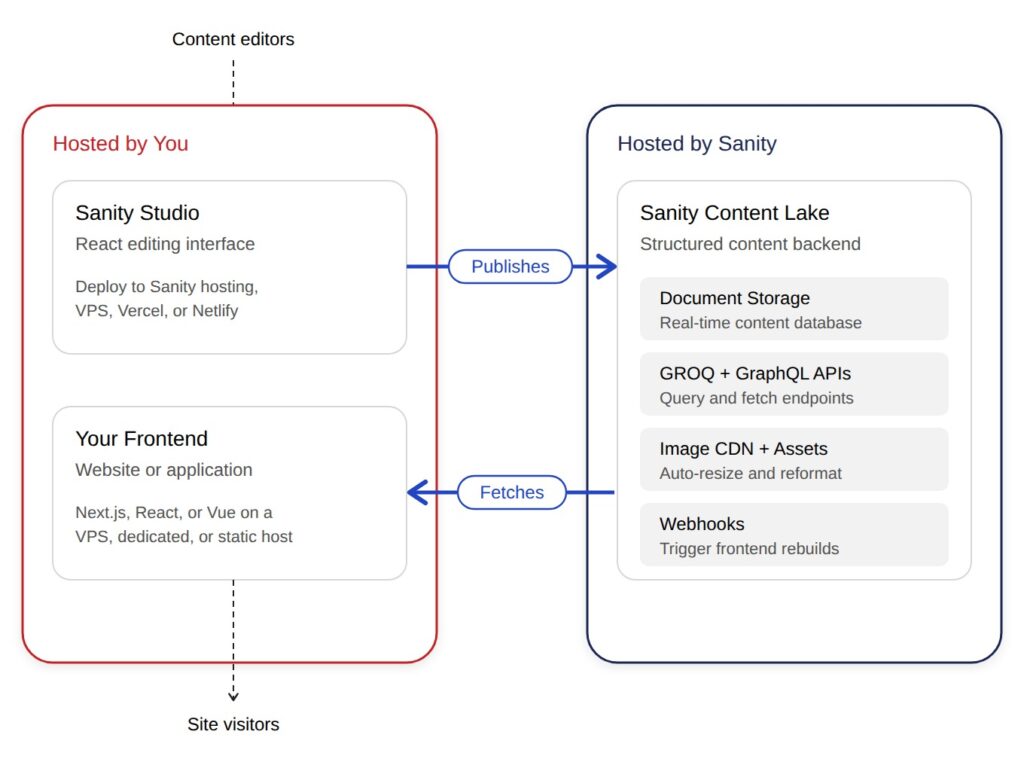
Sanity operates as three components:
- Content Lake: Your content, hosted by Sanity
- Studio: The React-based editing interface
- Your Frontend: Website/app that fetches content via API
You host components 2 and 3. Sanity handles content storage and API infrastructure.
Deploying Sanity Studio
Option 1: Sanity’s Free Hosting
Run sanity deploy and get a URL like your-project.sanity.studio. Free, zero config, works for most use cases.
Limitations: No custom domain without reverse proxy, no CDN control.
Option 2: Self-Host on VPS
Build Studio: npm run build
Serve with NGINX from /dist directory
Requires 2GB RAM minimum, SSL certificate, no Node.js needed post-build
Option 3: Vercel/Netlify/Cloudflare Pages
Deploy to these platforms for global CDN distribution automatically. All offer free tiers.
Hosting Your Frontend
Next.js with Static Generation (Recommended)
Use getStaticProps with Incremental Static Regeneration (ISR):
export async function getStaticProps({ params }) {
const post = await sanityClient.fetch(`*[_type == "post" && slug.current == $slug][0]`, { slug: params.slug });
return { props: { post }, revalidate: 60 };
}Host on Vercel (zero-config), self-hosted VPS with NGINX, or Cloudflare Pages.
React/Vue Single-Page Apps
For client-side rendered apps, content loads after JavaScript executes. Deploy to static hosting (Netlify, Vercel). Not ideal for SEO unless using prerendering.
Sanity API Optimization
Use GROQ Projections
Fetch only needed fields to reduce payload: // Bad: Fetches everything
const posts = await sanityClient.fetch(`*[_type == "post"]`);// Good: Fetch specific fields
*[_type == "post"]{
title,
slug,
"authorName": author->name
}
`);Client-Side Caching
Use SWR or React Query to cache responses and revalidate in background, reducing API calls.
Sanity’s Image CDN
Always use the URL builder for automatic resizing, format conversion, and responsive URLs:
import imageUrlBuilder from '@sanity/image-url';
const builder = imageUrlBuilder(sanityClient);
<img src={builder.image(post.mainImage).width(800).url()} />Webhooks for Content Updates
Configure Sanity webhooks to trigger frontend revalidation when content changes. Next.js on-demand revalidation: // pages/api/revalidate.js
export default async function handler(req, res) {
if (req.query.secret !== process.env.REVALIDATE_SECRET) {
return res.status(401).json({ message: 'Invalid token' });
}
await res.revalidate('/blog');
return res.json({ revalidated: true });
}Configure webhook to POST to your endpoint when content publishes.
Performance Monitoring
Monitor Sanity API usage in dashboard for request count, bandwidth, and query performance. Optimize queries taking >200ms.
Track frontend Core Web Vitals: LCP <2.5s, FID <100ms, CLS <0.1.
Cost Optimization
Sanity free tier: 100k API requests/month, 10GB bandwidth, 3 users.
To stay within limits:
- Cache aggressively at CDN and client level
- Optimize images with Sanity’s CDN
- Use webhooks instead of polling
- Implement pagination for large datasets
Common Deployment Patterns
Pattern 1: Jamstack with Next.js
Studio on Vercel/Netlify, Frontend Next.js on Vercel with ISR, Cloudflare for additional caching.
Best for: Marketing sites, blogs, documentation.
Pattern 2: SaaS Dashboard
Studio self-hosted on VPS, Frontend React SPA on same VPS talking to Sanity API.
Best for: Internal tools, authenticated applications.
Pattern 3: High-Traffic E-commerce
Studio on Sanity’s free hosting, Frontend Next.js on dedicated server with Redis cache, CDN caching product pages.
Best for: Product catalogs with high read volume.
Hosting Sanity.io is straightforward; deploy static Studio builds and API-consuming frontends. For most projects, deploy Studio to Sanity’s free hosting or Vercel, use Next.js with ISR for frontend, leverage Sanity’s image CDN, and monitor API usage to stay within free tier.
Need a VPS for self-hosted Sanity Studio or Next.js? InMotion Hosting’s VPS plans include SSD storage, NGINX, unmetered bandwidth, and root access.