
You built your agency around delivering results. Now half your Monday morning is spent logging into six different platform dashboards, each owned by a client who built their own site using an AI website builder before they hired you. You’re responsible for their performance but have no control over their infrastructure. This guide covers how to assess, organize, and centralize no-code client sites under infrastructure you actually control — and how to charge for it.
The Portfolio Problem No One Warned You About
Five years ago, a new agency client usually handed you a WordPress site or a half-finished Squarespace account. The operational footprint was manageable.
The no-code AI era changed that. Tools like Lovable and Base44 let clients go from a text prompt to a deployed web application in under an hour, meaning agencies are increasingly inheriting sites that were live before a brief was ever written. By the time you’re brought in to handle SEO, campaigns, or ongoing maintenance, the infrastructure is already locked inside a vendor’s ecosystem.
Citizen developers now outnumber professional software engineers by a ratio of 4 to 1, building an estimated 70% of all new enterprise applications. Agencies are on the receiving end of that. Clients arrive with Webflow sites, Framer pages, Durable-generated storefronts, and Wix AI builds. Each has its own DNS management, its own billing contact, its own support queue.
This is not a minor inconvenience. It is a structural problem that compounds with every new client.
What Vendor Lock-In Actually Looks Like at the Agency Level
Most no-code platform discussions frame vendor lock-in as a client risk. For agencies, it’s an operational risk with direct revenue consequences.
The majority of low-code and no-code software development platforms are vendor-specific, which can create a dependency on a particular vendor’s ecosystem — limiting flexibility and creating potential issues with vendor lock-in. For an agency managing 30 client sites across 10 platforms, that dependency multiplies.
Here’s where it hits:
Performance accountability without performance control. When a client’s Wix AI site loads slowly during a campaign launch, they call you — not Wix. You have no access to server logs, no ability to adjust caching headers, and no path to diagnose the actual bottleneck. You are responsible for a result you cannot influence.
Security gaps you can’t patch. Many AI builders cannot manage CRM connections, reservation systems, complex APIs, or advanced workflows. A Stack Overflow survey in 2025 indicated that 67% of developers consider AI-built apps difficult to maintain or extend. Security hardening on no-code platforms depends entirely on the vendor’s release schedule. You cannot apply patches, configure firewalls, or modify PHP settings. That exposure belongs to your client but reflects on your agency.
Fragmented billing across vendor invoices. Twelve client sites across six platforms means six separate invoice relationships, six renewal dates, and six separate escalation paths when something goes wrong. None of that time is billable.
No staging environment for client work. Running A/B tests, testing plugin updates, or previewing a redesign requires a staging environment. Most entry-level no-code plans either don’t offer staging or charge extra for it on a per-site basis. This slows delivery and increases the risk of breaking live sites.
Categorizing Your Client’s No-Code Sites
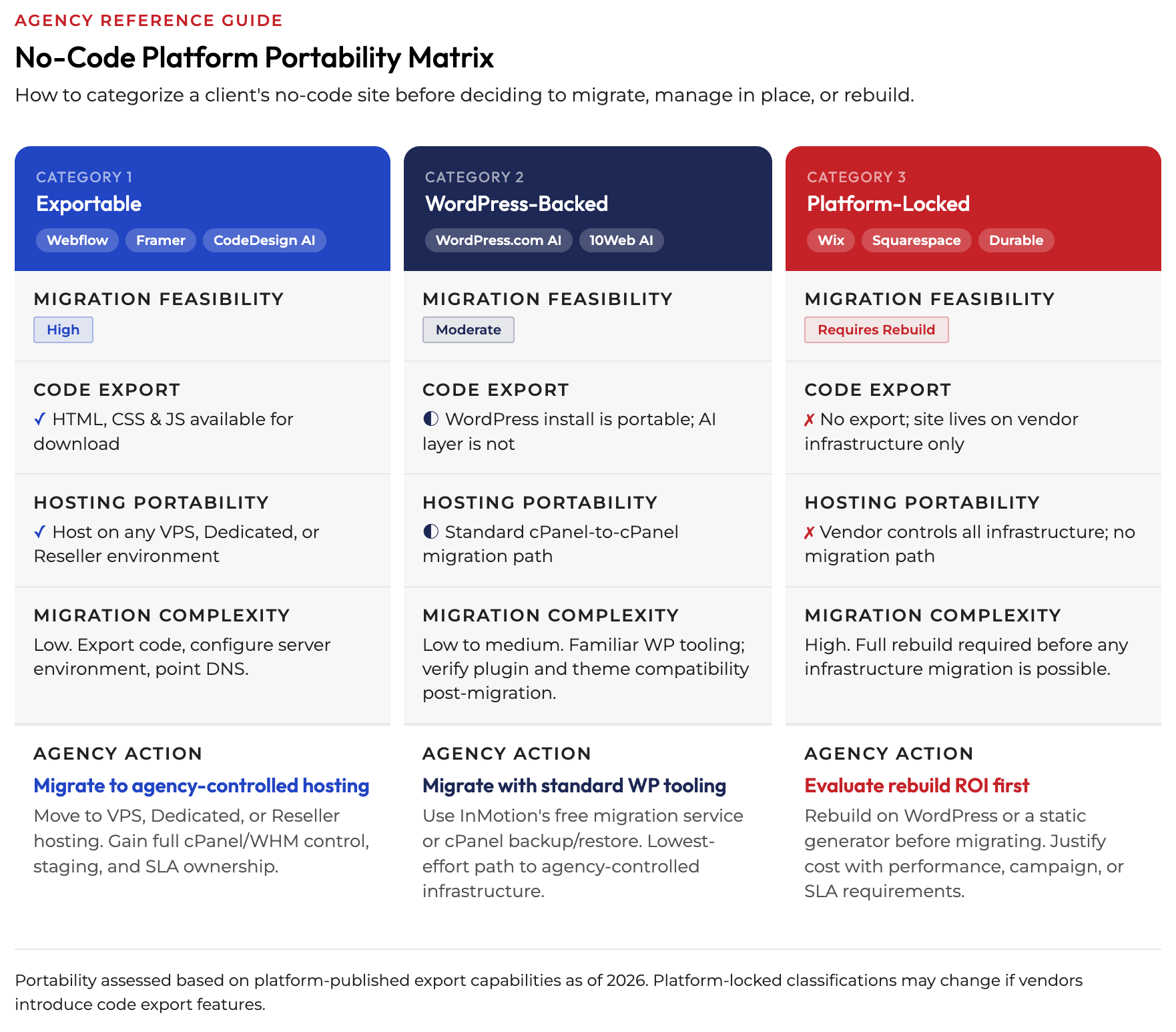
Not every no-code site should be migrated. Not every no-code site can be migrated. Before you build an operational plan, sort your portfolio into three categories.
Category 1: Exportable Sites
Some platforms generate real, portable code. Webflow and Lovable both offer code export functionality, allowing you to download the actual HTML, CSS, and JavaScript files for complete ownership and flexibility. Framer also supports code export. These sites are migration candidates. The underlying code can be hosted anywhere, including on a VPS or reseller environment that your agency controls.
If a client’s site was built on one of these platforms and their traffic or campaign complexity justifies tighter infrastructure control, migration is technically viable without a full rebuild.
Category 2: Hybrid or WordPress-Backed Sites
Some no-code AI builders produce WordPress-based output. WordPress.com’s AI website builder packages prompt-based generation backed by a fully managed WordPress infrastructure, meaning the site is built on WordPress — the CMS powering 43% of the web. These are often the easiest to migrate to agency-controlled hosting, since the underlying CMS is portable and the migration path is well-documented.
Category 3: Platform-Locked Sites
Wix, Squarespace, and Durable do not offer code exports. The site lives on their servers, period. Your options are to manage within their dashboard constraints or to rebuild the site on a portable platform before migrating. That’s a different engagement with a different price tag.
When to Migrate (and When Not To)
Migration is not always the right move. The correct call depends on the client’s actual operational needs, not on your preference for cleaner infrastructure.
Migrate when:
- The client runs paid campaigns that depend on page speed and uptime SLAs. You cannot guarantee performance on a platform you don’t control.
- The site handles user data, checkout flows, or form submissions that require configurable security settings and clear data residency.
- The client is on a growth trajectory that will require staging, multisite management, or custom server configuration within 12 months.
- The no-code platform’s hosting cost is within 30-50% of what you’d charge for managed hosting under your agency infrastructure — meaning the value trade-off is clear to the client.
Leave in place when:
- The site is a simple brochure with no active campaigns and minimal traffic. A Wix or Squarespace site for a local service business is not worth the migration effort or cost.
- The client is on a platform-locked builder and the rebuild cost would not be offset by performance or billing benefits within a reasonable timeframe.
- The client relationship is early-stage and you don’t yet have the budget conversation established.
The goal is not to migrate every site. The goal is to identify which sites are costing you operational time or limiting your ability to deliver results — and address those first.
The Migration Playbook for No-Code Sites
When migration is the right call, the process follows a predictable sequence regardless of the source platform.
Step 1: Audit the Source Environment
Document what’s actually running on the current no-code platform. What third-party scripts are loading? Is there a form handler, a booking system, or an external API connection? Map dependencies before you touch anything.
Step 2: Choose the Destination Environment
For single-site clients on a growth trajectory, VPS hosting gives you full server access, a stable IP, and the ability to configure caching, PHP settings, and security rules without constraints. InMotion’s VPS plans include cPanel and WHM access by default, giving you the same centralized control panel environment you’d use on a Reseller plan — with the added flexibility of root-level server configuration. For agencies managing 10 or more active sites, Reseller Hosting or InMotion’s Shared Pro plan with WHM access is more operationally practical. WHM lets you create and manage separate cPanel accounts per client, keeping resource usage and DNS isolated between accounts without logging into separate dashboards.
Step 3: Rebuild or Port the Frontend
For exportable platforms (Webflow, Framer), pull the code export and host the static output directly. For WordPress-backed AI sites, run a standard cPanel-to-cPanel migration. For platform-locked sites requiring a rebuild, use this as the opportunity to move the client to WordPress or a static site generator you can actually maintain.
Step 4: Validate Before DNS Cutover
Spin up the new environment using a temporary domain or a hosts file edit. Confirm page speed, form submissions, and any third-party integrations are functioning correctly before you touch DNS. InMotion’s free migration service covers the technical transfer for qualifying plans, which reduces the labor cost on your end.
Step 5: Document Everything in Your Agency System
Record the hosting environment, cPanel login path, renewal date, resource allocation, and any custom server configurations for each client. This is the operational layer that turns a one-time migration into a sustainable managed service.
Selling Infrastructure Control as a Premium Service
This is where most agencies leave margin on the table. Migration and infrastructure management are positioned as costs instead of services. That framing works against you.
Agencies that manage client hosting under their own infrastructure can charge $50-150/month per site as a managed hosting retainer. That’s not reselling bandwidth. That’s selling stability, accountability, and access to humans who understand what WHM is. The pricing reflects what the client is actually buying: a single point of contact for every hosting issue, proactive monitoring, and a guarantee that their site isn’t at the mercy of a no-code platform’s support queue.
The conversation with a client looks like this: “Right now, if your site goes down at 11pm before your biggest campaign of the year, you’re filing a ticket with Wix. Under our managed hosting program, you’re calling us.” That’s not upselling. That’s a value proposition with a direct operational comparison.
Vendor lock-in represents critical business logic becoming inextricably trapped within proprietary SaaS platform walled gardens. Clients who have experienced a no-code platform outage, a forced pricing change, or a feature deprecation understand this risk better than anyone. Frame the managed hosting conversation around control and continuity, not technical specs.
InMotion’s Infrastructure for Agency No-Code Management
InMotion’s agency-oriented infrastructure is built specifically for the multi-client management use case. A few specific capabilities are worth knowing.
Reseller Hosting and Shared Pro with WHM. InMotion’s Reseller plans and updated Shared Pro plan both include WHM access, which lets you create up to four separate cPanel accounts per Pro plan (and more under Reseller tiers). Each account is isolated, billed to your agency, and presented to clients under your brand. No InMotion branding appears in the client-facing interface. This is the core operational layer for agencies centralizing no-code site migrations.
For agencies whose client sites demand dedicated resources, InMotion’s cPanel VPS and cPanel Dedicated Server plans carry the same WHM-based account management — with the full server control that high-traffic or compliance-sensitive sites require.
VPS Hosting for performance-critical clients. When a client’s site needs configurable caching, custom PHP-FPM tuning, or OPcache management, a VPS Hosting gives you root access to do that work. InMotion’s UltraStack configuration (NGINX + PHP-FPM + OPcache + Redis) handles WordPress-heavy stacks at scale without per-plugin performance tuning.
Agency Partner Program. InMotion’s Agency Partner Program gives agencies a formal billing and commission structure built around the two most common agency hosting models.
| Model | How It Works | Best For |
|---|---|---|
| Referral (Client-Billed) | Up to 12% up-front commissions per referred client | Agencies where clients own their hosting relationship |
| Reseller (Agency-Billed) | Up to 25% discounts on new and renewal hosting | Agencies that bundle hosting into client service packages |
Tiers progress from Basic (no MRR requirement) through Recognized, Preferred, and Signature ($4,000+ MRR), with each tier adding dedicated account management, consulting hours, co-marketing, and higher discount or commission rates. For an agency managing 20 sites at $30/month each, the Reseller model at Signature tier returns roughly $1,800 in annual savings plus monthly hosting credits — before you factor in what you’re charging clients for managed hosting.
Staging and isolation. Each cPanel account under WHM supports staging environments per site, so you can test migrations, plugin updates, or redesigns without touching production. That eliminates the biggest operational risk in managing no-code site transitions.
24/7 human support that understands agency workflows. InMotion’s support team knows what WHM is, knows what a multi-tenant cPanel environment looks like, and can escalate server-level issues without requiring you to explain your agency’s operational structure from scratch.
The Operational Standard That Separates Agencies
Managing 30 client sites scattered across Wix, Webflow, Squarespace, Durable, and Framer is not a hosting strategy. It’s a fragmentation problem dressed up as flexibility.
Agencies that build a centralized hosting infrastructure — where client sites run on environments they control, under dashboards they access, with SLAs they can actually commit to — operate differently. Their account managers don’t spend mornings troubleshooting platform dashboards they don’t own. Their developers don’t build workarounds for caching behavior they can’t configure. And their clients don’t experience the gap between “your agency handles our website” and “our website is owned by three different vendors.”
Start with your exportable sites and your highest-traffic clients. Get those under infrastructure you control first. Then build the conversation around managed hosting as a standard service, not an optional add-on.
Explore InMotion’s VPS Hosting plans and Agency Partner Program to see how centralized multi-client management works in practice.