Global peering decides how fast your site reaches a visitor in Berlin, Mumbai, or São Paulo. Internet exchange points and software-defined network fabrics let hosting providers bypass open transit, cut latency, and stabilize routing during congestion. This guide breaks down how peering works, why it shapes site performance, and how InMotion Hosting is managing both legacy interconnections and a next-generation SDN peering architecture.
What Is Global Peering?
Peering is the agreement between two networks to exchange traffic directly, without paying a third party to carry it. When that arrangement spans multiple regions and exchanges around the world, it becomes a global peering footprint.
Two flavors do most of the work:
- Private peering is a direct cross-connect between two specific networks, typically inside the same data center.
- Public peering uses shared connections at an internet exchange point (IXP) where many networks meet on a common switching fabric.
A host with a strong global peering posture sits inside the rooms where traffic concentrates. That presence shows up in your TTFB, in jitter during peak hours, and in how cleanly traffic survives when routes change elsewhere on the internet.
How Does Internet Exchange Peering Work?
An internet exchange point is a physical or virtual location where multiple networks connect to a shared switching fabric. Once connected, a member network can establish direct BGP sessions with hundreds or thousands of other members at that IXP.
The mechanics:
- Both networks bring fiber into the same facility, or connect via an SDN fabric.
- Each side establishes a BGP session with the other across the exchange.
- Traffic flows directly across the shared switch, often a single hop, rather than crossing multiple transit providers.
Major exchanges like AMS-IX in Amsterdam, DE-CIX in Frankfurt, LINX in London, and Equinix Internet Exchange locations across the U.S. each host hundreds of networks. Sitting on or near one of these exchanges is a structural performance advantage, not a marketing claim.
Why Does Peering Reduce Latency?
Every hop in a network path adds milliseconds. A packet that crosses three transit providers and adds latency is slower than the same packet crossing two hops through a peering exchange.
Peering reduces latency in three ways:
- Fewer hops because direct connections eliminate intermediate networks.
- Shorter physical distance because traffic stays inside the same metro area or facility.
- Predictable routing because direct sessions are less affected by transit-level congestion or rerouting.
A site served from a data center directly peered with the visitor’s ISP often improves response time by 20 to 50 milliseconds compared to traffic routed through several transit hops. For checkout flows, API responses, and database round-trips, those milliseconds compound across every page load.
Peering is the difference between a route engineered for your traffic and a route that just happens to work today.
What Does Global Peering Look Like Today?
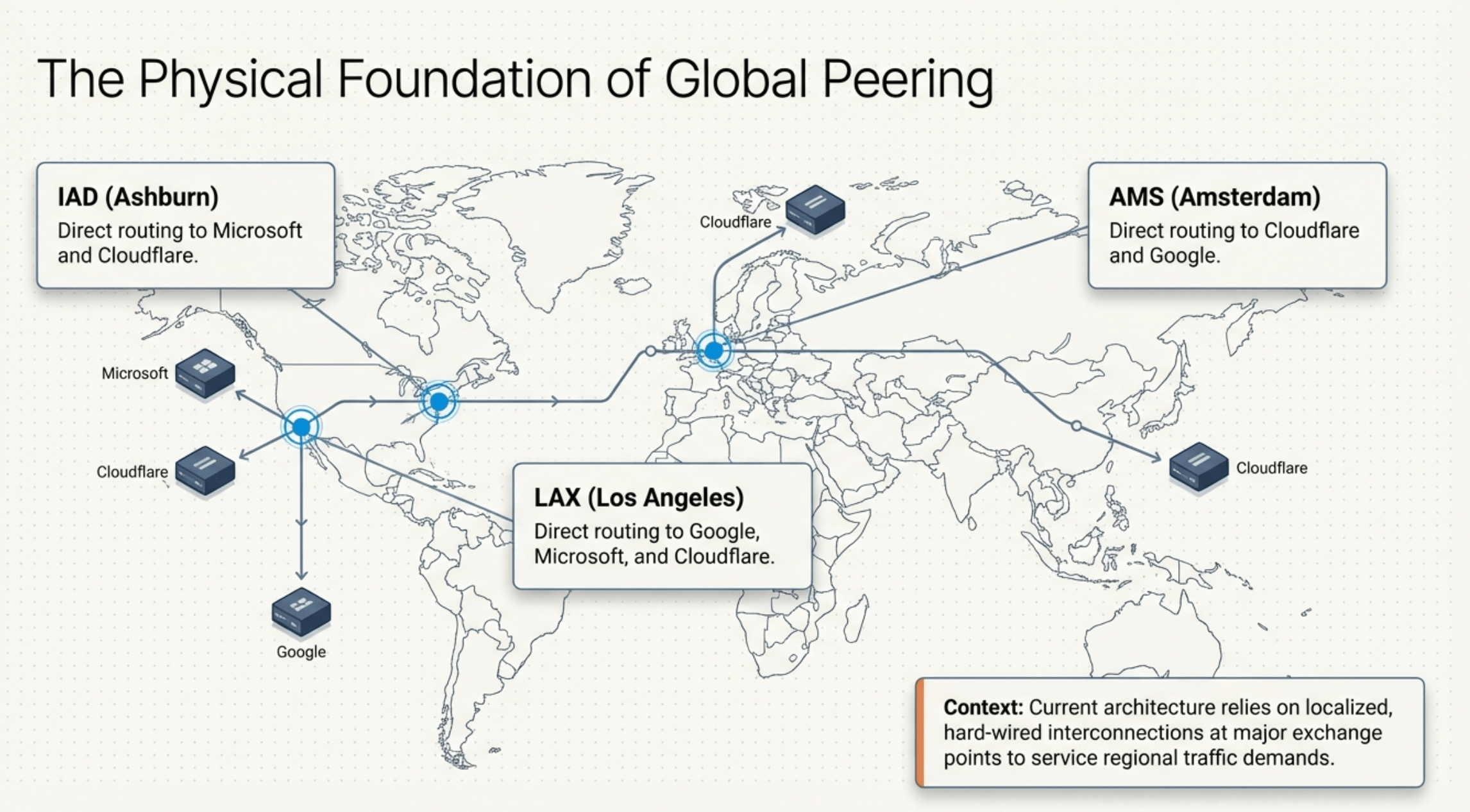
Today’s peering architecture still relies heavily on localized, hard-wired interconnections at major exchange points to service regional traffic. InMotion Hosting maintains direct routing relationships with the hyperscalers and CDNs that carry the largest share of internet traffic, at three strategic locations:
- LAX (Los Angeles): direct routing to Google, Microsoft, and Cloudflare.
- IAD (Ashburn / Washington D.C.): direct routing to Microsoft and Cloudflare.
- AMS (Amsterdam): direct routing to Cloudflare and Google, with continued expansion underway.
This footprint covers most of the traffic patterns that matter for U.S. and European workloads. The next architectural step is unlocking those same locations to reach the rest of the global provider ecosystem without buying additional hardware for every new relationship.
What’s the Difference Between Peering and IP Transit?
IP transit is a paid service where one network pays another to carry its traffic to the rest of the internet. Peering is usually a settlement-free exchange between two networks that benefits both sides directly.
| Factor | Peering | IP Transit |
|---|---|---|
| Cost model | Port and cross-connect fees only | Pay per Mbps or 95th percentile billing |
| Reach | Only directly connected networks | The full internet that peer with us |
| Latency | Lower, fewer hops | Higher, transit provider routing |
| Routing control | Direct BGP relationship | Provider determines path |
| Best for | High-traffic destinations | Long tail of internet endpoints |
Most serious hosting providers run a hybrid model: peer aggressively at the IXPs that carry their highest traffic volume, then buy transit from Tier 1 carriers for the long tail. The right ratio is a network engineering decision, not a procurement one.
What Is the Constraint of Legacy 1:1 Hardware Peering?
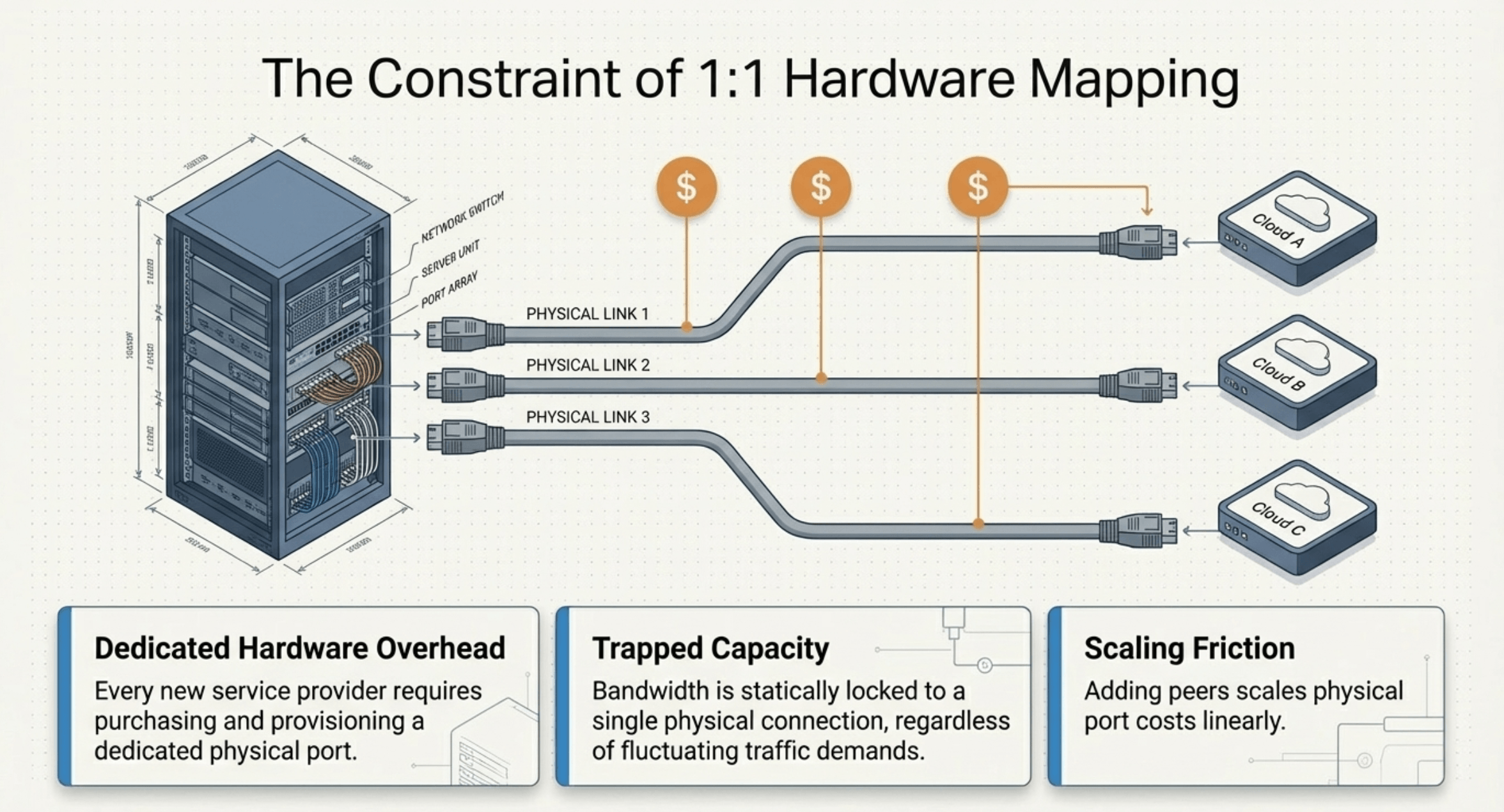
Traditional peering at internet exchanges generally follows a one-to-one model: one physical port, one peering relationship. Adding a new cloud provider, a new IXP, or a new managed service partner means provisioning another port, running another cross-connect, and absorbing another fixed cost.
Three structural problems show up immediately:
- Dedicated hardware overhead: every new service provider requires purchasing and provisioning a dedicated physical port.
- Trapped capacity: bandwidth is statically locked to a single physical connection, regardless of fluctuating traffic demands.
- Scaling friction: adding peers scales physical port costs linearly, which makes broad ecosystem reach prohibitively expensive.
The result is a network footprint that grows slowly, costs predictably too much, and can’t react in real time to traffic changes.
How Does Next-Generation IX Peering Use SDN Fabrics?
Software-defined network fabrics like Megaport replace the 1:1 hardware model with a 1:Many architecture. A single high-capacity physical port connects to the fabric, and then bandwidth is sliced into multiple Virtual Cross Connects (VXCs), each pointing to a different cloud, exchange, or partner network.
The shift from legacy to SDN-based peering changes four things at once:
| Architectural Factor | Legacy Peering | SDN Peering (Megaport) |
|---|---|---|
| Port-to-service mapping | 1:1 (dedicated) | 1:Many (Virtual Cross Connects) |
| Bandwidth allocation | Static and trapped | Dynamic and shared |
| Scaling mechanism | Physical hardware provisioning | Real-time software adjustment |
| Hardware cost model | Scales linearly with peers | Consolidated footprint |
For operators, this means bandwidth on each VXC can be dialed up or down instantly, scaling happens in software, and you only pay for the bandwidth slice each service actually needs. For customers, it means a network that adapts to their traffic instead of constraining it.
How Does an SDN Fabric Reach the Global Provider Ecosystem?
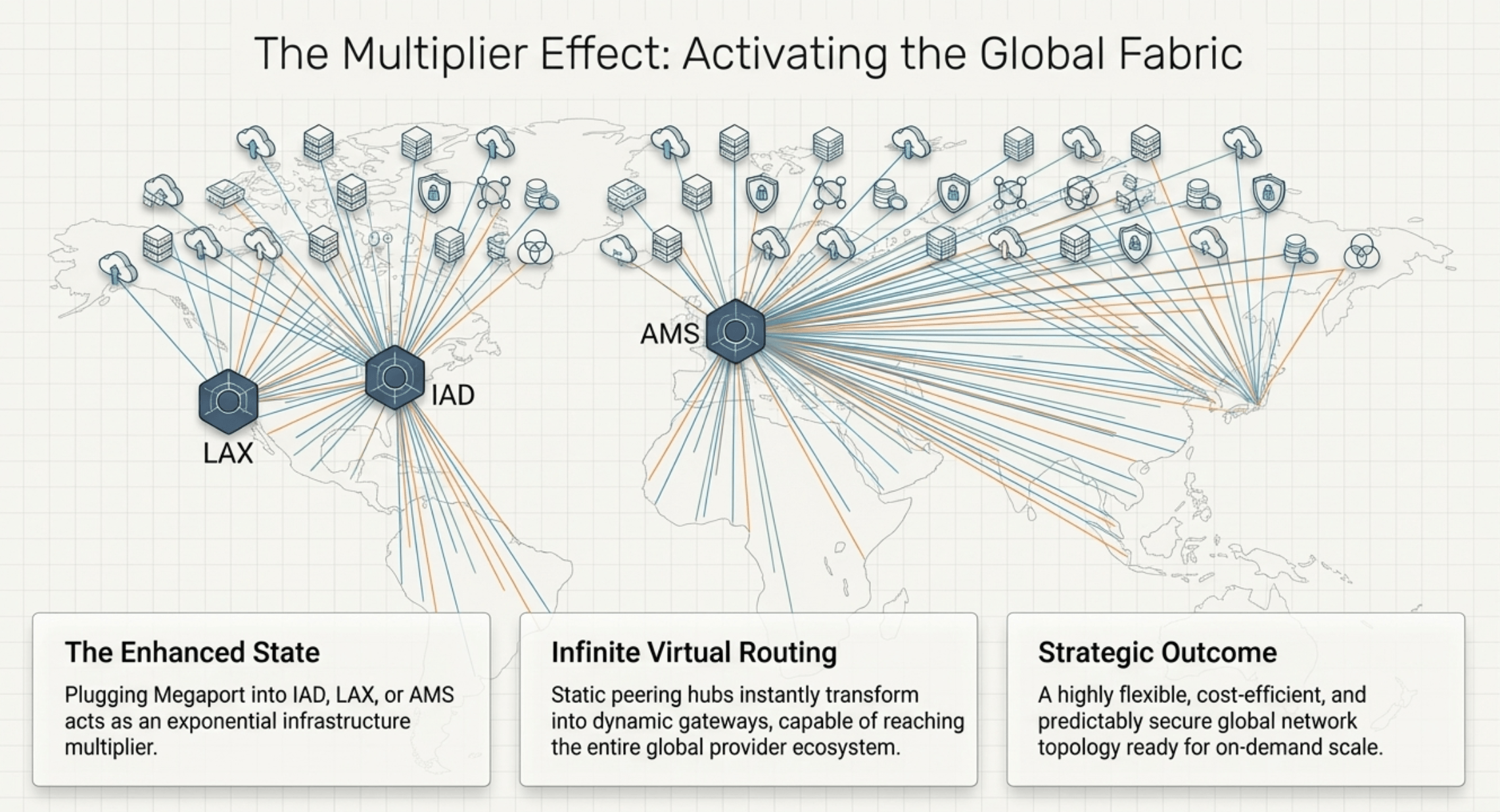
The fabric model also changes who you can reach from a single port. Connecting Megaport (or a similar SDN fabric) to a peering POP turns that POP into a gateway to a much broader ecosystem:
- Cloud providers: private connections to AWS, Azure, Google Cloud, and other hyperscale public clouds.
- Network service providers: regional and global carriers reachable without separate physical cross-connects.
- Managed service providers: direct access to value-added security and managed service partners.
- Internet exchanges: streamlined peering access at additional IXPs to optimize regional network performance.
This is the “multiplier effect”: plugging Megaport into LAX, IAD, or AMS turns each location from a regional peering hub into a programmable on-ramp to the global provider ecosystem.
How Does SDN Peering Improve Security and Predictability?
VXC traffic doesn’t cross the public internet. It rides a private path from your origin to the destination network, which removes a layer of variability and a layer of attack surface in one move.
The practical effects:
- Predictable latency: no variable hop counts, no surprise reroutes through congested transit providers.
- Reduced exposure: data in transit doesn’t traverse public routers where it could be observed, intercepted, or rerouted.
- Stable performance under stress: traffic spikes elsewhere on the internet don’t affect a private VXC path.
For compliance-sensitive workloads, financial services applications, and any workflow that moves sensitive data between locations, private fabric routing is no longer a luxury. It is a baseline expectation.
When Does Peering Matter Most for Your Workload?
Some applications feel peering depth more than others. Workloads where peering directly affects user experience:
- eCommerce and checkout flows, where every 100ms of added latency measurably reduces conversion rates.
- SaaS applications with chatty APIs that round-trip multiple times per user action.
- Streaming and media delivery, where throughput consistency matters as much as raw speed.
- Multi-region applications that replicate data or coordinate state across geographies.
- Compliance-sensitive workloads that need traffic to stay off the public internet for regulatory or risk reasons.
If your application serves a global audience or runs latency-sensitive operations, your host’s peering relationships are part of your performance budget. Treat them that way.
How Does InMotion Hosting Build for Global Reach?
InMotion Hosting designs, owns, and operates its private network end-to-end. Routing decisions, peering relationships, and capacity planning happen inside our own Network Operations Center, not at a third-party hyperscaler.
What that looks like in practice:
- Direct cloud and CDN peering at LAX, IAD, and AMS with Google, Microsoft, and Cloudflare, covering most of the traffic that matters for U.S. and European workloads.
- Tier 1 carrier connectivity for global reach beyond directly peered destinations.
- SDN fabric integration via Megaport that lets a single POP reach the broader global provider ecosystem without provisioning new hardware for every relationship.
- Up to 10 Gbps port speeds on dedicated servers, giving bandwidth-heavy workloads real headroom rather than overage fees.
- GDPR-compliant European hosting through the Amsterdam facility for organizations that need both performance and data residency.
Because we built the network, we are accountable for the network. There is no upstream cloud provider to blame when latency climbs or a route flaps. The engineers who see the metrics are the same engineers who act on them. That is the practical meaning of owned infrastructure: the routing table belongs to us.
How Do You Evaluate a Host’s Peering and Network Quality?
Marketing pages rarely tell you what a network actually does at 3 AM during a backbone outage. To assess real peering and network quality:
- Look up the host’s AS number on PeeringDB to see their declared peering policy and IX presence.
- Run mtr or traceroute from your target user regions to the host’s data center IPs. Per-hop visibility tells you more than ping does.
- Ask which IXPs they connect to and whether they have private peering with major eyeball networks like Comcast, Spectrum, BT, or Deutsche Telekom.
- Check the network topology: single transit provider, or true multi-homed connectivity with route diversity?
- Read uptime SLAs carefully. 99.9% allows 8.76 hours of downtime per year. 99.99% allows 52 minutes.
A host that answers these questions clearly takes its network seriously. A host that deflects is selling commodity hosting under a premium label.
Why Global Peering Matters for InMotion Hosting Customers
Global peering is one of the quieter performance levers in hosting, and it shapes the experience your users get every day. Direct connections at major exchanges, SDN fabric integration deliver consistent speed in ways that virtualized cloud setups built on shared transit cannot match.
InMotion Hosting operates as an independent infrastructure partner with 25 years of network experience, owned facilities across the U.S. and Europe, direct peering with the hyperscalers and CDNs your traffic depends on, and an evolving SDN architecture that extends our reach into the global provider ecosystem. If your workload depends on consistent global performance, the network behind your host deserves the same scrutiny as the hardware in front of it.
Ready to put a real network behind your application? Explore InMotion Hosting’s dedicated servers or talk with our Solutions team about custom infrastructure built on our private global network.