

cPanel turns a bare virtual server into something you can manage from a browser, with WHM for account creation, DNS, email, and backups. It also carries a per-account license fee that climbs as you grow. This guide covers what cPanel adds to a VPS, what it costs, where Control Web Panel makes more sense, and how to tell when your workload has outgrown the setup.
What Does cPanel Actually Add to a VPS?
A VPS without a control panel gives you SSH and nothing else. You install the web server, configure PHP, write DNS zone files by hand, and build your own backup routine. That is a reasonable setup for a developer running one application.
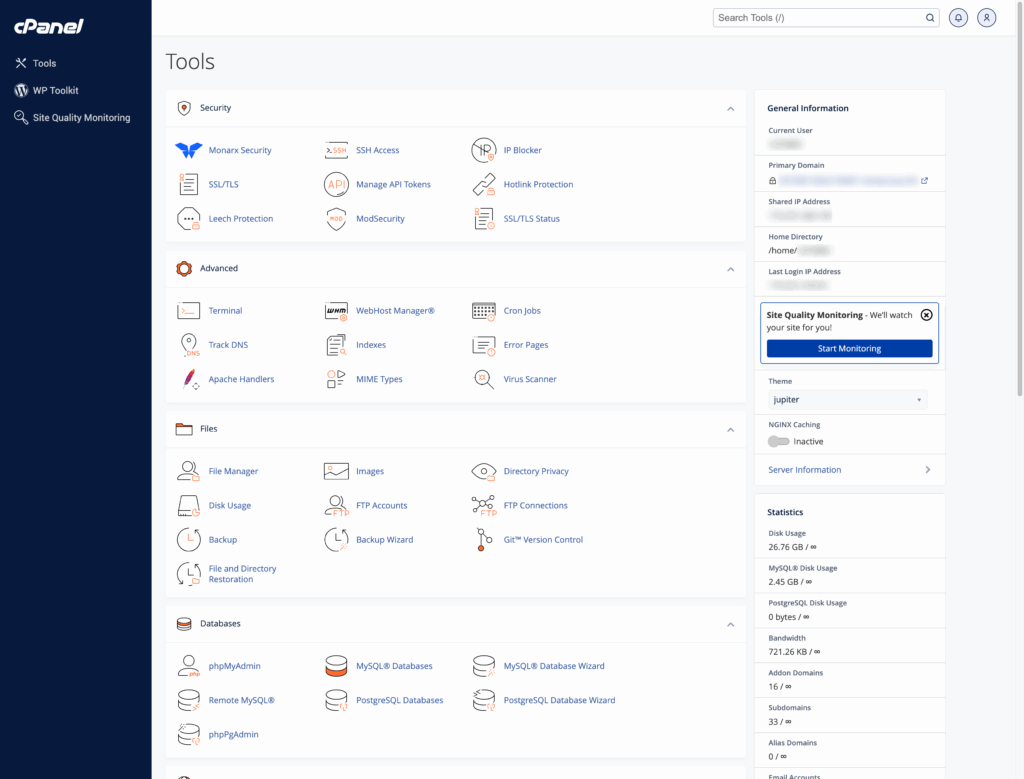
cPanel changes the model in two ways. The user-facing cPanel interface handles files, databases, email accounts, and SSL for a single account. WHM sits above it and gives the server owner account creation, resource limits, package definitions, and server-wide configuration. On a cPanel VPS, you get both.
The practical difference shows up when you host for other people. Creating an isolated account with its own home directory, database user, and email is one form in WHM. Doing the same thing by hand on a bare server is a twenty-minute job you will repeat every time a client signs on.
Who Should Run cPanel on a VPS, and Who Should Not?
cPanel earns its license fee when more than one person or one site touches the server.
Good fit:
- Agencies hosting client sites. Each client gets a separate cPanel account with its own credentials, files, and quota. You never hand out server-level access.
- Businesses with several internal properties. A marketing site, a store, a staging copy, and a landing page microsite can live on one VPS with clean separation between them.
- Teams without a sysadmin. DNS edits, SSL renewals, and database restores become tasks a marketer can do without opening a terminal.
Weaker fit:
- Single-application deployments. A Node or Laravel app with a CI pipeline gains little from cPanel and inherits a file layout that fights your deployment tooling.
- Custom stacks. If you need a specific NGINX build, a nonstandard PHP extension chain, or container orchestration, cPanel will get in your way more than it helps.
- Budget-constrained single sites. One site on a VPS does not need account management. That is what the license is paying for.
If nobody besides you will ever log into the server, you are buying a license for features you will not use.
What Are the Real Pros of cPanel on a VPS?
- WHM account management. Create, suspend, migrate, and terminate accounts without touching the command line. Package definitions let you set disk, bandwidth, and email limits once and apply them to every new account.
- DNS through the Zone Editor. Add an A record or fix an MX entry in a form rather than editing zone files and reloading the service.
- Email hosting included. Mailboxes, forwarders, autoresponders, and spam filtering run on the same server as the sites, with webmail access for clients who do not want a desktop client.
- phpMyAdmin for databases. A browser tool for creating databases, running queries, and importing or exporting SQL, which matters when a developer needs a one-time fix and does not have shell access.
- One-click application installs. Softaculous handles WordPress, Drupal, Joomla, and a long list of others, including staging copies and update management.
- Backup tooling and remote destinations. WHM schedules full and incremental account backups and ships them offsite to S3-compatible storage, SFTP, or Google Drive.
- Consolidation savings. Ten client sites on ten shared accounts often cost more per month than one VPS with a license covering all ten, and you get root access on top of that.
What Are the Drawbacks of Running cPanel?
The file layout is its own thing. Accounts live under /home/username/public_html, mail sits in a cPanel-specific structure, and configuration is generated from templates rather than edited directly. Moving to a different platform later means untangling that.
It constrains customization. cPanel manages Apache configuration through EasyApache 4. Hand-edited config files get overwritten on rebuild. There are supported ways to add includes, but you are working inside the panel’s rules.
It adds attack surface. A web-accessible control panel on ports 2083 and 2087 is a login prompt facing the internet. That is manageable with two-factor authentication, cPHulk, and firewall rules, but it is real work rather than a checkbox.
It costs money every month, forever. More on that next.
How Much Does a cPanel License Cost in 2026?
cPanel prices by account count, not by server, so the tier you need is set by how many clients or sites you host. Our licensing tiers start at 5 accounts and step up through 30, 50, 100, and 150, with options up to 850 for larger operations.
Two things about that structure matter for planning:
Growth pushes you across tier boundaries. An agency at 28 client accounts is one signature away from a tier jump. That is a step change in cost, not a gradual one, so it belongs in your client pricing rather than absorbed as a surprise.
Rates move upward annually. Every standard tier rose in the January 2026 adjustment, and 2026 also introduced a surcharge for servers still running end-of-life operating systems such as older CentOS builds. Budget for an increase each year rather than treating the current figure as permanent.
At InMotion Hosting, the control panel is chosen and priced during checkout as its own line item, so you see the current rate before you buy rather than finding it folded into a plan price.
While cPanel’s tiered licensing model means costs can rise as you grow, InMotion Hosting makes it easier to plan and scale with confidence. As an official cPanel partner, we offer fair, transparent license pricing with discounted rates designed to support your growth. When you choose InMotion Hosting, you’re getting more than just a VPS; you’re investing in a high-value platform that grows with you, without hidden fees or licensing surprises.
What Else Costs Money on a cPanel VPS?
The license is the visible number. These are the ones that catch people later:
- Backup Solutions: Backup tools outside of the cPanel ecosystem, like Backup Manager or premium WordPress backup plugins, typically come with their own licensing fees.
- Security Tools: Server-level scanning and remediation, such as Monarx, sits outside the panel.
- Advanced Server Configurations and Consulting Hours: Server-side troubleshooting that goes past standard support.
Premier Care bundles malware defense, backup storage, and priority support at a single monthly price, which is usually less than assembling the same pieces individually. The cPanel license stays a separate line item and is not folded into the bundle price.
Is Control Web Panel a Better Fit Than cPanel?
We offer Control Web Panel on VPS and Dedicated Servers as well, and for some workloads it is the smarter buy.
| Factor | cPanel | Control Web Panel | No Panel |
|---|---|---|---|
| Licensing model | Per account, tiered | Free tier plus paid version | None |
| End-user panels | Tiered by license | Unlimited end-user panels | None |
| Account isolation | Yes, per cPanel account | Yes, per user | Manual |
| Migration path in | Standard across the industry | cPanel import function | Manual |
| Migration path out | Widely supported | Fewer destinations | Full control |
| Client familiarity | Very high | Low | None |
| Best for | Agencies with clients who log in | Cost-sensitive multi-site hosting | Single custom application |
Client familiarity is the deciding factor more often than price. If your clients have used cPanel at three previous hosts, handing them CWP creates support conversations you will be paying for in staff time.
When Should You Choose a cPanel VPS Over Reseller Hosting?
Reseller Hosting also gives you WHM and client accounts, with the license and server management handled for you. The split comes down to control and resource guarantees.
| Feature | cPanel VPS | Reseller Hosting |
|---|---|---|
| Root access | Yes | No |
| CPU and RAM | Allocated to your server | Shared across the server |
| Software installs | Anything the OS supports | Provider’s configuration |
| License responsibility | Yours | Included |
| Server maintenance | Yours or managed | Provider’s |
| Typical trigger to move up | Resource ceilings, custom software | Starting out, small client list |
Move to a VPS when you hit one of three walls: a client needs software the shared environment does not offer, your sites are throttled during traffic peaks, or you need root for a compliance requirement. Staying on reseller is the right call when your client list is small and you would rather spend your hours on client work than server work.
Does cPanel Slow Down a VPS?
A default cPanel install is tuned for compatibility, not speed. That is where the “cPanel is slow” reputation comes from, and it is a configuration problem rather than a panel problem.
Our cPanel VPS plans ship with UltraStack, which combines NGINX, PHP-FPM, OPcache, and Redis. NGINX handles static assets and connection concurrency, PHP-FPM manages PHP processes with real memory limits instead of spawning a process per request, OPcache holds compiled PHP bytecode in memory, and Redis caches database objects so repeat queries never reach MySQL. The result is a panel-managed server that performs like a hand-tuned one, without you writing the configuration.
Three settings still deserve your attention as traffic grows: PHP-FPM process limits, the InnoDB buffer pool, and object cache memory. On a VPS running the web server, PHP, and MySQL together, giving the database most of your RAM will trigger memory errors under load. Our support team tunes these on request.
What Security Work Comes With a cPanel VPS?
Running a panel means running a login page, so a few controls are not optional:
- Two-factor authentication on both WHM for root and cPanel for each user account. These are configured separately.
- cPHulk brute force protection, with thresholds and lockout periods set to match how your team actually logs in.
- ModSecurity with a maintained rule set, updated as new rules are published rather than configured once and forgotten.
- Patch discipline. Panel vulnerabilities get exploited quickly after disclosure, and the gap between advisory and attack keeps shrinking.
On managed plans, our in-house systems team applies cPanel security updates across the fleet as they are released, which removes the patching window from your list of things to worry about. Self-managed customers get the same guidance and can reach a human at any hour.
When Should You Move From a cPanel VPS to a Dedicated Server?
Watch for these, in roughly this order of seriousness:
- Sustained resource saturation. CPU or memory sitting near the ceiling after an upgrade, not during a one-off event.
- Database contention. Query timeouts and slow admin dashboards while the front end still looks healthy.
- Account count outrunning the license. Once you are paying overage on top of a Premier tier, the economics of a Dedicated Server with more headroom often improve.
- Compliance requirements that rule out shared virtualization.
- Hardware-level control needs, which point toward Bare Metal Servers.
Moving between our plans does not require rebuilding your environment, so this is a capacity decision rather than a replatform.
Which cPanel VPS Setup Fits Your Workload?
If you host for clients, cPanel pays for itself in account management alone. If you run one custom application, put the license money into resources instead. If you are somewhere between, Control Web Panel is worth a serious look before you commit to a per-account license that grows with you.
Our cPanel VPS plans include UltraStack performance tuning, NVMe storage, and 24/7 support from engineers who complete 280 hours of training before handling a Tier 1 ticket. Every plan is covered by our money-back guarantee, and our team handles the migration.
Not sure which tier fits? Talk to our team and we will size it against your actual traffic.
Scalable VPS Infrastructure, Fully Managed
When shared hosting can't handle your traffic, VPS delivers dedicated resources that scale with demand. Our team manages the technical complexity while you manage your business.
 NVMe Storage High-Availability Ironclad Security Premium Support