
Website Builder for WordPress
Build Your WordPress Website With Ease
No Experience Needed. No Coding Required. All-in-One Hosting + Website Builder.
- Free Drag-and-Drop Website Builder with Hosting
- Free Domain, SSL, and Email
- 1-Click WordPress Installer
- 40x Faster Page Loads
- 24/7 Customer Support from WordPress Experts
It’s Easy to Get Started
Use the guided walkthrough to install your design and choose your pages.
Build Your Site Like a Pro
Customize text and images with the drag-and-drop post and page builder.
Designed to Fit Your Needs
Choose from hundreds of templates and design blocks to build your brand.
Build Your Own Website
with our free Website Builder for WordPress
Creating a website is easier than you think. With InMotion Hosting’s Website Builder for WordPress, you can build, customize, and publish your site in less than an hour—no coding or design experience needed. Just choose a hosting plan, and the BoldGrid Website Builder will be ready to use.
Pick from over 200 industry-specific starter templates and edit your pages using a simple drag-and-drop editor. You can easily change text, images, and layout to match your brand. Every site is mobile-friendly and designed to look great on any device.
The website builder is free with Hosting for WordPress and comes with extra tools like Total Upkeep for backups and Easy SEO to help your site rank in search engines. It’s the perfect all-in-one solution for bloggers, creators, and small business owners ready to get online fast.
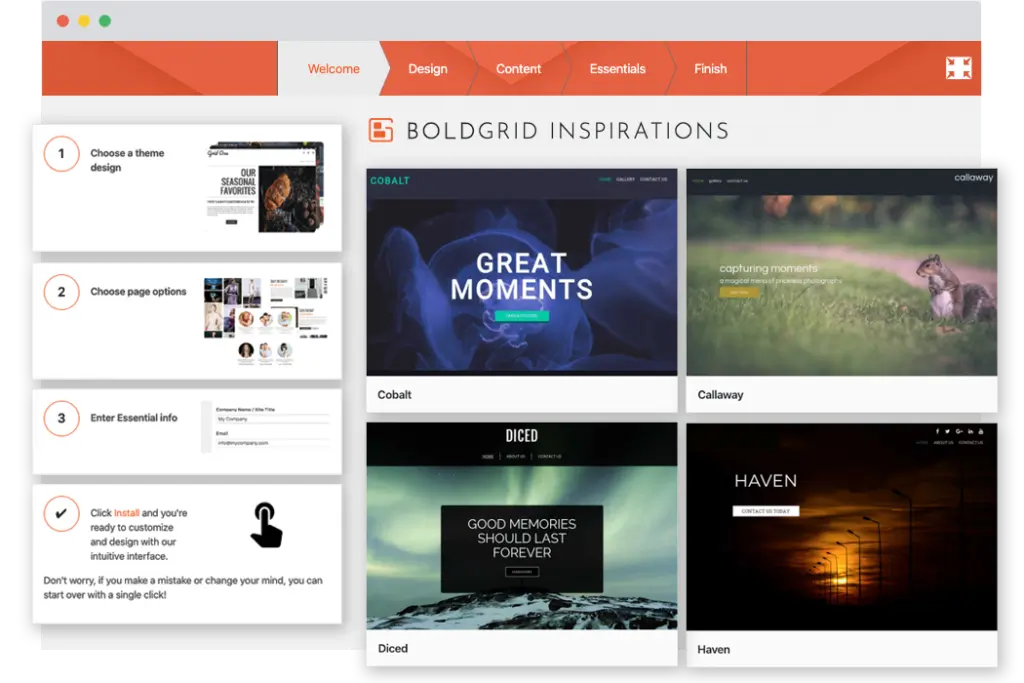
WordPress Site Creation & Hosting Plans in One
Don’t miss out on your free Website Builder. Launch your new site in less than an hour.
WP Launch
- 2 Websites
- 100GB NVMe Storage

- 20x WP Performance
- Unmetered Bandwidth
- 3 PHP Workers per Site
- Advanced Caching
- WordPress Multisite
- WordPress Staging Tool
- Live Chat Support from Helpful Humans
WP Power
- 10 Websites
- 200GB NVMe Storage
- 30x WP Performance
- Unmetered Bandwidth
- 4 PHP Workers per Site
- Advanced Caching
- Dedicated Opcode Cache Pool
- WordPress Multisite
- WordPress Staging Tool
- Choice of Data Center Location
Includes US and EU Locations - Live Chat and Phone Support from Helpful Humans
WP Pro
- 40 Websites
- 2 vCPU Cores
- 4GB RAM
- 300GB NVMe Storage
- 40x WP Performance
- Unmetered Bandwidth
- 6 PHP Workers per Site
- Included Agency Features
- Advanced Caching
- Dedicated Opcode Cache Pool
- Pro Level Support
- Dedicated IP
- WordPress Multisite
- WordPress Staging Tool
- Choice of Data Center Location
Includes US and EU Locations - Live Chat and Phone Support from Helpful Humans
Included In All Plans:
- Hosting Plus: Python, Node.JS, Ruby and GIT
- Free SSL
- Malware and DDoS Protection
- Web Firewall Application
- Native Backups and Migrations
- Free Domain
($23/yr value) - Free cPanel Email Accounts
- Professional Email with 1-Month Trial
 Free Domain Credit Terms
Not sure which plans best for your needs? We’re here to help.
The Easiest Way to Build A WordPress Website
In just a few simple steps, you can create a WordPress website for yourself or your clients. Our integrated ecosystem of plugins, themes, and services makes building and managing WordPress websites easier for beginners and more efficient for professionals.
Get Your Free Website Builder for WordPress Today
Website Creation Made Easy
Quickly and easily create your dream website with a free drag-and-drop builder, and WordPress pre-installed.
Business-Friendly Designs
Choose from hundreds of website templates and design blocks to build a website that fits your brand.
Mobile-Friendly
No matter how customers view your site, the experience is optimized for their device of choice.
cPanel Included
Starter Content
SEO Friendly
BoldGrid’s SEO-friendly designs and InMotion’s optimized servers ensure your site meets the latest SEO standards.
Want to Learn More About Hosting for WordPress?
We make it easy to get started and easy to grow.
Trust Your Website to the Experts
Host your site on a platform built for WordPress, by WordPress experts.
- Free Domain and SSL
- Superior Speed and Uptime
- Email Accounts included
- Managed Security
Free WordPress Website Transfer
Trust in a proven process to move your website to InMotion Hosting.
- Completed quickly and efficiently and for free with a provided cPanel backup
- Simple and easy process
- Your website experiences no downtime
Launch Today with Our Easy Website Builder
Powerful Design Tools
A website builder that will truly inspire you. Choose from multiple pre-built color schemes or create your own. Quickly change layouts, resize page sections, or update your website or blog.
Enhance Your Images
Replace, edit, resize images and other content using our editor. You will see your images exactly as your visitors will see them. Easily apply professional image filters to help enhance your pictures.
Quick Page Editing
Change any page element with intuitive editing tools. Drag-and-drop to rearrange content blocks. See your changes in real time, then publish them instantly to your website.
Hosting for WordPress: Plan Specs
| WP Launch | WP Power | WP Pro | |
|---|---|---|---|
| Products: | Price: | ||
| Primary Features | |||
| Free Domain | |||
| Websites Supported | 2 | 10 | 40 |
| Disk Space | 100GB NVMe Storage | 200GB NVMe Storage | 300GB NVMe Storage |
| Email Accounts | Unlimited Email Addresses | Unlimited Email Addresses | Unlimited Email Addresses |
| Dedicated IP Addresses | Available | Available | Included |
| Dedicated Opcode Cache Pool | |||
| WordPress Pre-installed | |||
| No Downtime Website Transfers | Available | Available | Available |
| Hack & Malware Protection | |||
| Automatic Offsite Backups | |||
| Suitable Monthly Visitors | ~ 170,000 | ~ 320,000 | ~ 520,000 |
| PHP Workers per Site | 3 | 4 | 6 |
| MySQL Databases | Unlimited | Unlimited | Unlimited |
| Parked Domains | Unlimited | Unlimited | Unlimited |
| Subdomains | Unlimited | Unlimited | Unlimited |
| Email Storage per Inbox | 5GB | 10GB | 20GB |
| Remote Backups | Available | Available | Available |
| Free Migrations Plugin | |||
| Custom Themes | |||
| Auto Update Plugins | |||
| Advanced Caching | |||
| Hosting Plus | |||
| Cloudflare Integration | |||
| Phone, Chat and Ticket Support | Chat and Ticket Only | ||
| WP Launch | $5.49/mo $5.49/mo $5.29/mo $16.49/mo | ||
|
Primary Features
Included 2 100GB NVMe Storage Unlimited Email Addresses Available Not Included Included Available Included Included ~ 170,000 3 Unlimited Unlimited Unlimited 5GB Available Included Included Included Included Included Included Chat and Ticket Only |
|||
| WP Power | $6.49/mo $6.49/mo $6.29/mo $17.49/mo | ||
|
Primary Features
Included 10 200GB NVMe Storage Unlimited Email Addresses Available Included Included Available Included Included ~ 320,000 4 Unlimited Unlimited Unlimited 10GB Available Included Included Included Included Included Included Included |
|||
| WP Pro | $11.49/mo $11.49/mo $11.29/mo $21.49/mo | ||
|
Primary Features
Included 40 300GB NVMe Storage Unlimited Email Addresses Included Included Included Available Included Included ~ 520,000 6 Unlimited Unlimited Unlimited 20GB Available Included Included Included Included Included Included Included |
|||
|
Included In All Plans
|
|||
WordPress Website Building Guides
Website Builder for WordPress
Frequently Asked Questions
Get detailed answers to your questions about Website Builder for WordPress. Need more help? Our Sales team is ready to assist you.
24/7 Expert Human Support
Contact Our Website Builder for WordPress Experts
24/7 Live Chat
24/7 Monitoring and Ticketing
Phone Support Available
Monday-Friday 9am to 9pm ET
Online Support Center
Step-by-Step WordPress Tutorials
Community Support Forums
Build Your Own Website on WordPress
Quickly design and publish a website of your own. No need for any coding skills or programming knowledge. Choose your hosting for WordPress plan to begin.