
Docker VPS Hosting
Your Docker Containers. Your Server. Zero Setup.
Docker hosting on your own NVMe VPS: Docker Engine and Compose preinstalled and ready the moment you log in. Ship microservices, AI apps and self-hosted tools with full root access, zero container caps and total isolation.
 Docker Engine + Docker Compose installed at setup
 Full root and SSH access, no control panel
- 3x the standard process and thread limit, from day one
- 24/7 Docker-aware support
 Docker Engine + Docker Compose installed at setup
 Full root and SSH access, no control panel
 3x the standard process and thread limit, from day one
 24/7 Docker-aware support
Got a question? Speak with our Docker VPS experts today at +1-757-995-2244 or Request a Call Back

Docker VPS Plans
Docker-ready is available on every plan at no extra cost. Pick your size, then choose AlmaLinux or Ubuntu at checkout.
Looking for a More Resources?
Running a large container fleet or need Kubernetes? Run Docker on a Bare Metal Server with the whole machine to yourself.
Docker VPS, Explained
What Is Docker VPS Hosting?
A Docker VPS is Docker hosting with full root access instead of a managed container platform, running on your plan’s dedicated CPU, RAM and NVMe storage. New to containers? Read what Docker is and how it works.
Your VPS is isolated and resource-capped at the host level. Pull from Docker Hub or your own registry, run stacks with Compose and publish on any port. It’s standard Docker, so there’s no lock-in.
What Developers Say About Running on InMotion
Developers, dev teams and agencies run production apps on servers we own, in data centers we operate. Here’s what they say about our servers and support on Trustpilot.
What Can You Run on a Docker VPS?
From a single container to a full stack, a Docker-ready VPS gives every workload root access, its own share of CPU, RAM and NVMe storage, and Docker Engine and Compose from day one.

Apps, APIs and Microservices
Run Next.js, Node.js, Laravel or Python services in separate containers, each with its own memory and CPU limits, connected over private Docker networks.

n8n and Workflow Automation
Self-host n8n with Docker Compose and run your automations around the clock, with your credentials and data kept on your own server.

AI Agents and RAG
Containerize agent frameworks like LangChain alongside vector databases such as Qdrant or Chroma. Pair them with hosted model APIs or small CPU-friendly models.

CI/CD Runners
Host GitLab Runner, Jenkins agents or GitHub Actions self-hosted runners. Docker-in-Docker and socket-mounted builds both work out of the box.

Databases and Caches
Run PostgreSQL, MySQL, MongoDB or Redis in containers with persistent volumes on NVMe storage, on a backup schedule you control.

Reverse Proxy and HTTPS
Put Traefik, Caddy or Nginx Proxy Manager in front of your containers to route domains and renew TLS certificates automatically.

Dev and Staging Environments
Spin up a staging copy of your stack next to production, test changes in isolated containers and tear it down when you’re done.

Self-Hosted Tools
Run Uptime Kuma, Plausible Analytics, Vaultwarden or a private Docker Registry, and keep the data on a server you control.
Run the Docker Images You Want
Full root access means you’re not limited to a host’s approved software list. Pull official images from Docker Hub or your own private registry, and run them with Compose. Deploy any of these, or anything else that runs on Linux.


Quick Setup
Run Docker on a VPS in 3 Steps
No install scripts and no setup tickets. Servers provision automatically and are usually ready in under 15 minutes.

Step 1: Pick a Plan
Choose any Self-Managed VPS plan and pick AlmaLinux or Ubuntu. Docker-Ready is already selected under Control Panel Options when you start from this page, and it’s free on every plan.

Step 2: We Install Docker and Compose
Your server provisions automatically with Docker Engine and Docker Compose from Docker’s official repository. It also gets 3x the standard process limit, ready for multi-container stacks.

Step 3: Log In, Verify and Deploy
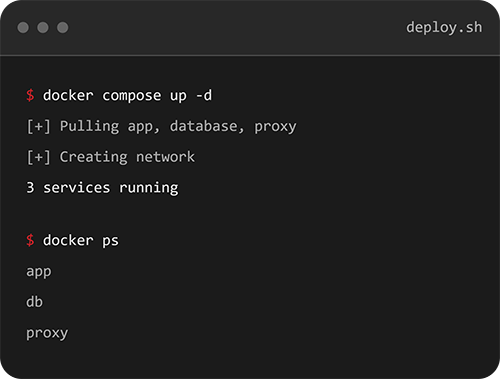
Add your SSH key in your account dashboard and log in as root. Run docker compose version to confirm everything’s ready, add a non-root user to the docker group, then start launching your containers.
InMotion Hosting VPS Reviews and Ratings
Independently reviewed, publicly rated, and running production workloads for over 25 years.






Contact Us
Have questions about Docker VPS Hosting? Our hosting experts are here to help you find the right solution. Whether you’re running applications, managing multiple brands, or scaling high-traffic platforms, we’ll match you with a solution built for your project goals.
Talk to Our Team About Your Stack
Tell us what you’re running, and we’ll help you pick the right plan size and data center.
Docker VPS Hosting
Frequently Asked Questions
Launch a Docker-ready VPS
Docker Engine and Compose installed, full root, zero setup.