---
title: "How to Secure cPanel Service Daemons (cpsrvd) in WHM"
description: "WebHost Manager (WHM) grants access to powerful server functions that can affect all cPanel users. A root user may go between configuring ConfigServer Security & Firewall (CSF) rules, resetting a..."
url: https://www.inmotionhosting.com/support/product-guides/vps-hosting/secure-cpanel-service-daemons-in-whm/
date: 2020-06-16
modified: 2023-11-03
author: "InMotion Hosting Contributor"
categories: ["VPS Hosting"]
type: post
lang: en
---
# How to Secure cPanel Service Daemons (cpsrvd) in WHM
**WebHost Manager (WHM)** grants access to powerful server functions that can affect all cPanel users. A root user may go between configuring ConfigServer Security & Firewall (CSF) rules, resetting a cPanel user password, backing up data, and ImunifyAV file scans in one session.
This power, combined with the fact that cPanel is one of the most popular Linux server management applications, makes an enticing target for malicious users to learn how to hack cPanel websites and servers.
For websites, you can add security HTTP headers in your .htaccess file to protect viewers from malware and spyware if your server is infected. You can do the same in WHM to protect important [cPanel service deamons (cpsrvd)](https://docs.cpanel.net/knowledge-base/cpanel-product/the-cpanel-service-daemons/) for applications such as [cPHulk](https://www.inmotionhosting.com/support/edu/whm/enable-cphulk-brute-force-protection/), PHP-FPM, and ClamAV. [*A daemon is a program that runs as a background process*.]
Below we will cover how to secure cPanel Service Daemons in WHM via:
- [How to Secure cPanel with Content-Security-Policy (CSP)](#csp)
- [How to Secure cPanel with X-Frame-Options and X-Content-Type-Options](#x-options)
## How to Secure cPanel with Content-Security-Policy (CSP)
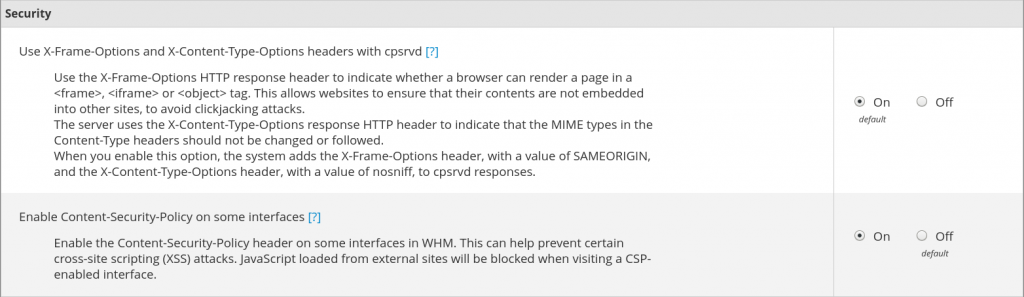
**Content Security Policy (CSP)** can prevent cross-site scripting (XSS) attacks with cpsrvd by only allowing whitelisted sources to load and disallowing JavaScript from external sites.
1. Log into WHM
2. Select **Tweak Settings**
3. Search for “header” and select *On* beside **Enable Content-Security-Policy on some interfaces**
4. At the bottom, select **Save**
Enjoy high-performance, lightning-fast servers with increased security and maximum up-time with our [Secure VPS Hosting](https://www.inmotionhosting.com/vps-hosting)!
Linux VPS cPanel or Control Web Panel Scalable Website Migration Assistance
[Linux VPS Hosting](https://www.inmotionhosting.com/vps-hosting/linux-vps)
## How to Secure cPanel with X-Frame-Options and X-Content-Type-Options
**X-Frame-Options**, with the `SAMEORIGIN` directive, forces the browser to only allow elements from your cPanel instance to be embedded within itself using the ``, `