
The longer your blog exists and the more posts you continue to add to your blog, the more tags you may end up having in your Tags list. There may be situations where you need to remove tags that no longer need to be on your site. The following tutorial shows how to delete tags.
How to Delete Tags
Delete Multiple Tags
- Login to the WordPress Administrator
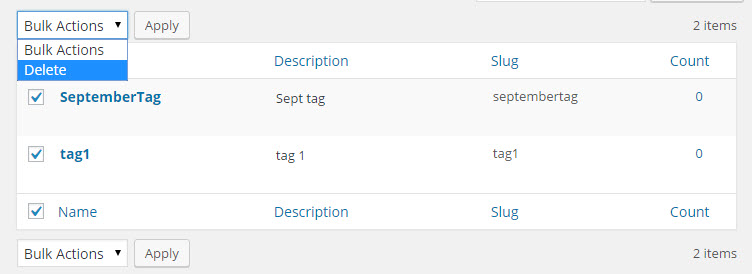 Click on the check box for each tag you wish to delete
 - Click on the drop-down arrow of the button labeled Bulk Actions.
- Click on Delete, then click on Apply
Delete a Single Tag
- Login to the WordPress Administrator
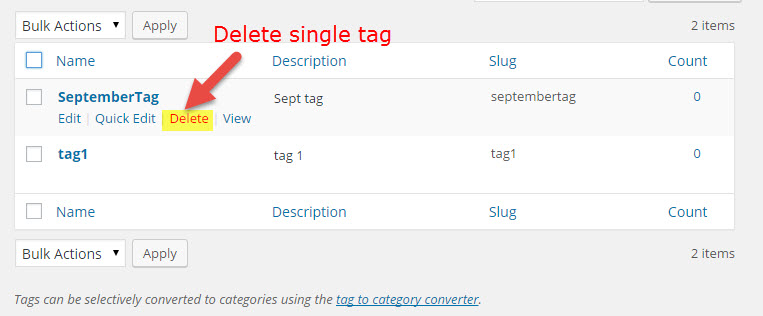 Hover over the name of the tag and you will see a pop-up menu
- Click on Delete to remove that particular tag
Please be cautious when you delete your tags as they cannot be immediately recovered once you have deleted them. The only way to recover them is to restore a backup.
Wait: you’re not done yet! Deleting a bunch of tags without consideration for SEO can cause problems; you may end up with broken links or errors throughout your site. Be sure to read the below section on SEO to avoid hurting your site’s page ranking.
Tag Deletion and SEO
Based on our experience in recent years, tags don’t seem to provide much SEO value to sites. The primary purpose of tags is to organize content, but if tags become disorganized or unmanaged they usually lead to site clutter.
For tags that you intend to keep, it’s a good idea to set the URLs for your tag archive pages and as un-indexed. For tags that you delete, set the URLs of the tag archive pages to redirect elsewhere on your site to avoid broken links. I’d recommend redirecting to a relevant article or pillar page, but you can always redirect to your homepage or posts if there is nowhere else to redirect a tag archive URL.
