---
title: "Hiding your Joomla version in the meta tags in Joomla 3.1"
description: "In Joomla 3.0, you have the option to show / hide your Joomla version number. If you choose to show it, it will show as a meta generator tag, as in: <meta name=\"generator\" content=\"Joomla! - Open..."
url: https://www.inmotionhosting.com/support/edu/joomla/joomla-3/show-joomla-version/
date: 2012-08-01
modified: 2021-11-19
author: "Brad Markle"
categories: ["Joomla", "Joomla 3"]
tags: ["Joomla v3"]
type: post
lang: en
---
# Hiding your Joomla version in the meta tags in Joomla 3.1
[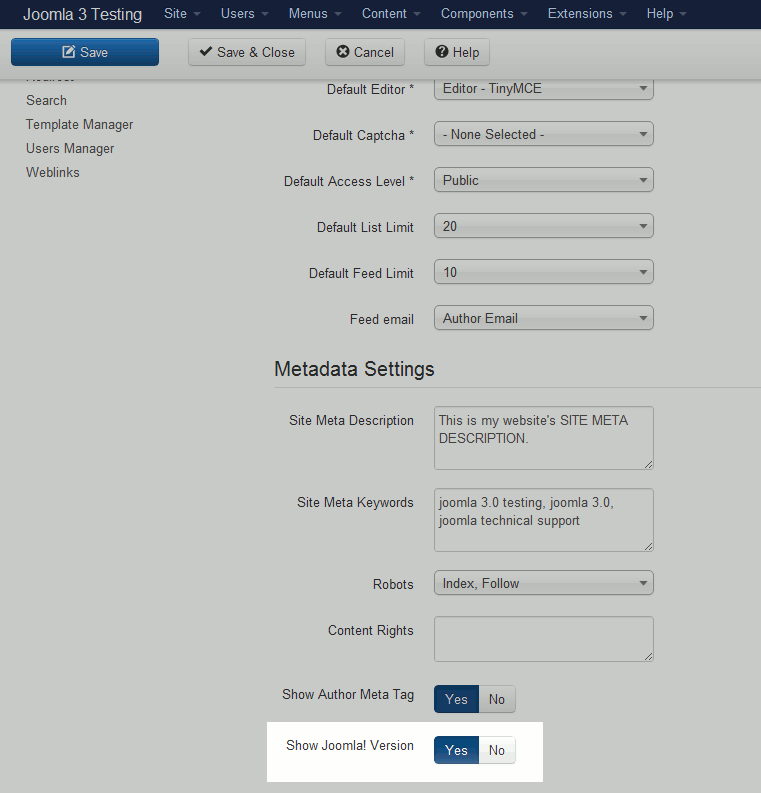](/support/wp-content/uploads/2012/08/edu_joomla-3_global-configuration_meta-show-joomla-version.gif)
In Joomla 3.0, you have the option to show / hide your Joomla version number. If you choose to show it, it will show as a **meta generator** tag, as in:
**To toggle the showing of your version number in Joomla 3.0:**
1. [Log into your Joomla 3.0 /administrator dashboard](/support/edu/joomla/joomla-3/how-to-log-in-to-administrative-dashboard/)
2. In the left menu, click **Global Configuration**
3. If you are not on the Site tab, click **Site** (towards the top of the page)
4. Towards the bottom of the page, find the **Show Joomla! Version** setting (refer to screenshot at the top of this page). Click **Yes** / **No** to change the value, and then click **Save** in the top left of the page. As shown in the example at the top of the page, if you set this value to Yes, you will see in your page’s source code the following **generator** meta tag: If you set the value to No, the meta generator tag will change, as in:
We hope you’ve enjoyed our tutorial series on [working with meta data in Joomla 3.0](/support/). InMotion Hosting offers joomla hosting, so keep us in mind if you’re ever looking for a new hosting provider!