---
title: "How to add the .html suffix to the end of URLs in Joomla 3.1"
description: "Joomla 3.0 allows you to toggle on / off whether you want to add the .html suffix to the end of your URLs. This is just one of several SEO Settings you can adjust in Joomla 3.0. In this tutorial..."
url: https://www.inmotionhosting.com/support/edu/joomla/joomla-3/add-html-suffix/
date: 2012-07-25
modified: 2021-11-19
author: "Brad Markle"
categories: ["Joomla", "Joomla 3", "Website"]
tags: ["Joomla v3"]
type: post
lang: en
---
# How to add the .html suffix to the end of URLs in Joomla 3.1
[](/support/wp-content/uploads/2012/07/edu_joomla-3_global-configuration_seo-settings-adds-suffix-to-url.gif)
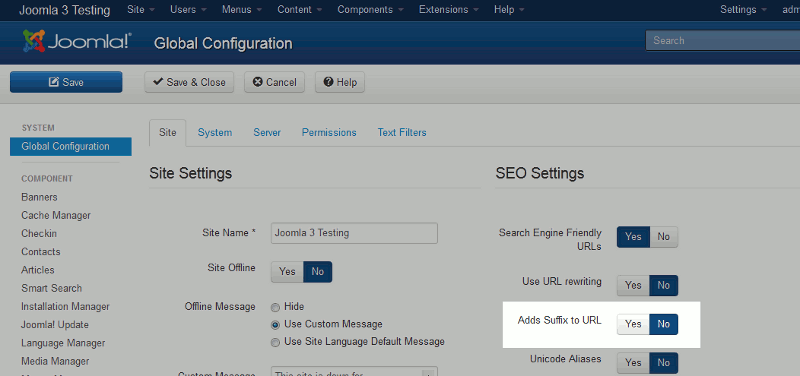
Joomla 3.0 allows you to toggle on / off whether you want to add the .html suffix to the end of your URLs. This is just one of [several SEO Settings](/support/website/getting-started/) you can adjust in Joomla 3.0. In this tutorial we’ll go into more depth on the *Adds Suffix to URL* option in Joomla 3.0.
**To adjust whether .html is added to the end of your Joomla 3.0 URLs:**
1. [Log into your Joomla 3.0 dashboard](/support/edu/joomla/joomla-3/how-to-log-in-to-administrative-dashboard/)
2. In the left menu, find and click **Global Configuration**. This link is located under the **SYSTEM** heading.
3. Ensure you are on the Site tab by clicking **Site** (this is the tab that loads by default)
4. On the right side of the page, locate the **Adds Suffix to URL** setting (which is highlighted in the screenshot above). Click Yes / No to toggle the setting, and then click **Save** in the top left menu. **Please note!**This setting will only take effect when if you have [enabled SEF URLs](/support/edu/joomla/joomla-3/using-sef-urls/). You can see in the table below how the **Adds Suffix to URL** setting changes our URLs: Adds Suffix to URL – YES https://domain.com/index.php/2-uncategorised/1-this-is-my-first-test-article.html Adds Suffix to URL – NO https://domain.com/index.php/2-uncategorised/1-this-is-my-first-test-article You may need to scroll to the right to see it, but in our first URL .html has been added to the end of the URL. **TIP!**You may have noticed in the URL that index.php is included. If you’d like to learn how to remove index.php from your Joomla 3.0 URLs, [click here](/support/edu/joomla/joomla-3/remove-index-php/).