When configuring your PrestaShop 1.5, there are several checkout settings that you can configure. One of these is the order process type. This is how the order process is presented to the customer when they are ready to buy your products and go through the check out. The order processing type has two options; either a five step process (one step per page) or a single order processing form.
What is the checkout process like for customers?
Regardless of which checkout option you choose, your users will go through the follow steps during checkout:
- Addresses
This is where the user will configure their billing address and delivery address. - Delivery Methods
The user will select their preferred shipping option and whether or not they want the items gift wrapped. - Payment Method
The user will decide how they will pay for their products, such as by check or credit card. - Order Summary
The user will see a summary of their total purchase price and their payment method, and they will be asked to confirm their order. - Order Confirmation
The user will see a confirmation message stating their order has gone through.
To configure either the one page or five page checkout option:
- Log into your PrestaShop 1.5 dashboard.
- Using the top menu bar, hover over the Preferences tab and select the Orders option.
- From the Preferences : Orders screen, find the Order process type field and select your desired option from the dropdown menu. They are:
Standard (5 steps) breaks the order process into 5 separate steps One Page Checkout makes the checkout process an all-in-one page 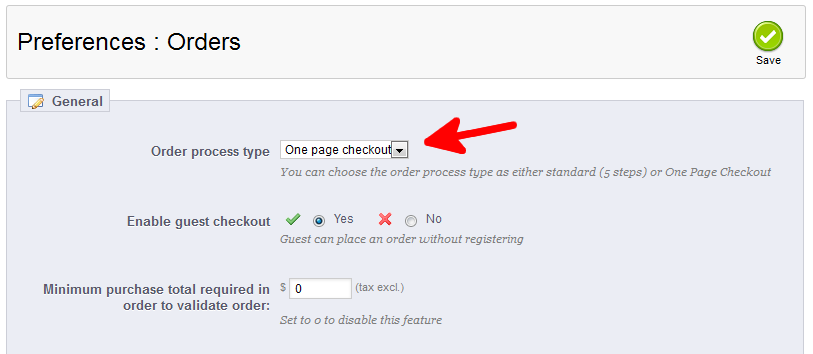
- Once finished, click on the Save button in the upper right corner of the screen.
You have now edited the Order process type in PrestaShop 1.5!


