DNS records indicate to the internet where specific aspects of your website are hosted. Of the many DNS records that can be modified, nameservers are one of the most important entries. This is because nameservers tell the world where DNS records for your domain are located. They can then ask the server where to go to find your website (A record) or email (MX record), for example.
This guide will cover the following topics:
- Why DNS and Nameservers are Important
- Nameservers for Shared, VPS, & Dedicated Accounts
- Nameservers for Resellers
- How to Find Your Domain’s Registrar
- Changing your Nameservers
- DNS Record Types
Why DNS and Nameservers are Important
Domain names are important because they are what people type into a browser in order to see your content or application. DNS entries are important because they include the address of your site, different records that provide instructions about your domain, and the nameservers that identify where to find the DNS entries that apply to your domain.
Understanding the different DNS entries and how to change them is critical in keeping your website properly configured. Note that this article pertains to DNS entries made and maintained within the cPanel interface.
InMotion Hosting Nameservers for Shared, VPS, Platform InMotion, & Dedicated Accounts (not Resellers)
When updating your domain’s nameservers to point your domain to InMotion Hosting, you will need to use the following nameservers:
| Hostname | IP Address |
|---|---|
| ns1.inmotionhosting.com | 74.124.210.242 |
| ns2.inmotionhosting.com | 70.39.150.2 |
InMotion Hosting Nameservers for Resellers (Not Shared, VPS or Dedicated Accounts)
When updating your domain’s nameservers to point your domain to a Reseller account, you will need to use the following nameservers:
| Hostname | IP Address |
|---|---|
| ns1.servconfig.com | 216.194.168.112 |
| ns2.servconfig.com | 70.39.146.236 |
As a reseller you can also use custom Nameservers, here is a link to our guide on Using Custom Nameservers as a Reseller.
How to Find Your Domain’s Registrar
Your nameservers will need to be updated at your domain’s registrar. This may be InMotion Hosting or another company such as GoDaddy or Network Solutions. If you’re unsure how to update your nameservers, please contact your current registrar for further assistance.
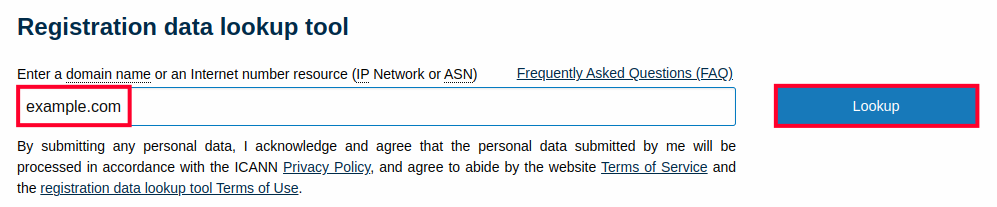
If you need help finding the domain registrar for your site, you can contact our technical support team, or you can find it yourself by going to the ICANN Lookup page. Here are the full steps.
- Visit the ICANN Lookup page.
- Type in your domain name and hit the Enter key or click the Lookup button.
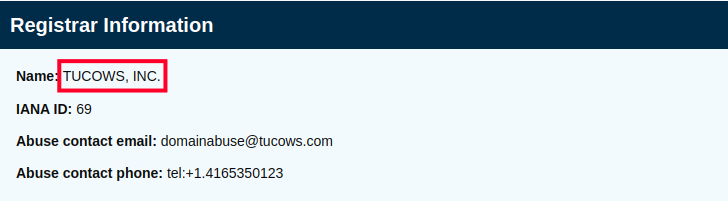
- Scroll down to the Registrar Information section and you will see where the domain was registered.
Changing Your Nameservers in AMP
Nameservers for domains that are registered through us can be changed through the Account Management Panel. Follow along below to see how this is done:
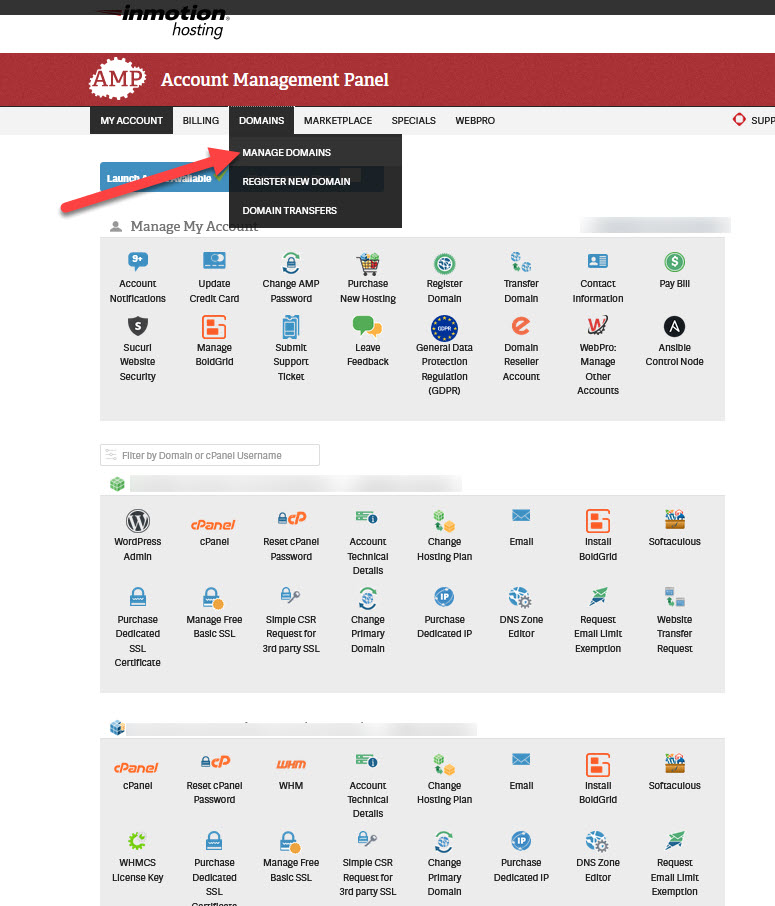
- Log into AMP.
- In the menu at the top of the screen click on Domains, then click on Manage Domains.
- Next, you will need to select the domain where you want to add the nameservers.
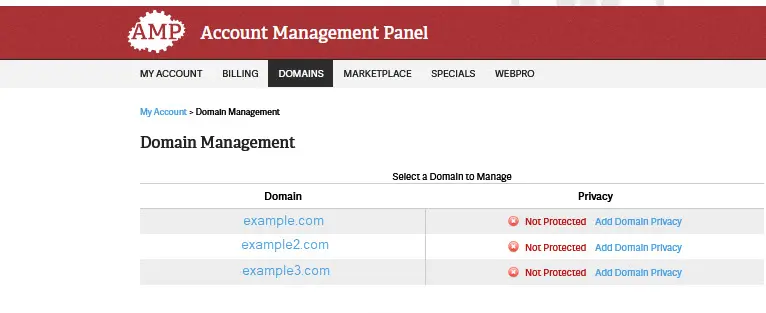
- You will then see several choices to manage the domain. If you’re not sure what to use, then contact our live technical support team for assistance.
To change the nameservers to a custom nameserver, click on the last option labeled Custom Nameservers. If you’re simply changing the nameservers to point to another location, then you can select Point your domain.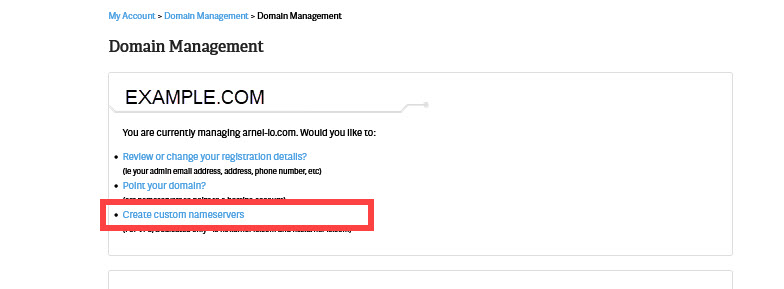
- You will then need to add the information for your nameservers on the next page.
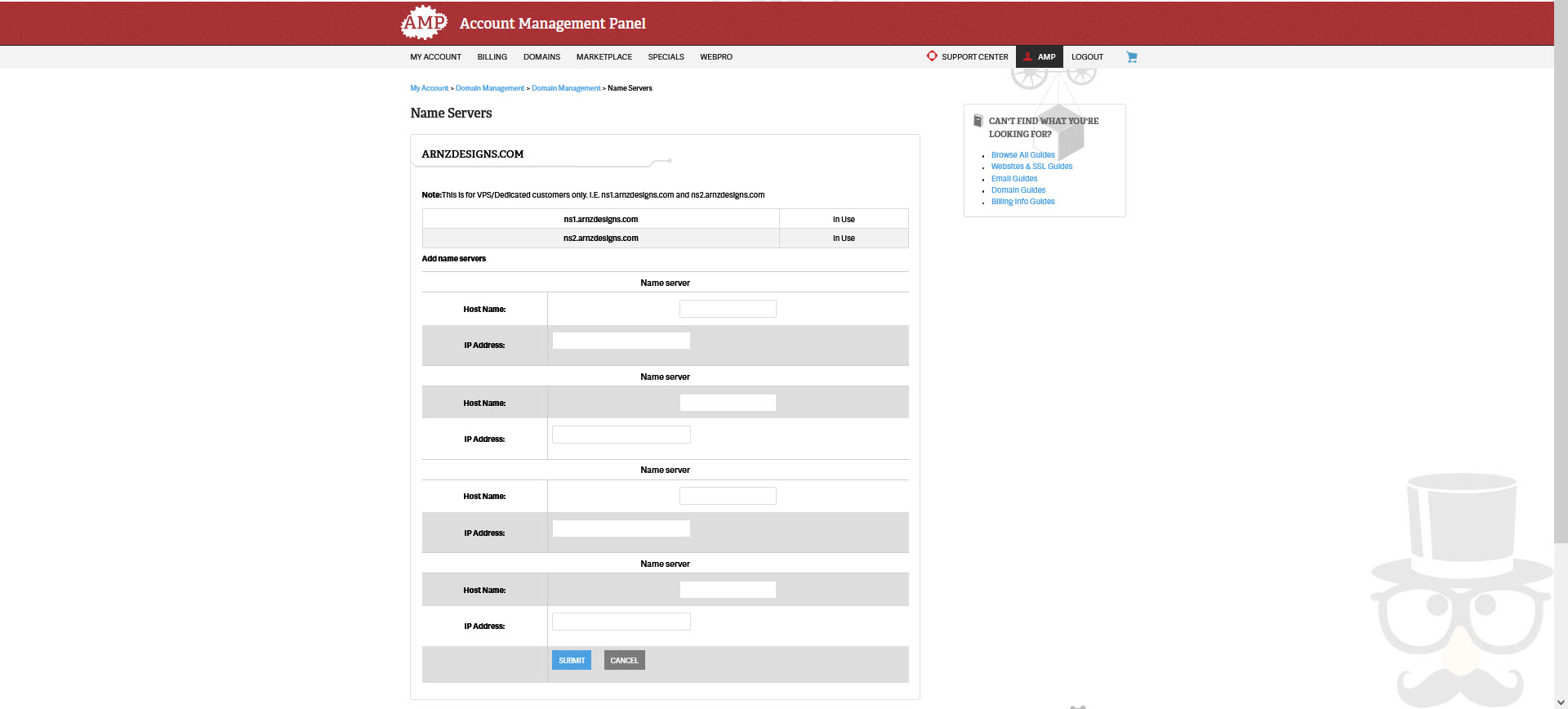
- Once you’re finished, you can click on the blue SAVE button at the bottom of the page to save your changes.
Changes to the nameservers may take only take a few hours or up to 24 hours. If you have any problems with the change, make sure to contact our live technical support team for immediate assistance.
To learn more about adding Custom Nameservers, please see How to Change your Nameservers in AMP.
Where Do I Change my Nameservers for Domains Registered Elsewhere?
If you registered your domain name with InMotion Hosting, you do not need to change anything as it is already pointed here. However, if you have registered the domain name with another registrar you will need to change the nameservers with that company. Please see the following links for the major registrars below:
DNS Record Types
Common DNS entries include A records, CNAME records, MX records, Nameserver records, and TXT records. These records have various purposes, but they provide information on how your domain should be handled. So, for example, if you wanted to redirect a subdomain to a different location, then it would use the DNS information to do that.
DNS entries also include mail server settings, security settings, and other application records that can be recorded in TXT files.
- The Complete Guide to DNS Records
- How to Set MX Records using the cPanel Zone Editor
- Setting Domain MX Records to Remote Settings in cPanel
- How to Change MX Records Using WebHost Manager (WHM)
- Wildcard Subdomains and DNS
- How to Enable DNSSEC with CloudFlare
- How to Use the Track DNS Tool in cPanel
- WHMCS – “Use an existing domain and change the nameservers” Not Working
- Performing a DNS Cleanup in WHM
- How to Set Up Custom Nameservers for Resellers
Latest Tutorials for DNS and Nameserver Changes
- The Complete Guide to DNS Records
- WHMCS – “Use an existing domain and change the nameservers” Not Working
- How to Enable DNSSEC with Cloudflare
- How to Use the Track DNS Tool in cPanel
- Performing a DNS Cleanup in WHM
- How to Make DNS Changes at Namecheap.com
- Wildcard Subdomains and DNS
- How to Set Up Custom Nameservers for Resellers
- Making DNS Nameserver Changes at GoDaddy.com
- Working with the DNS Authority API key
- Nameserver issue identified
- Modifying DNS in WHM
- Using Custom Nameservers as a Reseller
- The RBL Checker for DNS Blacklisting
- Changing MX records to point to InMotion servers from third party DNS
- How to Set DNS Records for 3rd Party Services
- What Is a Name Server?
- How to Enable or Disable Advanced DNS Zone Editor in WHM
- Using Custom Name Servers
- Upcoming Move of Secondary Nameserver
- How Do I Clear My Local DNS Cache?
- Vanity Nameservers: What are they and how do I set them up?
- Mac Mail Error – Mail can’t verify the identity of “mail.domain.com”
- Adding an A Record
- Making DNS changes at NetworkSolutions.com
- Making DNS Nameserver Changes at Enom.com
- Making DNS changes at 000Domains.com
- Domain Names – Registrar Transfer versus NameServer Change
- How Do I Add DNS Records?
- How to Change Your Domain Nameservers in AMP


